


Microsoft Planner

Published by: Microsoft

Description

Esta aplicación requiere una suscripción comercial adecuada de Office 365. Si no estás seguro de la suscripción o los servicios de la empresa a los que tienes acceso, ponte en contacto con tu departamento de TI.
Planner ofrece una forma fácil y visual de organizar el trabajo en equipo, ya que permite crear planes, organizar y asignar tareas, compartir archivos, chatear para hablar sobre el trabajo y estar al día con el progreso fácilmente.
-- Organización visual del trabajo --
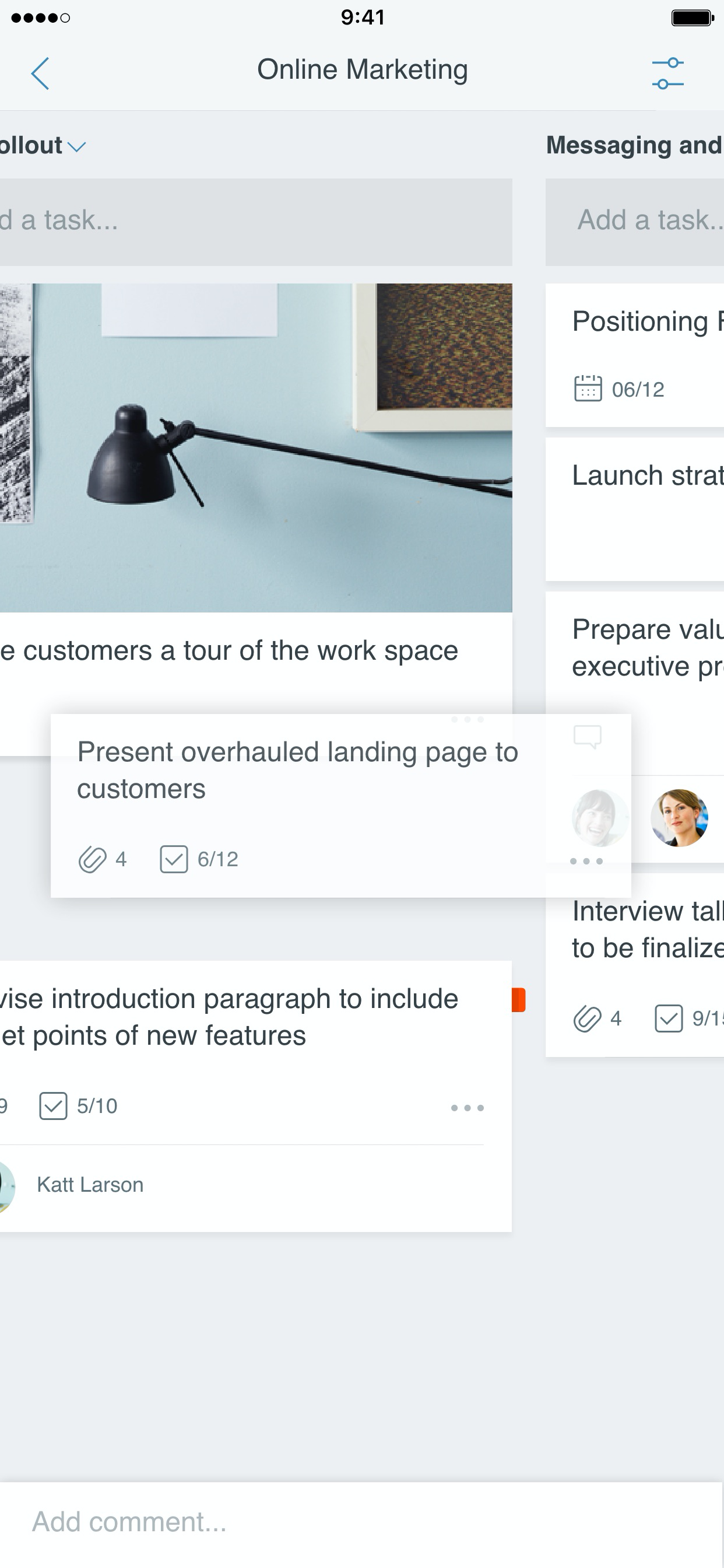
Cada plan tiene su propio panel, donde puedes organizar tareas en depósitos. Puedes clasificar las tareas según el estado o el usuario al que se le han asignado. Para actualizar el estado o cambiar las asignaciones, solo tienes que arrastrar y colocar las tareas entre las columnas.
-- Visibilidad --
La vista Mis tareas proporciona una lista completa de todas tus tareas y tu estado en todos los planes. Al colaborar en un plan, los miembros del equipo siempre conocerán en qué trabajan otros miembros.
-- Colaboración --
Diseñado para Office 365, Planner permite trabajar conjuntamente en las mismas tareas, adjuntar fotos en ellas e incluso tener conversaciones sobre las tareas sin tener que cambiar de aplicación. Con Planner, todas las discusiones y entregas de tu equipo se realizan según el plan sin quedar confinadas en distintas aplicaciones.
-- Trabajo desde cualquier dispositivo --
Planner funciona en todos tus dispositivos. Y, con Planner, todo el mundo siempre estará al tanto de todo. Continúa charlando y actualiza las tareas en cualquier lugar.
Condiciones del servicio: https://go.microsoft.com/fwlink/?linkid=846830
Directiva de privacidad: https://go.microsoft.com/fwlink/?LinkId=521839
Para obtener más información, visite https://go.microsoft.com/fwlink/?linkid=849067.
La aplicación Microsoft Planner solicitará permiso para tener acceso a tus fotos y a tu cámara: al intentar adjuntar una foto a una tarea de Planner, la aplicación solicita permiso de acceso a tu aplicación de fotos para seleccionar imágenes. Si decides tomar una foto para adjuntarla a una tarea de Planner, la aplicación solicitará permiso de acceso a la aplicación de la cámara.
Hide Show More...

Screenshots

Microsoft Planner FAQ

  • Is Microsoft Planner free?

    Yes, Microsoft Planner is completely free and it doesn't have any in-app purchases or subscriptions.

  • Is Microsoft Planner legit?

    ⚠️ The Microsoft Planner app has poor ratings and negative feedback. Users seem unsatisfied with its performance or features.

    Thanks for the vote

  • How much does Microsoft Planner cost?

    Microsoft Planner is free.

  • What is Microsoft Planner revenue?

    To get estimated revenue of Microsoft Planner app and other AppStore insights you can sign up to AppTail Mobile Analytics Platform.

User Rating

4.92 out of 5

25 ratings in Paraguay

5 star
23
4 star
2
3 star
0
2 star
0
1 star
0
Ratings History

Microsoft Planner Reviews

Lacking some basics

PivotHead on

United States

Want to use this badly as the idea of it is both cost effective for work and simple and straightforward but it’s lacking is some basic functionality and some logical navigations, instructions and features that make it so far a little frustrating - cmon people! Message me and I’ll tell you what’s needed - can’t be difficult to do


Not working

00920MJ on

United States

Tried customer service, 9 times and they couldn’t help.

This interface…

alejj22 on

United States

The saddest most unintuitive interface. I feel like I’m working off something from 20 years ago.

Microsoft Planner

ACErBryan on

United States

This iPhone app doesn’t work at all Rip off app

Can’t use with personal account

matchumoo on

United States

As it says in the title, you are only privileged with access to this application if you’re using it for school or work. Have a family you’re trying to keep organized? A personal project? Get bent, Microsoft doesn’t value those things. If you aren’t owned by the system in some form then you aren’t worth Microsoft’s attention :) but hey, this is normal, right?

Terrible on IOS

Coqboricua on

United States

It takes for ever to refresh and show up to date information.

Planner continues to be solid

Stangdjc on

United States

Planner continues to be great at the basics, simplifying updates on the go and staying up to date on card progress. However, still no premium features which hinders those of us that adapted our plans. Please add this in for those of us that use Planner while traveling. 🙂‍↕️

Great information management

Keithbornmann on

United States

I have found this to be a very useful app. It can get cluttered with a lot of projects and cards but it’s a whole lot more manageable than keeping the information in different places. The ability to link to Files and other documents makes it even better. The alternatives to this are clickup which costs about $10/ month, Smartsuite for $7/month

Useless

Glowing goddess on

United States

Limited visualizations, no Gantt chart. No replacement to MS Project

More Settings Please

BinkBankBonk on

United States

Allow me to choose settings like task row height, switch to table view, etc.

Store Rankings

Ranking History
App Ranking History not available yet
Category Rankings
Chart
Category
Rank
Top Free
106
Top Free
137
Top Free
155
Top Free
183
Top Free
190

Microsoft Planner Installs

Last 30 days

Microsoft Planner Revenue

Last 30 days

Microsoft Planner Revenue and Downloads

Gain valuable insights into Microsoft Planner performance with our analytics.
Sign up now to access downloads, revenue, and more.

App Info

Publisher
Microsoft
Languages
English, Catalan, Croatian, Czech, Danish, Dutch, Finnish, French, German, Greek (modern), Hungarian, Indonesian, Italian, Japanese, Korean, Norwegian Bokmål, Polish, Portuguese, Romanian, Russian, Chinese, Slovak, Spanish, Swedish, Thai, Turkish, Ukrainian, Vietnamese
Recent release
1.17.11 (3 weeks ago )
Released on
May 18, 2017 (8 years ago )
Last Updated
1 month ago
This page includes copyrighted content from third parties, shared solely for commentary and research in accordance with fair use under applicable copyright laws. All trademarks, including product, service, and company names or logos, remain the property of their respective owners. Their use here falls under nominative fair use as outlined by trademark laws and does not suggest any affiliation with or endorsement by the trademark holders.



