CapCut: Photo & Video Editor

Video maker with music

Published by: BYTEDANCE PTE

Description

CapCut offers easy-to-use video editing functions, in-APP fonts and effects, advanced features such as keyframe animation, smooth slow-motion, chroma key, and stabilization, to help you capture and snip moments.
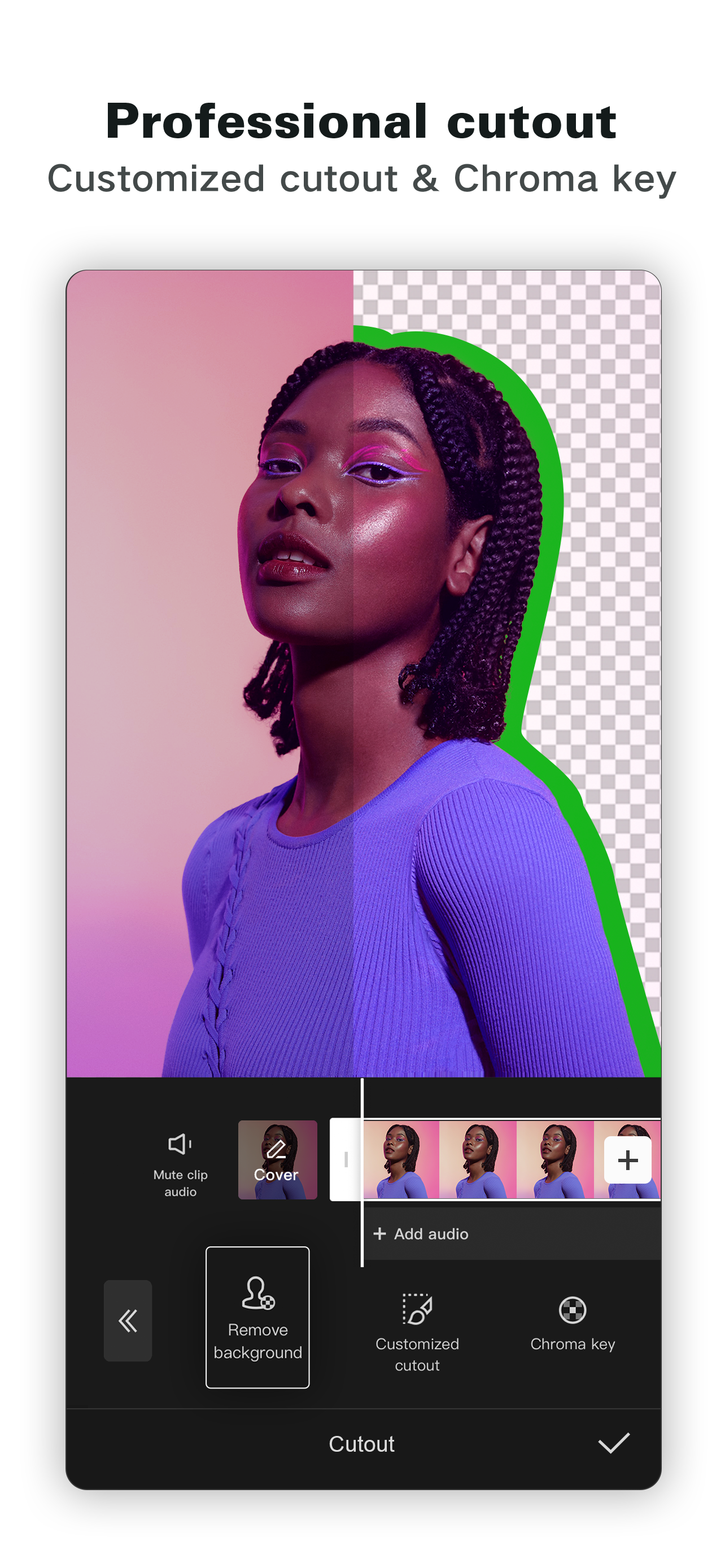
Create fancy videos with other unique features: auto captions, text-to-speech, motion tracking, and background removal. Show your personality and go viral on TikTok, YouTube, Instagram, WhatsApp, and Facebook!
FEATURES
Basic video editing
• Trim and shorten clips and split or merge videos.
• Adjust video speed from 0.1x to 100x, and apply speed curves to clips.
• Animate video clips with incredible zoom in/out effects.
• Highlight the best moments with the freeze feature.
• Explore transition options with awesome effects on and between clips.
Advanced video editor
• Keyframe video animation is available for all settings.
• Edit videos to create smooth slow-motion with the optical flow feature and speed curve tool.
• Use the chroma key to remove specific colors from videos.
• Easy to arrange and preview clips on multi-track timeline.
• The stabilizing feature keeps video footage steady.
Intelligent features
• Auto captions: automate speech recognition and subtitles in videos.
• Text-to-speech: apply text-to-speech in multiple languages and voices.
• Background removal: automatically remove backgrounds.
Text & Stickers
• Add text to videos with different fonts and styles, choose unique text templates. Fonts can be imported locally.
• Subtitles can be added to the timeline of video tracks and can be moved and adjusted in one step.
Trending Effects & Filters
• Match video content with diverse filters that are updated weekly with the latest trends.
• Edit videos with hundreds of trending effects, including Glitch, Blur, 3D, etc.
• Add movie-style video filters or adjust video brightness, contrast, etc.
Music & Sound Effects
• Add millions of music clips and sound effects to videos.
• Extract audio, clips, and recordings from videos.
Easy to Share
• Custom video export resolution, HD video editor supports 4K 60fps exports and smart HDR.
• Adjust the format and share with your friends on social media platforms.
CapCut is an all-in-one video editor and video maker application with everything you need to create stunning, high-quality videos. Beginners can get started with CapCut in a matter of seconds, while advanced users can enjoy all the functions they need to edit videos.
Terms of Service —
https://www.capcut.com/clause/terms-of-service
Privacy Policy —
https://www.capcut.net/clause/privacy
Contact Us
Any questions about CapCut? Please contact us at [email protected].
Facebook: https://www.facebook.com/capcutapp
Instagram: https://www.instagram.com/capcutapp
YouTube: https://www.youtube.com/capcutofficial
TikTok: https://www.tiktok.com/@capcut
Hide Show More...

In-Apps

Capcut Pro
USD 6.99
Standard Monthly Subscription
USD 6.99
Monthly Subscription
USD 6.99
Pro Monthly Subscription
USD 13.99
Yearly Subscription
USD 64.99
One Month Pro
USD 8.99

Screenshots

CapCut FAQ

  • Is CapCut free?

    Yes, CapCut is free to download, however it contains in-app purchases or subscription offerings.

  • Is CapCut legit?

    ⚠️ The CapCut app has poor ratings and negative feedback. Users seem unsatisfied with its performance or features.

    Thanks for the vote

  • How much does CapCut cost?

    CapCut has several in-app purchases/subscriptions, the average in-app price is USD 18.16.

  • What is CapCut revenue?

    To get estimated revenue of CapCut app and other AppStore insights you can sign up to AppTail Mobile Analytics Platform.

User Rating

4.57 out of 5

3,132 ratings in Jamaica

5 star
2,521
4 star
269
3 star
103
2 star
70
1 star
169
Ratings History

CapCut Reviews

Messed up

Mickey handed on

Jamaica

This app has been giving me problems with adds I make my perfect video and the adds freeze the video and took eveything😡🤬😤😤😤

I would and not recommend this app

Drae the fastest learner on

Jamaica

First of all it is easy to use has its own tutorial sometimes if your lucky you could go on template and go to see edit for free and you could learn from that but now this is the bad part you have to pay for almost everything! Like some people edit for fun and have no money my brother switched to after effects and blurr I also switched

Smh

A kev bredda. on

Jamaica

Yall make everything premium we need back old capcut 🤦🏿‍♂️

Remove pro

Remove vs attack on

Jamaica

How about just remove pro features like flashing features in our faces because you want some bread cmon man do better

Worst app ever!!!

💯jamaica on

Jamaica

It is very horrendous,to many ads…..on top of that people can’t afford to Pay for premium…and why doesn’t it allow screen recording???worst app ever.

Very helpful

Jayden curl boss on

Jamaica

10 of ten very good

Why is everything pro?

N.Richards on

Jamaica

I just found out that exporting templates is a pro feature, but it wasn’t like that before. Everything else is also pro, which makes no sense because CapCut claims that it is free

Why’d add ads?

Multistan queen🤌🏽💜💜 on

Jamaica

Like what’s the point I gotta export a video and the ads have to be like 112 secs or 60 seconds like does this even make sense?…. Just remove it, it’s really annoying n holding up time

Wow

Gabzielovesarmani on

Jamaica

Just wow

🤦🏾‍♀️

Mializante on

Jamaica

What an awful app I can’t do anything it’s literally so unusable ugh

Store Rankings

Ranking History
App Ranking History not available yet
Category Rankings

Keywords

CapCut Competitors

CapCut Installs

Last 30 days

CapCut Revenue

Last 30 days

CapCut Revenue and Downloads

Gain valuable insights into CapCut performance with our analytics.
Sign up now to access downloads, revenue, and more.

App Info

Category
Photo Video
Publisher
BYTEDANCE PTE
Languages
English, Arabic, Finnish, French, Hebrew (modern), Indonesian, Italian, Japanese, Korean, Malay, Polish, Portuguese, Russian, Chinese, Spanish, Thai, Turkish, Ukrainian, Urdu, Vietnamese
Recent release
16.0.0 (17 hours ago )
Released on
Apr 14, 2020 (5 years ago )
Last Updated
1 week ago
This page includes copyrighted content from third parties, shared solely for commentary and research in accordance with fair use under applicable copyright laws. All trademarks, including product, service, and company names or logos, remain the property of their respective owners. Their use here falls under nominative fair use as outlined by trademark laws and does not suggest any affiliation with or endorsement by the trademark holders.