座標轉換器 - GPS地圖工具

支援 MGRS、UTM、Georef、EPSG 格式

Published by: Mapnitude Company

Description

《座標轉換器 - GPS地圖工具》是一款功能強大且使用者友善的工具,適用於旅行者、測量員、工程師和 GIS 專業人士等需要處理地理位置數據的用戶。
透過簡潔直觀的介面,您可以在地圖上查看、轉換和管理各種全球坐標格式與基準系統。
支援靈活的圖釘和標籤樣式、即時導航、方位角計算,以及強大的匯入匯出功能,是您進行精確定位工作的全能助手。
# 使用者友善設計
目前位置顯示在兩條灰色線的交點處,並清晰顯示經緯度讀數。您可以透過點擊地圖、輸入坐標或地點搜尋手動設定位置。
直觀的按鈕可快速存取測量工具、地圖圖層和位置書籤,介面簡潔緊湊。
# 多種坐標格式
支援 UTM、MGRS、Georef 等多種格式,以及經緯度。
# 基準轉換
使用 EPSG、ESRI 和 IAU2000 參考系轉換坐標。支援 X/Y、地理和投影系統。
# 導航與追蹤
固定位置或新增標籤以開始導航。提供即時方位和距離更新,配有大型坐標讀數,適合現場使用。
# 世界磁場模型
使用 WMM 2015/WMM 2015v2 計算磁偏角、強度和變化。
# 海拔支援
陸地區域可取得海拔數據。
# 匯入 / 匯出(支援 AirDrop)
- 匯出目前坐標
- 匯入備份或共享檔案
- 支援 .gpx .geojson .kml 檔案
# 距離、方位與面積
標記點或繪製線條來測量距離、方位與面積。
# PROJ.4 計算器
使用 PROJ.4 地圖投影庫在系統之間轉換坐標。
# 離線地圖圖磚
下載地圖圖磚以供離線使用。選擇城市或自訂區域。
# 自訂地圖圖層選擇器
選擇 Apple Maps、OSM 或使用 {z}/{x}/{y} 格式新增自訂圖層。
# 單位換算
支援超過40種單位轉換(距離、壓力、輻射等)。
# 訊號板
在螢幕上顯示粗體大字訊息
# 支援的輸入 / 輸出格式
經緯度(DD、DMS)
標準 UTM
北約 UTM
MGRS / USNG
Georef
QTH 定位器 / Maidenhead
(WGS84)世界墨卡托
(WGS84)Web 墨卡托
Geohash
what3words
全球區域參考系統(GARS)
英國國家網格 [BNG]
OSGB36
ISO 6709
自然區域代碼
愛爾蘭網格參考 / 坐標
Plus Code(開放位置代碼)
Mapcode
荷蘭網格
ECEF
印度 Kalianpur 1975
開放郵政編碼
Geohash-36
瓜地馬拉 GTM
RT90
SWEREF99
印度 1975
QND95 / 卡達國家網格
IRENET95 / 愛爾蘭橫軸墨卡托
KOSOVAREF01
HD 72 / EOV
Kertau (RSO) / RSO 馬來亞
Timbalai 1948 / RSO 婆羅洲
EST97 愛沙尼亞 1997
LKS92 / 拉脫維亞 TM
NZGD49
NZGD2000
CH1903/+
GGRS87
ETRS89-extended / LAEA 歐洲
NTF(巴黎)/ Lambert 第二区
法國 DFCI 網格
ARINC 424
FMS
ARC1950
Pulkovo 1942 / SK42
PZ-90
H3
Placekey
GDM2000
JGD2011
KUDAMS/KTM
按名稱搜尋
照片中繼資料
Proj.4 格式
街道地址
## 訂閱 ##
座標轉換器 - GPS地圖工具。您可以訂閱此應用以刪除廣告。
設備訂閱可在這些計劃中使用,並將自動每月,六個月或一年續訂,除非取消。
所示價格適用於美國商店。其他商店的定價會有所不同。
訂閱付款將在確認購買時從您的iTunes帳戶中扣除
除非在當前期間結束前至少24小時關閉自動續訂,否則訂閱會自動續訂。購買後轉到帳戶設置可能會關閉自動續訂。
訂購可以通過購買後轉到您的iTunes帳戶設置或點擊“購買/管理訂閱”來管理
在有效訂閱期間無法取消訂閱
隱私政策:https://mapnitude.com/privacy-policy
使用條款:https://mapnitude.com/terms-of-service
Hide Show More...

In-Apps

Plus 升級
15.00 H$

Screenshots

座標轉換器 FAQ

  • Is 座標轉換器 free?

    Yes, 座標轉換器 is free to download, however it contains in-app purchases or subscription offerings.

  • Is 座標轉換器 legit?

    🤔 The 座標轉換器 app's quality is mixed. Some users are satisfied, while others report issues. Consider reading individual reviews for more context.

    Thanks for the vote

  • How much does 座標轉換器 cost?

    座標轉換器 has several in-app purchases/subscriptions, the average in-app price is 15.00 H$.

  • What is 座標轉換器 revenue?

    To get estimated revenue of 座標轉換器 app and other AppStore insights you can sign up to AppTail Mobile Analytics Platform.

User Rating

4.73 out of 5

126 ratings in Hong Kong SAR China

5 star
108
4 star
11
3 star
1
2 star
3
1 star
3
Ratings History

座標轉換器 Reviews

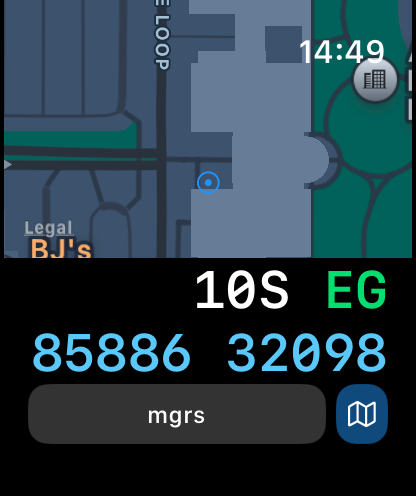
MGRS in Apple Watch

whiteheadcat on

Hong Kong SAR China

wish to add MGRS info in Apple Watch interface since it is very useful for map reading

Good app

estormbird on

Hong Kong SAR China

Good~user friendly 👍👍

Best app for coordination

SiphSiph on

United States

I am a biologist that heavily relies on marked sites. This app is the best. There’s an ad every time you open but it’s not one of those kinds that covers the screen or makes itself impossible to skip. It barely uses any battery and stays connected the entire time. I was able to use it for 12 hours straight and my phone still stayed on. You also don’t have to pay a ridiculous set of fees or subs to use it. Thank you devs for making an app that does what it’s meant for!

IT WORKSS EEEEE

Kiri_thefloof on

United States

YES YES YES YES YES YES YES YES

Plays games

BrentVer1.1.1 on

United States

I put in a location, but it will not remember or give details. It then asks my age and starts laying games. What good is it ?

Accurate

fc12oneton on

United States

Wonderfully accurate used it overseas as well

Great, simple app

Ebony Dark'ness Dmtia Rvn Way on

United States

Does what it says on the tin, which is a welcome rarity these days. Wish there was an ad-free version/upgrade though.

Navigation

Baldachino on

United States

It is very good but I would like navigation in the app

Does it have Navigation

Juggernaut 2424 on

United States

I’ve been using this app to mark precise GPS coordinates and for that it’s great but I’m confused. In the App Store the very first picture claims Navigation with information . I do not see a way to open Navigation and have the App start to navigate you to a GPS coordinate. Is the what you’re claiming and if that’s accurate how do you start navigating? I have not been able to match the screen that is the first picture in the App Store. I have an Apple 14 Pro Max.

So confusing to use!!!!

TheiPhoneG33k on

United States

I hate this app

Store Rankings

Ranking History
Category Rankings
Chart
Category
Rank
Top Free
12
Top Grossing
21
Top Free
26
Top Free
38
Top Grossing
39

Keywords

座標轉換器 Competitors

Coordinates Installs

Last 30 days

Coordinates Revenue

Last 30 days

座標轉換器 Revenue and Downloads

Gain valuable insights into Coordinates performance with our analytics.
Sign up now to access downloads, revenue, and more.
This page includes copyrighted content from third parties, shared solely for commentary and research in accordance with fair use under applicable copyright laws. All trademarks, including product, service, and company names or logos, remain the property of their respective owners. Their use here falls under nominative fair use as outlined by trademark laws and does not suggest any affiliation with or endorsement by the trademark holders.