Final Cut Camera

Erstelle professionelle Videos

Published by: Apple

Description

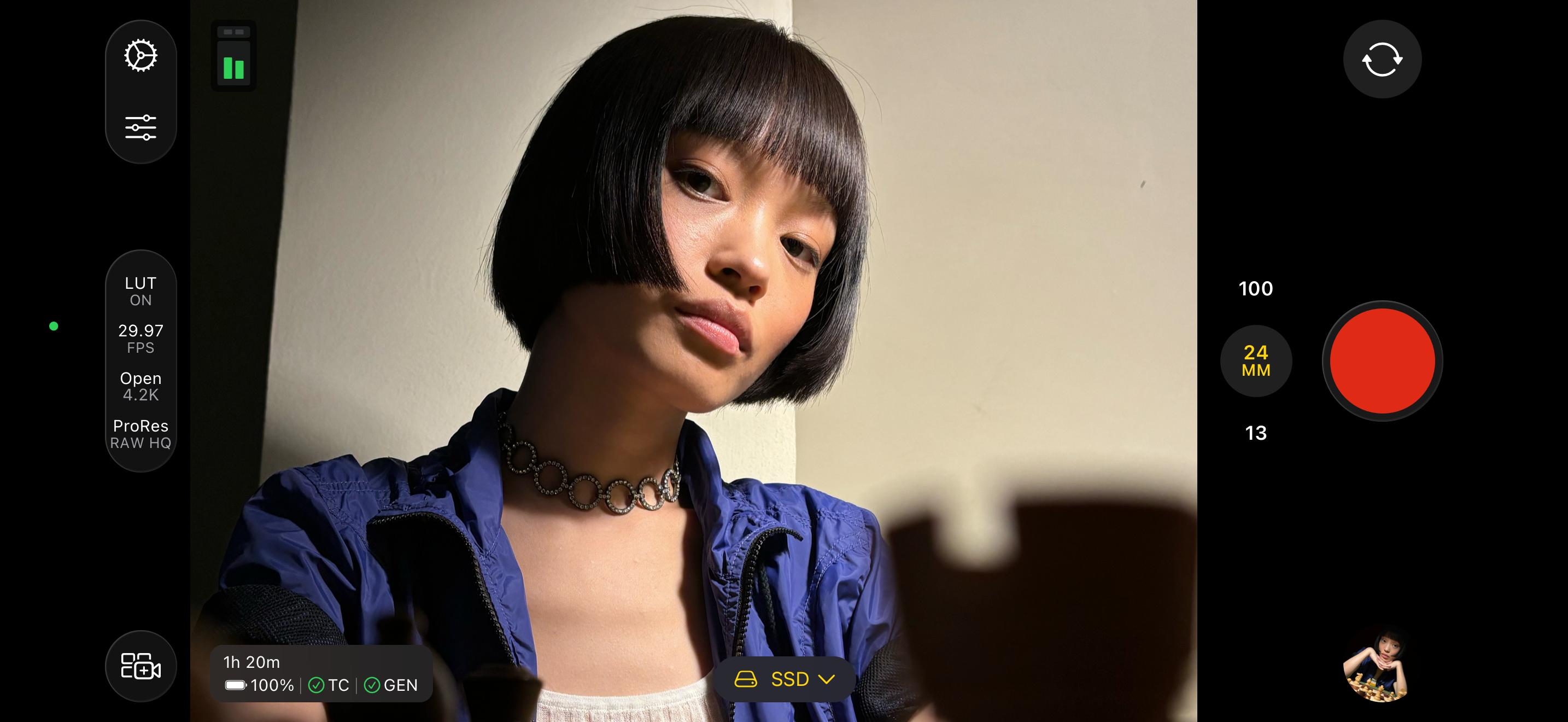
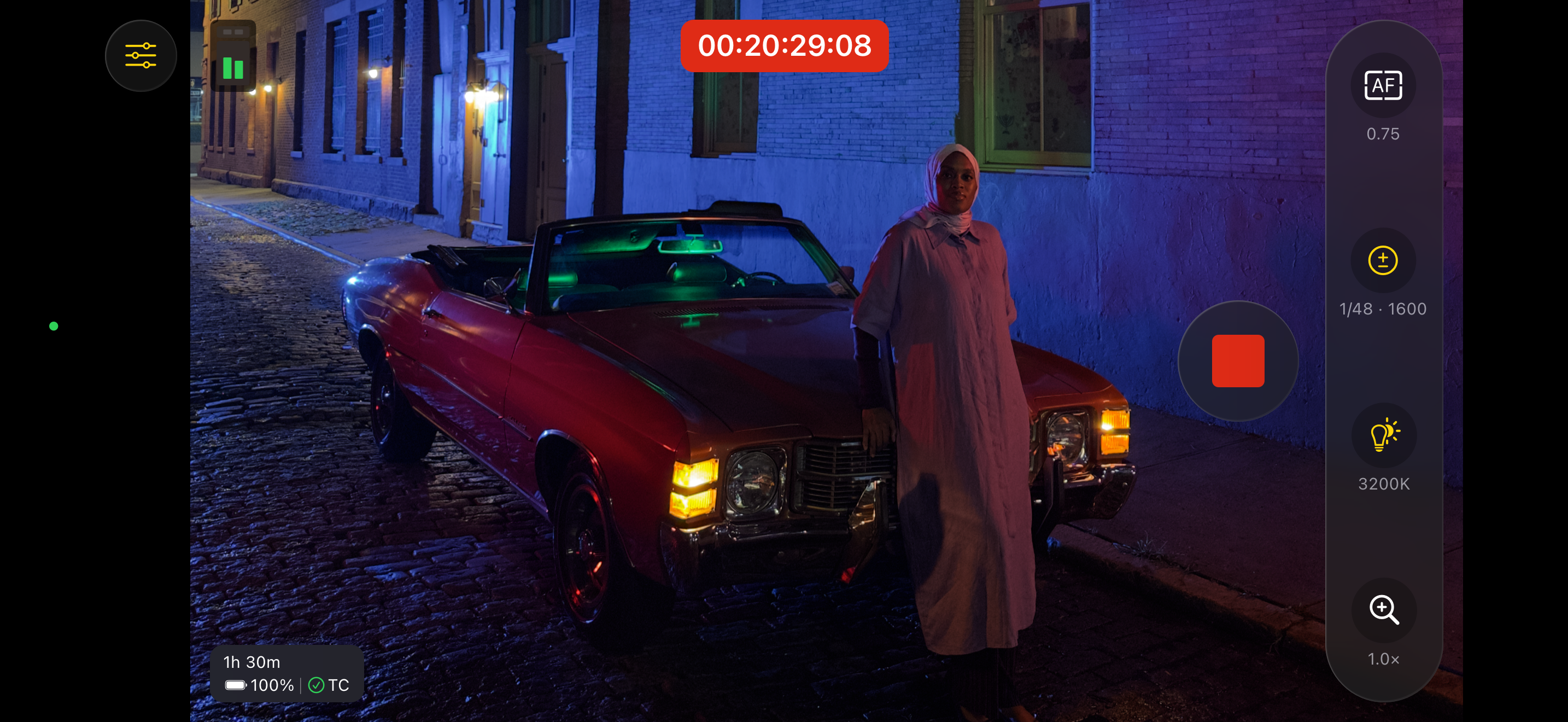
Übernimm die Regie mit den intuitiven Profisteuerungen für die gesamte Videoproduktion von Final Cut Camera. Starte eine Live-Multicam-Sitzung durch Verbinden von bis zu vier Geräten mit Final Cut Camera, um die Kameraperspektiven in Final Cut Pro für iPad zu überprüfen, aufzunehmen und zu synchronisieren. Erstelle mit erweiterten Einstellungen wie Verschlusszeit, ISO, Weißabgleich und einem manuellen Fokus großartige Aufnahmen. Passe Parameter wie Auflösung, Bildrate, Farbraum und mehr an. Überwache dein Video mit Focus-Peaking und Überbelichtungsanzeigen. Finde die perfekte Perspektive für deine professionellen Videos mit Final Cut Camera.
Professionelle Aufnahmen mit voller Kontrolle
• Verwende zahlreiche Videoauflösungen, Bildraten und Codecs, einschließlich ProRes und Log-Farbcodierung.*
• Lege die Belichtung mit Steuerungen für ISO und Verschlusszeit fest.
• Passe den Weißabgleich mit Voreinstellungen an oder lege eine eigene Farbtemperatur fest.
• Verändere den Fokus, um der Action zu folgen und die Schärfe der Motive sicherzustellen.
• Sperre die Ausrichtung, um unabhängig von der Geräteposition einen konsistenten Bildausschnitt sicherzustellen.
• Aufnehmen mit 3D-Audio für Videos mit noch immersiverem Klang.**
• Reduziere Wackeln und Bewegungen beim Aufnehmen mit der Bildstabilisierung.
Vorschau-Ansicht, Aufnehmen und Synchronisieren von bis zu vier Geräten in Final Cut Pro für iPad mit „Live-Multicam“
• Starte eine Live-Multicam-Sitzung durch Verbinden deines Geräts mit Final Cut Pro für iPad.***
• Öffne aus der Ferne eine Vorschau, passe Profisteuerungen an und starte die Aufnahme auf all deinen verbundenen Geräten direkt in Final Cut Pro.
• Bearbeite deine Multicam-Clips mit Vorschaumedien, die automatisch in der Final Cut Pro-Übersicht synchronisiert werden.
• Spare Zeit in der Postproduktion mit der Hintergrundübertragung, die beim Arbeiten Vorschaumedien durch Originale ersetzt.
Perfekter Look und Klang von Videos durch leistungsstarke Kontrollwerkzeuge
• Richte Videos mit Neigungs- und Rollanzeigen oder Fadenkreuzen für Aufnahmen aus der Vogelperspektive aus.
• Zeige eine Vorschau deines Log-Videos in SDR oder HDR an, indem du „Apple Log LUT“ anwendest.*
• Aktiviere Focus-Peaking, um die Schärfe deines Filmmaterials sicherzustellen*
• Lege mit Zebra-Indikatoren die passende Belichtung fest.*
• Fasse deine Aufnahme mit Seitenverhältnis-Leitlinien oder Rasterüberlagerungen ein.
• Überwache die verfügbare Aufnahmezeit und Audiomessungen.
Überprüfen und Übertragen von Medien direkt in der Übersicht
• Sichere Videos in „Dateien“ oder nimm auf einem verbundenen externen Speichergerät auf.*
• Durchsuche und überprüfe dein Filmmaterial direkt in der Final Cut Camera-Übersicht.
• Stelle eine Verbindung mit Final Cut Pro für iPad her und übertrage Medien direkt in ein Projekt.
• Halte Medienübertragungen an und setze sie später fort.
Upgrade auf die neueste Version von iOS oder iPadOS empfohlen
* Erfordert iPhone 15 Pro oder neuer
** Erfordert iPhone 16 oder neuer
*** Erfordert ein Abo von Final Cut Pro für iPad
**** Erfordert für Focus-Peaking und Überbelichtungsanzeigen iPhone- oder iPad-Modelle mit A13 Bionic-Chip (oder neuer)
Hide Show More...

Screenshots

Final Cut Camera FAQ

  • Is Final Cut Camera free?

    Yes, Final Cut Camera is completely free and it doesn't have any in-app purchases or subscriptions.

  • Is Final Cut Camera legit?

    🤔 The Final Cut Camera app's quality is mixed. Some users are satisfied, while others report issues. Consider reading individual reviews for more context.

    Thanks for the vote

  • How much does Final Cut Camera cost?

    Final Cut Camera is free.

  • What is Final Cut Camera revenue?

    To get estimated revenue of Final Cut Camera app and other AppStore insights you can sign up to AppTail Mobile Analytics Platform.

User Rating

4.65 out of 5

68 ratings in Switzerland

5 star
54
4 star
9
3 star
1
2 star
3
1 star
1
Ratings History

Final Cut Camera Reviews

It‘s great but…

Swisspixelhunter on

Switzerland

It would be even better, if it would preserve the settings reliably. Most often I have to do all my settings like grid and LUT preview from scratch.

AWESOME App .. but 50GB of Documents & Data ?!?

SwissSpey on

Switzerland

REALLY, really fantastic camera app but how the heck does one get rid of the enormous Documents & Data files that are stored internally in the App on the iPhone? I delete all of my docs after transferring to my MBP via AirDrop. As of this message I have found little to nothing to assist.

Entlich ein Apple App zum Filmen

sven01ch on

Switzerland

Das App bietet fast alles was ich mir wünschte. Leider behält es im Moment noch nicht die Einstellungen wenn man das App schliesst. Ausserdem muss die Fixierung auf links festgesetzt werden, damit die Filme nach dem export in die Kameraroll nicht hochkannt dargestellt werden. Was mir noch fehlt: Dirkekter Export in die Kameraroll & Zoomen zwischen den Linsen während des Recordings. So wie es das Standart Kamera App auch kann. Die andern neuen Features benötige ich nicht.

Photo Mode

DarthKS01 on

Switzerland

Let Pro Photographers do the same things with there cameras settings

Raster

joshua8333 on

Switzerland

Super App. Aber es währe super, wenn es möglich währe das Rastervehältniss besser selber anpassen zu können. Damir man Video direkt filmen kann für werbeanzeigen um dann gleich passend zu filmen für mehrere verhältnisse

Needs flash

null0000 on

United States

The default camera program can record video while the camera LED is on, this should be able to as well

Laggy / unreliable

Tomgreen99200 on

United States

It’s hard to believe this app was created by Apple because it’s extremely laggy / unreliable. On an iPhone 15 Pro with lots of available storage this app has lots of problems: * app becomes laggy. Sometimes the record button won’t work. You’ll press it but you may need to press it again * it records in the wrong orientation. You could be recording horizontally but it still saves vertically * the worst bug: stabilization will mess up the first two seconds of almost every clip! The whole frame will jump. Almost like it kicks in late. This makes this part of the video unusable. This app records nice video but these issues make the app unpredictable / unreliable

Fantastic update, However

Anthony81l on

United States

(Update) This release is super buggy. Certain camera settings just reset randomly after closing out the app like stabilization and preview lut and leveler and I’ll start to record and not realize my footage is super shaky. Also I shot about 7 fairly important clips yesterday and chose 4k 60 and when I bought them into post they were 32 fps. We need updates more often. (Original review) The addition of h.265, lut preview and levelers are great but I can’t believe Apple doesn’t let you launch from the capture button. Please add this so I can map the capture button to launch Final Cut camera!

AirPods Pro 2 cannot be found as a source

jjvcob on

United States

As in the title - AirPods Pro 2 cannot be found as an input source in Audio Settings

Settings randomly change

Headbanger559 on

United States

My active stabilization turns from on and off. Its ruined plenty of my videos. I don’t know why anyone would want the stabilization turned off. Fix it!

Store Rankings

Ranking History
Category Rankings
Chart
Category
Rank
Top Free
5
Top Free
11
Top Free
11
Top Free
13
Top Free
17

Keywords

Final Cut Camera Installs

Last 30 days

Final Cut Camera Revenue

Last 30 days

Final Cut Camera Revenue and Downloads

Gain valuable insights into Final Cut Camera performance with our analytics.
Sign up now to access downloads, revenue, and more.
This page includes copyrighted content from third parties, shared solely for commentary and research in accordance with fair use under applicable copyright laws. All trademarks, including product, service, and company names or logos, remain the property of their respective owners. Their use here falls under nominative fair use as outlined by trademark laws and does not suggest any affiliation with or endorsement by the trademark holders.