iFont: find, install any font

Pro font management made easy

Published by: VINCI APPS

Description

What can iFont do?
iFont lets you install new fonts for use in apps which support creating content using custom fonts, such as Pages, Keynote or Numbers.
What can't iFont do?
iFont can't change the system font; work with the keyboard; or force apps to let you customise the font. iFont also can't make Comic Sans look good.
***
“Without iFont, writing my new book, ‘Ten Seconds To Consider’, would be an impossible task, given that I'm designing as I write. For my Pages documents to be consistent between macOS and iOS now is a game changer. Thank you for iFont!” — Daniel Klein, former Apple employee
***
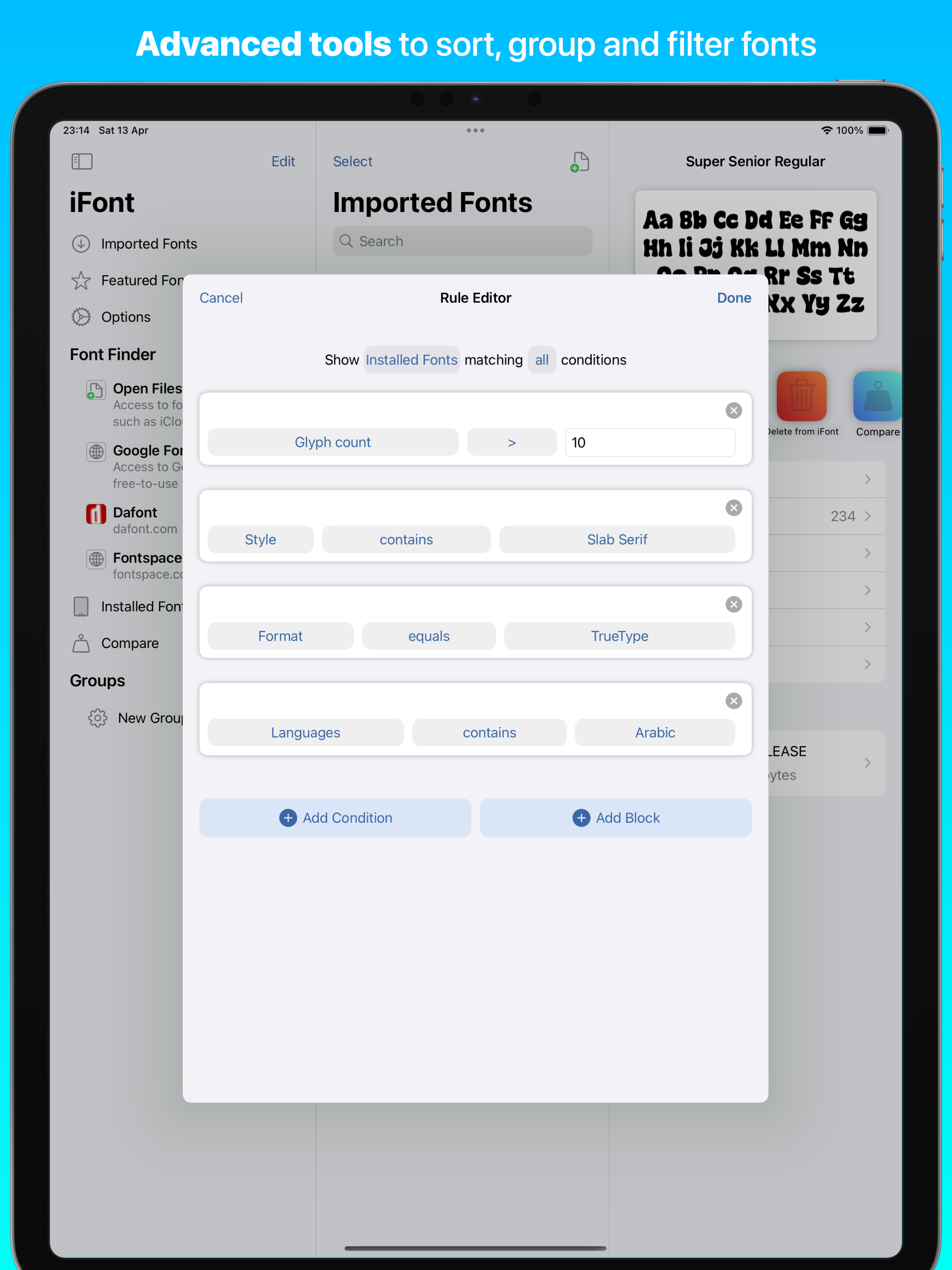
iFont includes a wide range of features which let you install, compare, and view typefaces, including individual glyphs and technical details. These include:
CUSTOM FONTS
Install your own fonts (.ttf, .ttc, .otf formats supported, as well as these formats compressed in a .zip) for use in other apps. Simply download a font in a web browser, open in iFont and follow the simple instructions to install it on your device. You can also export a copy of the font, or send the profile to a friend to let them install it, too. iFont can also open archives containing multiple fonts.
FONT DOWNLOADS
iFont lets you download and install a range of fonts from the Google Fonts library, Dafont and more (including custom sources) within the app. It couldn’t be easier to find a suitable typeface for your next leaflet, poster or financial report.
***
After discovering iFont a couple of years ago it has slotted happily into my professional workflow on the iPad Pro. It has a number of standout features which set it apart from the competition, and has been a great help in my client project work.
There’s also an appreciation of type heritage and design, with biographical information and rich technical detail on hand. Choosing the right type is made easier with the Notepad and Compare features. The ability to install multiple fonts at once is essential, saving time and allowing better management of your font library. Imported fonts are viewed as families allowing you to easily compare different weights and make the right choices. There’s also easy access to online type resources such as Google Fonts, which makes finding and installing them a breeze. Great if you’re in a hurry, or have no access to your own font library. — Martin Cleave, creative professional
***
COMPARE
Compare many different typefaces to see which will suit your intended use. Arial or Helvetica? Zapfino, Snell Roundhand or Savoye LET? Georgia, Iowan Old Style or Times New Roman? With Compare, you can be the judge!
NOTEPAD
The Notepad you find under each font lets you test it out and type a message, and then export it as an image to send in apps such as Messages. Add some character to your texts by using a font which stands out from the crowd!
WATERFALL
See how a font looks at very small or very large point sizes easily using the Waterfall view. This lets you judge which size would be suitable for your use.
ZOOM
Zoom into a font up to 500%, allowing you to see the minute details in each character.
TECHNICAL DETAILS
See information about each font, from the designer and trademark information to the spacing of the ascents and descents.
***
“Missing fonts on iOS is an issue of the past, thanks to apps like iFont… I hope you saw how easy it is to install fonts on iPhone or iPad and I suggest you give iFont a try.” — Michael Kummer, blogger
***
NOTE: iFont does not currently support .suit or .dfont files.
iFont is also fully optimised for iPad with a beautiful split view experience and a range of keyboard shortcuts.
Terms of Service: https://www.apple.com/legal/internet-services/itunes/dev/stdeula/
Privacy Policy: https://bit.ly/ifont_pp
Hide Show More...

In-Apps

iFont Premium Yearly
$39.99
iFont Premium
$6.99
iFont Premium Weekly
$9.99

Screenshots

IFont FAQ

  • Is IFont free?

    Yes, IFont is free to download, however it contains in-app purchases or subscription offerings.

  • Is IFont legit?

    ⚠️ The IFont app has poor ratings and negative feedback. Users seem unsatisfied with its performance or features.

    Thanks for the vote

  • How much does IFont cost?

    IFont has several in-app purchases/subscriptions, the average in-app price is $18.99.

  • What is IFont revenue?

    To get estimated revenue of IFont app and other AppStore insights you can sign up to AppTail Mobile Analytics Platform.

User Rating

4.42 out of 5

756 ratings in Canada

5 star
573
4 star
72
3 star
26
2 star
22
1 star
63
Ratings History

IFont Reviews

Scammed me and charged me

Ayesha8767 on

Canada

I didn’t sign up for a plan and yet they signed me up and refused a refund. Utterly disappointed.

Sneaky and Misleading App Page! Be prepared for a subscription on this formerly free app!

Jean-Pierre Joubert on

Canada

This app was free. I have used this app as a free app for years on the iPad. On this very app page it makes no mention of in-app purchasing. It does mention how it collects usage data and identifiers. If I download this “free” app on my iPhone I am suddenly forced to fill in a survey, with no way to skip, before having a subscription service thrust in my face. On a free app. An app that I was using for free for nigh on a decade An app whose page that makes ZERO mention of in-app purchasing. This is misleading, sneaky and underhanded and these “features”, both the forced survey and the in-app payments, should be removed! And if not, the app should be!

Says it’s free, but it’s NOT

Flashgirl2 on

Canada

It’s subscription-based. I am NOT paying to install one font on my iPad! Why not offer a free version??!

Why

johnnynox69 on

Canada

Says free then forces you to sign up

App needs updating

Lloydplays on

Canada

It’s a good app but it uses an outdated way to install fonts and the old way no longer works properly

pls update to work with goodnotes 6

bunkissu on

Canada

doesnt work with goodnotes 6 for me

It’s not working

Benny201333 on

Canada

When I download the profile and put in my password, it says invalid profile

Only featured fonts install on iOS 18?!

Mozbius on

Canada

I have been poking the app for a while now and it appears thaf only the features fonts get listed in the “My Fonts” but anything else imported through the font finder feature gets a font profile installed but not useful as it is not listed in “My Fonts” section in settings.

Crashes

UnusualK8K8 on

Canada

Keeps crashing every time I try to install

I love your app!

Read please pls on

Canada

It is so fun and I love all the fonts you have! I hope this improves even more later on but this app is easy to use and fun! I hope you see this letter! Have a great day -3mma

Store Rankings

Ranking History
App Ranking History not available yet
Category Rankings
Chart
Category
Rank
Top Grossing
58
Top Free
69
Top Grossing
73
Top Grossing
93
Top Grossing
93

Keywords

IFont Competitors

IFont Installs

Last 30 days

IFont Revenue

Last 30 days

IFont Revenue and Downloads

Gain valuable insights into IFont performance with our analytics.
Sign up now to access downloads, revenue, and more.
This page includes copyrighted content from third parties, shared solely for commentary and research in accordance with fair use under applicable copyright laws. All trademarks, including product, service, and company names or logos, remain the property of their respective owners. Their use here falls under nominative fair use as outlined by trademark laws and does not suggest any affiliation with or endorsement by the trademark holders.