


Description
Images Classifier enables you to identify and group images using your iPhone or iPad with custom-trained machine learning models.
The app includes a built-in model, FruitsClassifier.mlmodel, which detects 8 different types of fruits using a neural network.
Features:
• Automatically group images into category folders, accessible via the Files app
• Preview grouped images within the app
• Set a classification confidence threshold - images below this value are grouped under "Other"
• Load and run custom machine learning models from your library
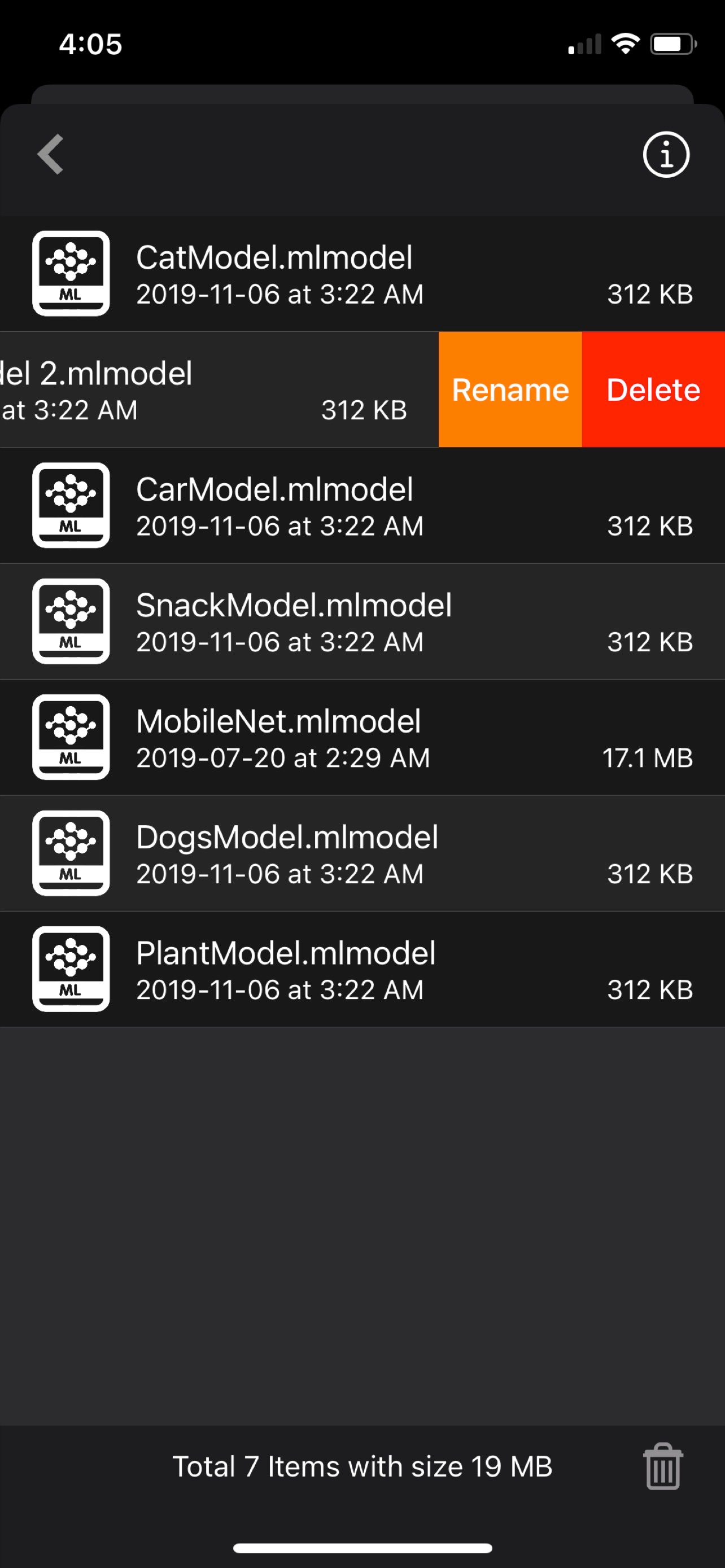
• Rename or delete models directly from the library
Grouped images are saved in the Files app under:
[Images Classifier / Images]
To Add a Custom Model:
Download a pre-trained .mlmodel file and place it in:
[Images Classifier / MLModel] via AirDrop
You can also train your own model using tools like CreateML or TensorFlow (models must be converted to .mlmodel format)
Custom Model Tips:
For example, if your model classifies 5 dog breeds - Husky, Bulldog, Golden Retriever, German Shepherd, and Beagle—it will perform accurately for those. However, classifying an unfamiliar breed like Boxer may result in incorrect predictions (e.g., classified as Bulldog).
To improve results, include as many relevant classes as possible when training your model.
Usage Examples:
• Group plant species images in the jungle using a custom-trained model
• Identify and sort dog breeds with a trained model
• Classify and group wildlife or insect species
• Detect and categorize defective products
• And many more use cases - limited only by your creativity
Quick Start Guide:
1. AirDrop your .mlmodel file (e.g., DogBreedsModel.mlmodel) into:
[Images Classifier / MLModel] via the Files app
2. Launch the Images Classifier app
3. Open the Library tab and select your model (e.g., DogBreedsModel.mlmodel)
4. Load images from your Camera Roll
5. Tap Run and wait for processing to complete
6. Tap Result to view categorized images
7. Access all grouped images in the Files app under:
[Images Classifier / Images]
[*] Make sure your model is specifically trained for image classification (not object detection or other ML types).
What is Image Classification?
Image classification is the process of identifying and labeling groups of pixels or vectors within an image using predefined rules.
It's a supervised learning task where a model is trained to recognize specific target classes using labeled sample images.
Early computer vision models used raw pixel data as input, and this foundation still powers many modern classification techniques.
Thanks for your support and do visit nitrio.com for more apps for your iOS devices.
Hide
Show More...
The app includes a built-in model, FruitsClassifier.mlmodel, which detects 8 different types of fruits using a neural network.
Features:
• Automatically group images into category folders, accessible via the Files app
• Preview grouped images within the app
• Set a classification confidence threshold - images below this value are grouped under "Other"
• Load and run custom machine learning models from your library
• Rename or delete models directly from the library
Grouped images are saved in the Files app under:
[Images Classifier / Images]
To Add a Custom Model:
Download a pre-trained .mlmodel file and place it in:
[Images Classifier / MLModel] via AirDrop
You can also train your own model using tools like CreateML or TensorFlow (models must be converted to .mlmodel format)
Custom Model Tips:
For example, if your model classifies 5 dog breeds - Husky, Bulldog, Golden Retriever, German Shepherd, and Beagle—it will perform accurately for those. However, classifying an unfamiliar breed like Boxer may result in incorrect predictions (e.g., classified as Bulldog).
To improve results, include as many relevant classes as possible when training your model.
Usage Examples:
• Group plant species images in the jungle using a custom-trained model
• Identify and sort dog breeds with a trained model
• Classify and group wildlife or insect species
• Detect and categorize defective products
• And many more use cases - limited only by your creativity
Quick Start Guide:
1. AirDrop your .mlmodel file (e.g., DogBreedsModel.mlmodel) into:
[Images Classifier / MLModel] via the Files app
2. Launch the Images Classifier app
3. Open the Library tab and select your model (e.g., DogBreedsModel.mlmodel)
4. Load images from your Camera Roll
5. Tap Run and wait for processing to complete
6. Tap Result to view categorized images
7. Access all grouped images in the Files app under:
[Images Classifier / Images]
[*] Make sure your model is specifically trained for image classification (not object detection or other ML types).
What is Image Classification?
Image classification is the process of identifying and labeling groups of pixels or vectors within an image using predefined rules.
It's a supervised learning task where a model is trained to recognize specific target classes using labeled sample images.
Early computer vision models used raw pixel data as input, and this foundation still powers many modern classification techniques.
Thanks for your support and do visit nitrio.com for more apps for your iOS devices.
Screenshots


Images Classifier FAQ
-
Is Images Classifier free?
Yes, Images Classifier is completely free and it doesn't have any in-app purchases or subscriptions.
-
Is Images Classifier legit?
Not enough reviews to make a reliable assessment. The app needs more user feedback.
Thanks for the vote -
How much does Images Classifier cost?
Images Classifier is free.
-
What is Images Classifier revenue?
To get estimated revenue of Images Classifier app and other AppStore insights you can sign up to AppTail Mobile Analytics Platform.

User Rating
App is not rated in United States yet.
Ratings History
Images Classifier Reviews
No Reviews in United States
App doesn't have any reviews in United States yet.
Store Rankings
Ranking History
App Ranking History not available yet
Category Rankings
App is not ranked yet
Images Classifier Competitors
Images Classifier Installs
Last 30 days
Images Classifier Revenue
Last 30 daysImages Classifier Revenue and Downloads
Gain valuable insights into Images Classifier performance with our analytics.
Sign up now to access downloads, revenue, and more.
Sign up now to access downloads, revenue, and more.
App Info
- Category
- Photo Video
- Publisher
- Heng Jia Liang
- Languages
- English
- Recent release
- 1.1 (5 months ago )
- Released on
- May 9, 2022 (3 years ago )
- Also available in
- Australia , Azerbaijan , Colombia , Iceland , Netherlands , Türkiye , United States , Switzerland
- Last Updated
- 6 days ago
This page includes copyrighted content from third parties, shared solely for commentary and research in accordance with fair use under applicable copyright laws. All trademarks, including product, service, and company names or logos, remain the property of their respective owners. Their use here falls under nominative fair use as outlined by trademark laws and does not suggest any affiliation with or endorsement by the trademark holders.