Inkflow Visual Notebook

Journal. Sketchnotes. Todos.

Published by: Qrayon

Description

Inkflow is a note-taking and brainstorming experience unlike any other! Capture your ideas as easily as with pen and paper, then resize and reorganize them with your fingers.
DIGITAL WRITING DONE RIGHT
Inkflow's ink feels like a really smooth fountain pen. Great for expressive writing or sketching. Effortlessly scale or move anything you select. This will change the way you think about ink: Jot down a list of concepts then rearrange them to fit into the bigger picture. literally move your thoughts around the page, and assemble big ideas with your fingers. This works great for brainstorming and planning. It's also perfect for prototyping layouts, sketching, and drawing.
FULL RESOLUTION ZOOM
Zoom and pan with two fingers. Inkflow's ink stays sharp no matter how much you zoom in, so you can add fine details at full quality. It's also lightning fast and lag free. This allows writing and drawing with incredible precision, with or without a stylus.
TEXT, PHOTOS, and PAPER BACKGROUNDS TOO
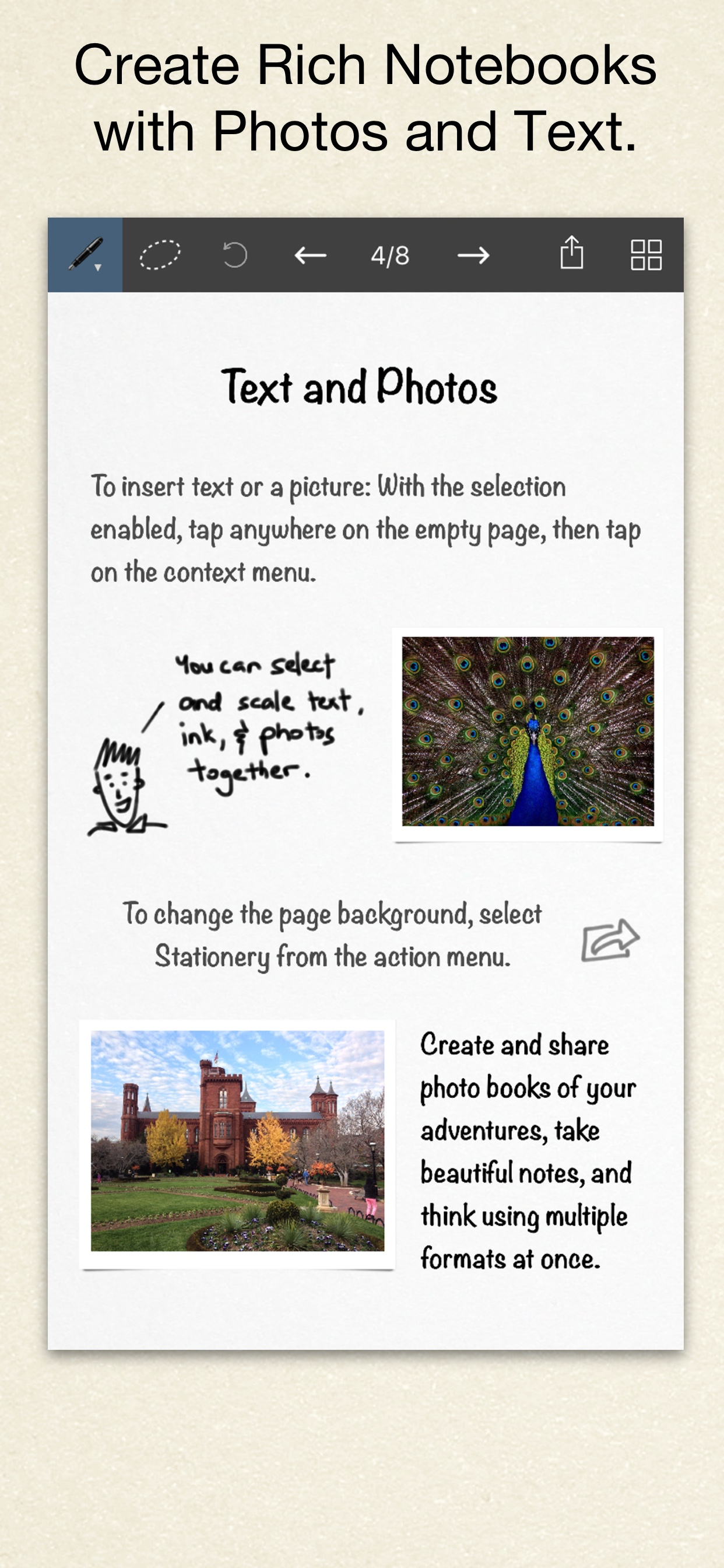
Insert text boxes and photos anywhere on the page and resize them seamlessly with the ink. You can also choose from a selection of different paper backgrounds.
EASILY CREATE and SHARE
Inkflow let's you export your books to PDF, high-resolution JPEG, and share them via Twitter, Email, or with other Apps.
TRY INKFLOW FOR FREE
Rather than just read about Inkflow, go ahead and try it out: We've decided to make the Basic Edition of Inkflow completely FREE. The Basic Edition is a full featured note-taking and sketching app. It comes with the Fountain Pen with black ink, photos, and a standard set of 5 popular fonts for text. Books max out at 20 pages each, but you can create as many as you like.
*** NOTE: To delete ink, tap on the selection then tap delete. Tap on the book name to delete a book.
If you're looking for more, there is...
INKFLOW PLUS
Upgrade instantly at any time to the Plus Edition to get:
- Inkport
- A customizable, full color palette,
- Pencil, Eraser, and Paint Brush tools,
- The Write-Behind Hilighter tool,
- Rotate, Cut, Copy, Paste Ink, and Page Management,
- Export as PNG with transparent backgrounds,
- Notebooks with unlimited pages,
- Custom paper backgrounds,
- An additional 50+ fonts,
- And more!
The Plus Edition lets you do even more things such as: Painting, cartooning, page layouts, and brainstorming in full color. Learn more in the in-App Quickstart Guide.
INKPORT: COPY AND PASTE FROM THE REAL WORLD
Only Inkflow Plus includes the revolutionary Inkport tool. Inkport uses your iPad's camera to instantly convert your written notes and sketches into Inkflow's native vector ink. Easily pull in materials from multiple sources and go from paper to iPad without missing a beat. Inkport is going to change the way you use paper in your workflow.
Universal App for iPad, iPhone and iPod Touch: Upgrade once and get Inkflow Plus on all your compatible devices connected to your iTunes account!
EDUCATORS: Inkflow Plus is also available as a standalone App, and qualifies for Apple's Volume Purchase Program.
A PLATFORM FOR CREATIVITY
We strongly believe that the iPad is not just a consumption device. It's a creativity device. Check out our whole range of creativity Apps on our website.
Keep on creating!
Hide Show More...

In-Apps

Inkflow Plus
299.00 ₱

Screenshots

Inkflow Visual Notebook FAQ

  • Is Inkflow Visual Notebook free?

    Yes, Inkflow Visual Notebook is free to download, however it contains in-app purchases or subscription offerings.

  • Is Inkflow Visual Notebook legit?

    ✅ The Inkflow Visual Notebook app appears to be high-quality and legitimate. Users are very satisfied.

    Thanks for the vote

  • How much does Inkflow Visual Notebook cost?

    Inkflow Visual Notebook has several in-app purchases/subscriptions, the average in-app price is 299.00 ₱.

  • What is Inkflow Visual Notebook revenue?

    To get estimated revenue of Inkflow Visual Notebook app and other AppStore insights you can sign up to AppTail Mobile Analytics Platform.

User Rating

4.46 out of 5

120 ratings in Philippines

5 star
90
4 star
9
3 star
9
2 star
2
1 star
7
Ratings History

Inkflow Visual Notebook Reviews

AMAZING

ibhiigvyfyfyubhbbubu on

Philippines

Its amazing try it!

MyOpinions

MyIdealsPlease on

Philippines

Hi there! This app is great but 😅 I can't touch the pen to change the palette color though. And could you please suggest to fix that please? Sorry to offend 😞 And please make an easy button to have an eraser section. That is all for today have a nice day! Sorry for that if im being a bit offended but please fix that little problem. Im rating it 4 starts thank you!⭐️⭐️⭐️⭐️

AMAZING!

Don meer on

Philippines

This is amazing i love the app and helps me save a lot of paper! Wish they could add another free color to the pen :)

Limiting

Jenny Funny on

Philippines

Wish i could wwi

Fantastic App

RachelJChristensen on

Philippines

Great for mind mapping and other memory techniques!

Love it

Hemady on

Philippines

My kid uses it for studying and she absolutely enjoys it!! She thinks her grades are improving because of this.....

So expensive

Toni1385532 on

Philippines

It’s nice but it’s the price that’s holding me back. :)

how can I edit ?

casper127_9637 on

Philippines

The app is great and from the looks of it it’s looks perfect but I don’t like these app it lack instruction and I can’t even edit those things that I want to erase. Tsk.02 !

Very useful

Vhans23 on

Philippines

So far the only app I've found where I can make notes by typing text, doodling, and inserting pictures all at the same time. Hope the developers would add "insert pages" in the future.

Helpful

Lish Aquino on

Philippines

Great for taking notes

Store Rankings

Ranking History
App Ranking History not available yet
Category Rankings
App is not ranked yet

Keywords

Inkflow Visual Notebook Competitors

Inkflow Visual Notebook Installs

Last 30 days

Inkflow Visual Notebook Revenue

Last 30 days

Inkflow Visual Notebook Revenue and Downloads

Gain valuable insights into Inkflow Visual Notebook performance with our analytics.
Sign up now to access downloads, revenue, and more.
This page includes copyrighted content from third parties, shared solely for commentary and research in accordance with fair use under applicable copyright laws. All trademarks, including product, service, and company names or logos, remain the property of their respective owners. Their use here falls under nominative fair use as outlined by trademark laws and does not suggest any affiliation with or endorsement by the trademark holders.