La Terminal - SSH Client

SFTP, Files and Server Monitor

Published by: Xibbon

Description

مرحباً بك في La Terminal، مركز الأوامر ssh الجديد والمثير لديك.
أكثر من مجرد قذيفة سطر الأوامر البسيطة، تقدم La Terminal تجربة لمس من الدرجة الأولى وبشكل كامل وأصلي لهاكرز سطر الأوامر على iPhone وiPad.
مبني على المصدر المفتوح:
من المطور الأصلي لـ Midnight Commander، مدير الملفات البصري المفتوح المصدر لـ Linux، تقدم La Terminal تجربة شاملة لمحاكاة الطرفية Xterm/DEC VT مبنية على مكتبة SwiftTerm المفتوحة المصدر الشهيرة مع وسائل راحة قوية لعشاق سطر الأوامر الجادين.
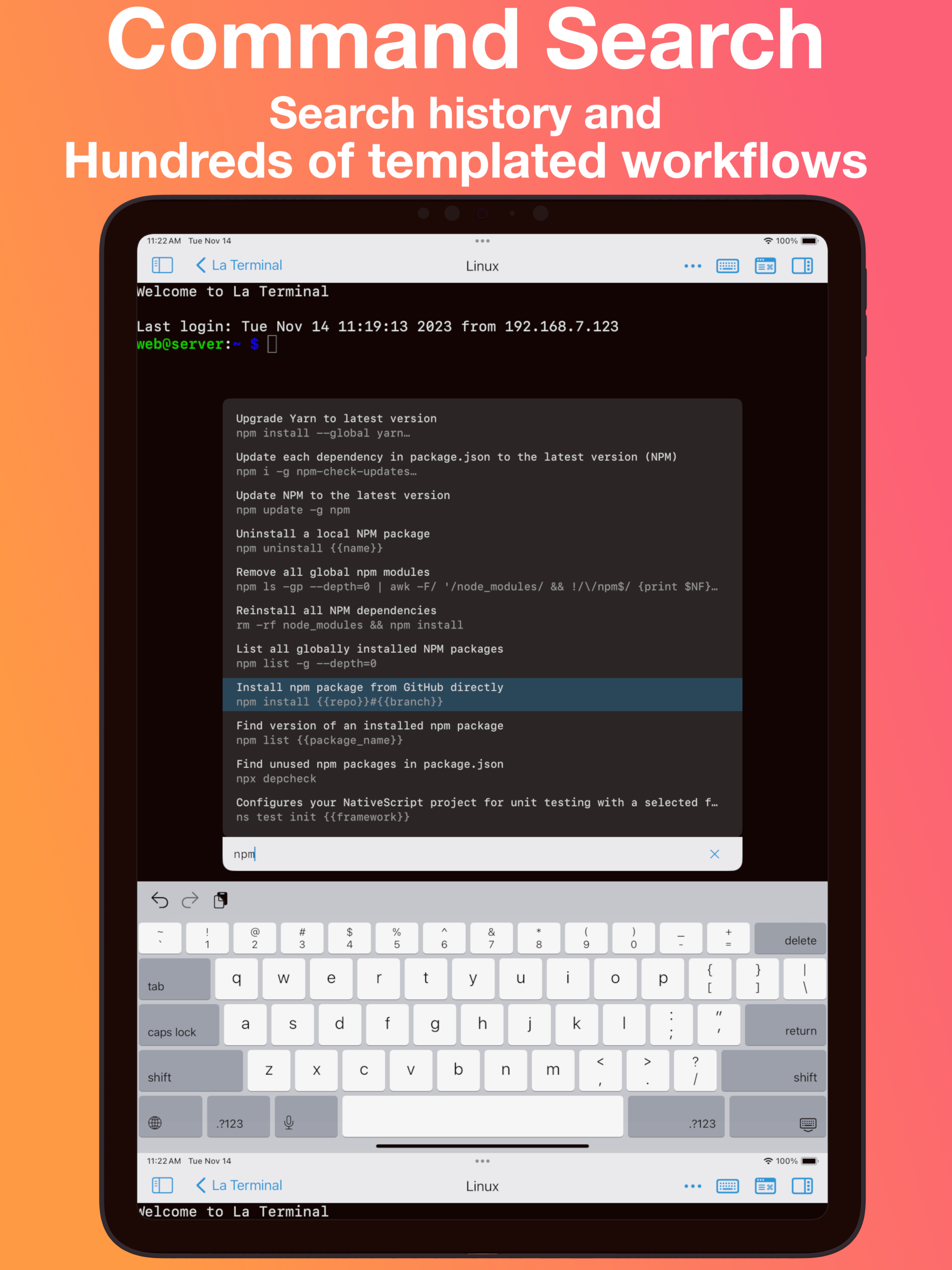
البحث في الأوامر:
استخدم خاصية البحث في الأوامر للعثور بسرعة على الأمر الذي تبحث عنه. ابحث في سجل أوامرك الخاص وفي معرض العمل الشامل لدينا للعثور على الأوامر وتنفيذها. أنشئ وعدل سير عمل خاصة بك لمجموعة متنوعة من المهام، بما في ذلك تنفيذ الأوامر المستخدمة بشكل متكرر، وأتمتة سلسلة من الأوامر، أو مجرد تتبع أمر معقد قد يكون من الصعب تذكره.
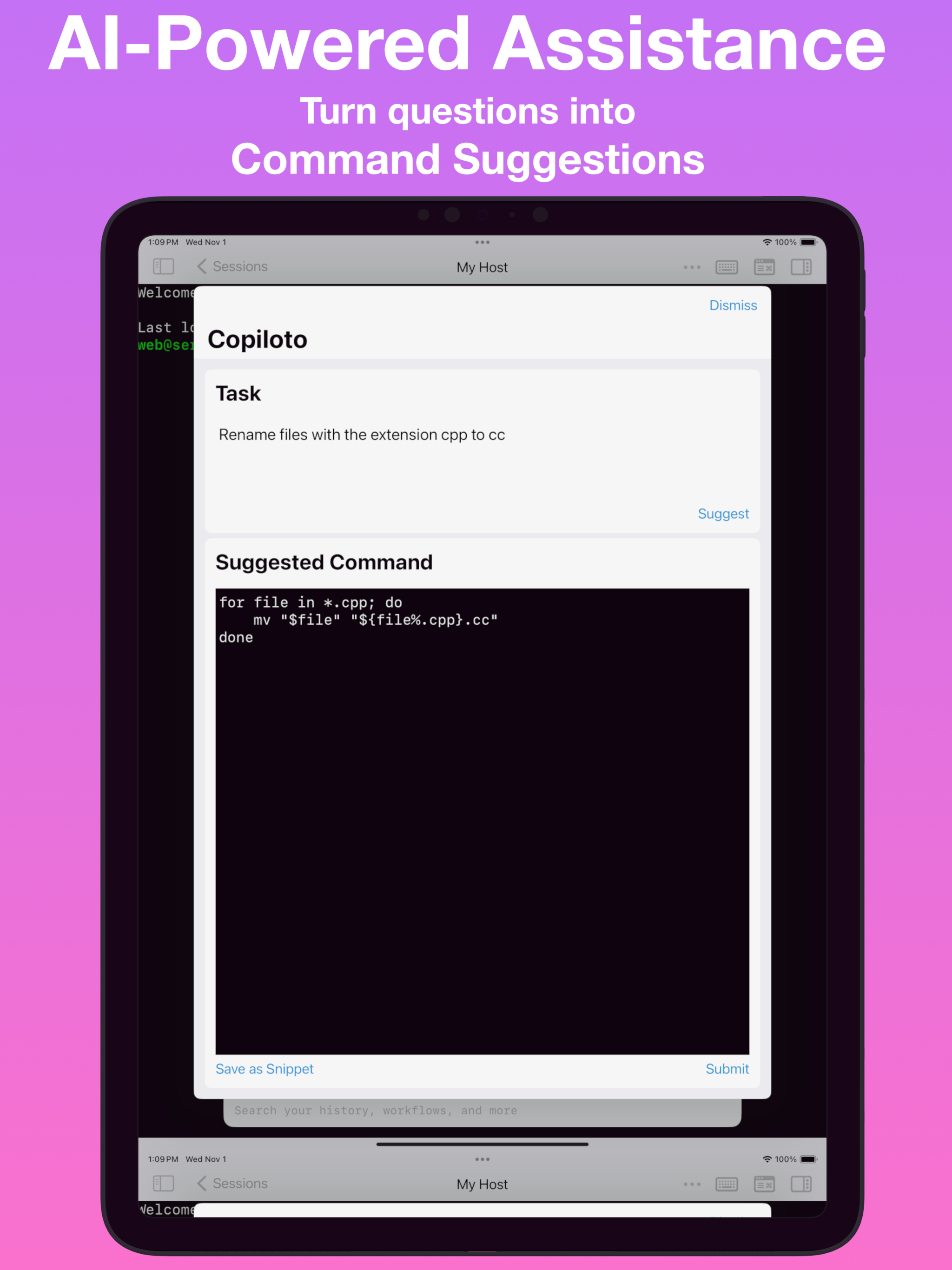
مساعد مدعوم بالذكاء الصناعي:
احصل على المساعدة في كتابة أوامر الطرفية لـ Linux، Mac، أو Windows بالإنجليزية البسيطة، مثل "استخراج خاصية الاسم داخل عنصر المقالة من ملف json" أو "عرض العُقد الأكثر استهلاكًا لـ CPU في Kubernetes". عندما تحتاج إلى بعض المساعدة، فقط انقر على أيقونة الدماغ في أعلى أي جلسة طرفية نشطة للوصول إلى المساعدة الذكاء الصناعي المدعومة بـ GPT.
حلوى العين:
تقدم La Terminal تجربة قابلة للتخصيص بالكامل مع خلفيات جذابة بتأثيرات مباشرة مدعومة بـ Metal Performance Shaders.
المختزن الآمن:
تُخزن مفاتيحك الخاصة في المختزن الآمن بحيث لا يمكن العثور على مفتاحك الخاص في نص عادي.
تصوير الحالة القوي:
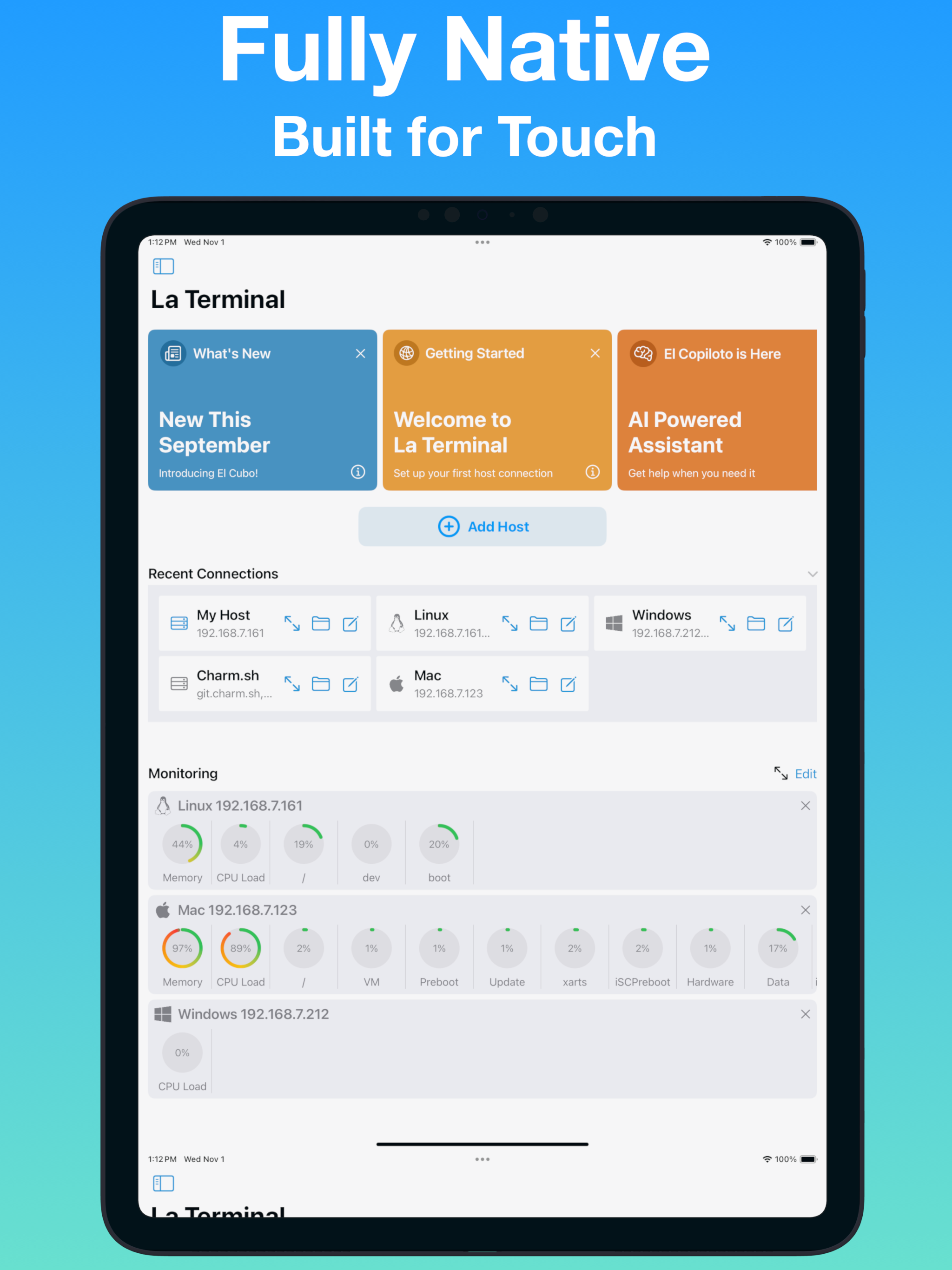
تضع أدوات مراقبة الموارد في La Terminal تصويرات قوية لاستخدام الـ CPU والذاكرة، بالإضافة إلى استكشاف العمليات الأصلي، بين يديك. يمكن الوصول إلى تصويرات مراقبة الموارد من أعلى أي طرفية متصلة، وتوفر أدوات استكشاف العمليات عرضًا متعددًا لاستخدام الـ CPU، الذاكرة، والقرص. الصور المصغرة تُظهر معاينات للمضيفين المتصلين مع حمل النظام على مر الزمن في عرض الطرفيات النشطة. تصوير مراقبة الشبكة يرسم حركة البيانات على خريطة العالم لمساعدتك على فهم مصادر وأهداف الاتصالات من وإلى مضيفين متصلين.
iCloud للجميع:
تجعل La Terminal الانتقال بين iPhone وiPad وMac الخاص بك سهلاً عن طريق مزامنة إعداداتك ومفاتيحك عبر iCloud - كالسحر!
مدرك لمنصة المضيف:
سواء كنت تدير عشرات VMs الـ Linux على AWS أو Azure، أو تقوم بتسجيل الدخول إلى zsh على سطح المكتب الخاص بك على Mac، أو تكون العمل على مشروع Raspberry Pi IoT الأخير الخاص بك عبر bash، توفر تجربة الأكثر إنتاجية ممكنة على جهاز محمول. La Terminal حتى تعرف Windows لضمان أن مستخدمي PowerShell الخبراء يمكنهم أيضًا الاستمتاع بتجربة ssh ممتعة.
الدعم الدولي:
تقدم La Terminal دعماً واسعاً للطرفيات الدولية، بما في ذلك تقديم الناتج المعرب وكذلك دعم لطرق الإدخال المعربة من التفويض الأصلي لـ iOS ولوحات المفاتيح الدولية.
ميزات La Terminal Pro
مدير ملفات SFTP كامل
قم برفع، وتحميل، والتنقل في أنظمة الملفات البعيدة مع عميل SFTP الأصلي لدينا.
يمكن رفع الملفات أو تحميلها إلى الجهاز المحلي للوصول إليها من خلال تطبيق الملفات الأصلي لـ iOS، أو يمكن نسخها بين المضيفين البعيدين.
دعم تطبيق الملفات
اكسب الوصول إلى الملفات على أي مضيف مُكون في La Terminal باستخدام تطبيق الملفات من Apple وتطبيقات iPhone وiPad الأصلية الأخرى التي تدعم مزود الملفات.
توجيه وكيل SSH
استخدم المفاتيح المُكونة محليًا في La Terminal للتفويض بشكل سلس عند استخدام SSH من مضيف بعيد إلى آخر.
كل الخلفيات المباشرة
اختر من مكتبتنا الكاملة من الخلفيات المباشرة المُعززة بـ GPU لتخصيص تجربة سطر الأوامر الخاصة بك بالكامل.
Hide Show More...

In-Apps

La Terminal Pro Yearly
199.99 د.إ.‏
La Terminal Pro Monthly
19.99 د.إ.‏

Screenshots

La Terminal FAQ

  • Is La Terminal free?

    Yes, La Terminal is free to download, however it contains in-app purchases or subscription offerings.

  • Is La Terminal legit?

    🤔 The La Terminal app's quality is mixed. Some users are satisfied, while others report issues. Consider reading individual reviews for more context.

    Thanks for the vote

  • How much does La Terminal cost?

    La Terminal has several in-app purchases/subscriptions, the average in-app price is 109.99 د.إ.‏.

  • What is La Terminal revenue?

    To get estimated revenue of La Terminal app and other AppStore insights you can sign up to AppTail Mobile Analytics Platform.

User Rating

5 out of 5

1 ratings in United Arab Emirates

5 star
1
4 star
0
3 star
0
2 star
0
1 star
0
Ratings History

La Terminal Reviews

Magnificent!

ClayHarpo on

United States

If you’re reading these comments to see if this app does what you want, trust me it does lol. The hunt is finally over

SSH to raspberry pi

realdawei on

United States

Quite good.

It’s nice, but quite laggy

Kibblerz on

United States

This would be amazing if latency were reduced significantly, I tried using Neovim through it, but it was quite a bit too laggy. It’d also be amazing if scrolling could be made to work with Neovim. Scrolling works in the terminal, but for some reason with Neovim, it just acts like the mouse is clicked and starts highlighting text to yank.

Too slow to use

KesaGatame on

United States

I don't know what makes this particular terminal so incredibly slow, but it makes it unusable if you're planning to sit down and do work. If you code from a terminal you might think that this is a solution to the inability to code on vision pro -- it's not, unfortunately. Separately, it no longer works for me -- I think the owner may have price gated some of the ssh features. (certainly reasonable -- but since I'm not sure if that's the cause of the change it bares mentioning)

Delightfully silly

Stephen Jennings on

United States

My needs are light, but I find this client to be a joy to use. Miguel’s sense of humor shines through.

Lot of lag

Geo.de.ta on

United States

When typing, there is a lot of lag, so much so that the app is unusable. I ssh’ed into a machine on my local network, and after logging in, there is nothing I am able to do.

Blurry fonts, only two window support and pasting on click.

Cyanphx on

United States

I noticed that the font is blurry compared to other SSH apps for Vision Pro. Despite that, I was unable to open more than two SSH sessions, one in an extra window and another in the main window. Furthermore, clicking on the terminal results in the text on the clipboard being pasted. Those make the app hard to use. Once those issues are fixed it will be a 5 start app!

Now working on Vision Pro!

T1Jason on

United States

First, I'm happy to update this review once things start working. I can't get anything to connect using the Vision Pro. I have no problem using this app successfully with my iPad or iPhone. With the Vision Pro I see ".waiting ... PolicyDenied" for every host I try connecting to (macOS and Linux). I tried enabling additional diagnostics in settings, but I didn't get any more info. Nicely designed app, however. I **really** want a setup with the Vision Pro where I can use my paired keyboard and a terminal. And I was hoping this would be it... *** UPDATE 1 *** I was able to get La Terminal working on Vision Pro by going into Settings -> Apps -> La Terminal, then turn OFF "Local Network Access", then turn ON "Local Network Access". I don't know why network access seemed to not be granted when visionOS prompted me to allow when I first started the app? Anyway, now that everything is working I can give this a proper test drive. *** UPDATE 2 *** This app really makes the Vision Pro a usable work device for me. It is super cool to have a terminal open, a browser open, music playing, while being immersed on top of a cliff with clouds rolling by. La Terminal is a bit glitchy, so thank the gods for tmux. The "native" session persistence doesn't seem to do anything. Also, the "tmux" option in the menu is no good because it starts a new session when reconnecting instead of attaching to the existing session. Running tmux is REQUIRED because La Terminal does not seem to handle network glitches gracefully. I will literally be typing in my editor and I get a popup about a network disconnect — this seems specific to La Terminal; I don't see these frequent network interruptions with a-Shell (also I can't run the helix editor with a-Shell, but it renders beautifully with La Terminal).

Got lots of great details right but blew one of the basics

Mike7543332333363246 on

United States

It’s a cool app with a lot of thoughtful features, but it annoyingly puts a black bar at the top and bottom of the window in order to accommodate rounded corners. I wish they would just make the corners square, so that the text could go right up to the margin.

This is what I purchased AVP for.

12343557643321 on

United States

As a linux admin/devops engineer. This is my “killer app” for the AVP. This app makes it possible for me to work effectively on remote clients without relying on my macbook. Other terminal apps work, but this is the first one I’ve used where I immediately knew that I could confidently get work done. I never leave app reviews, but this one definitely deserved it. Hats off to the team behind this!

Store Rankings

Ranking History
Category Rankings
Chart
Category
Rank
Top Free
33
Top Free
80
Top Free
109
Top Free
111
Top Free
124

Keywords

La Terminal Competitors

La Terminal Installs

Last 30 days

La Terminal Revenue

Last 30 days

La Terminal Revenue and Downloads

Gain valuable insights into La Terminal performance with our analytics.
Sign up now to access downloads, revenue, and more.

App Info

Publisher
Xibbon
Languages
English, Arabic, Catalan, Danish, Dutch, French, Greek (modern), Hebrew (modern), Italian, Japanese, Korean, Portuguese, Serbian, Spanish, Chinese, Turkish, Vietnamese
Recent release
1.10 (2 weeks ago )
Released on
Sep 2, 2022 (3 years ago )
Last Updated
4 days ago
This page includes copyrighted content from third parties, shared solely for commentary and research in accordance with fair use under applicable copyright laws. All trademarks, including product, service, and company names or logos, remain the property of their respective owners. Their use here falls under nominative fair use as outlined by trademark laws and does not suggest any affiliation with or endorsement by the trademark holders.