


Lean Run Chart Rpt
Published by:
MCS Media
Description
Run Chart is a graph monitoring data over time to detect trends, shifts, or cycles. This app provides fundamental information on how the Run Chart is used to display data points over time in a standardized, customizable, and sharable format on the cloud. The visual representation of data allows for seeing trends and patterns of an entire process over time. This app is designed for anyone who wants to effectively visualize data trends and patterns in analyzing processes in a continuous improvement or problem-solving project.
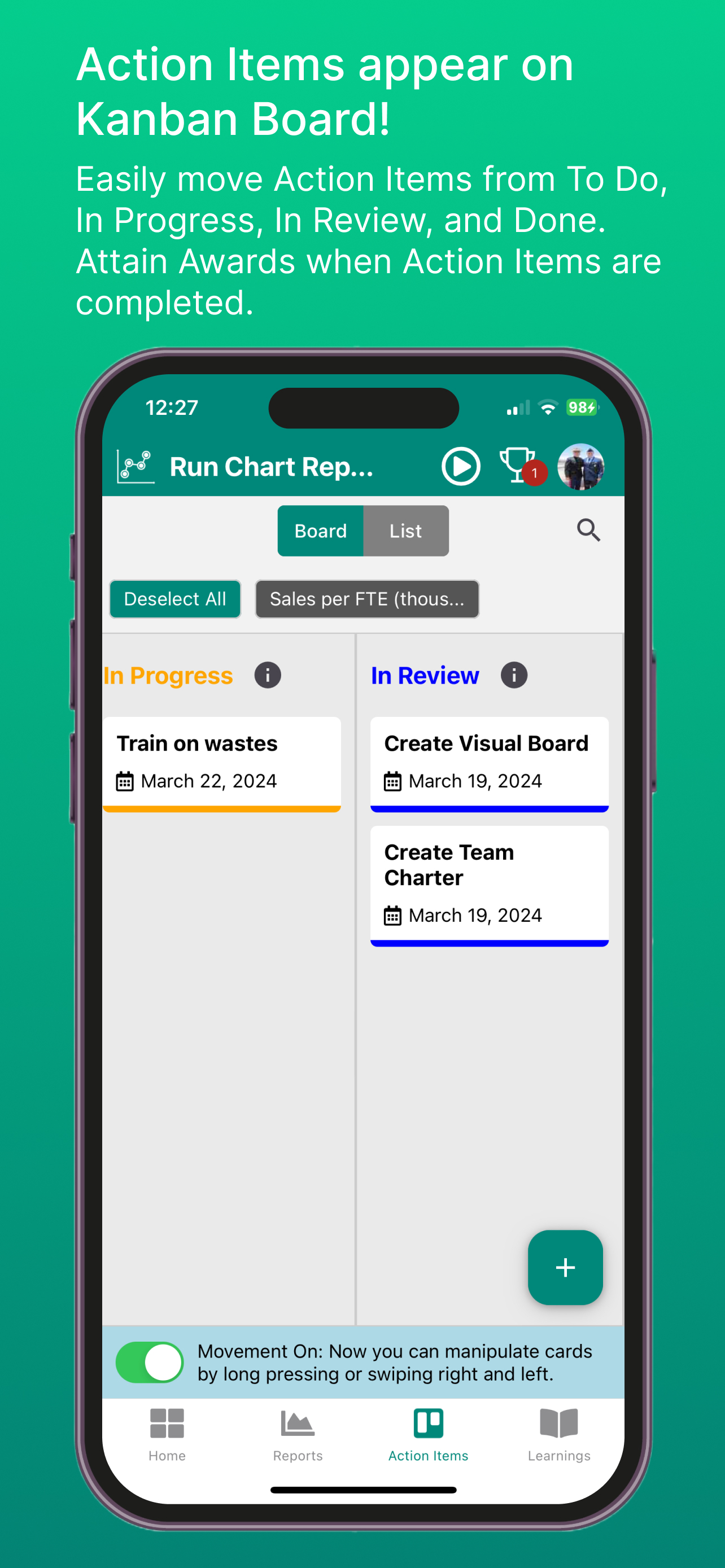
The Dynamic Kanban Action Item Board allows Action Items to be visually managed using 4 “buckets” of To Do, In Progress, In Review, and Done allowing for Assignor to track progress by a simple drag and drop function to each bucket. Emails are automatically sent to Assignee(s) for all Action Items.
The 4 buckets functions as follows:
To Do – The Assignor will create the Action Item and reside there until the Assignee receives the email notification and acknowledges receipt to the Assignor via email or text. The Assignor then moves it to In Progress.
In Progress – The Assignee will work on the Action Item and once completed notify the Assignor. The Assignor then moves it to In Review.
In Review – The Assignor will ensure the Action Item is completed and move it to Done, or if not completed, make comments and move it back to In Progress, and subsequently notify the Assignee.
Done – The Assignor moves the Action Item to Done once they are satisfied that it has been fully completed.
Beyond educational purposes, this app provides a platform for creating a customizable and standardized use of the Run Chart report and Action Item tracking.
This app features:
An overview (Learnings) of the Run Chart.
A standardized approach and application of the Run Chart Report.
Access to Sensei tips for further understanding.
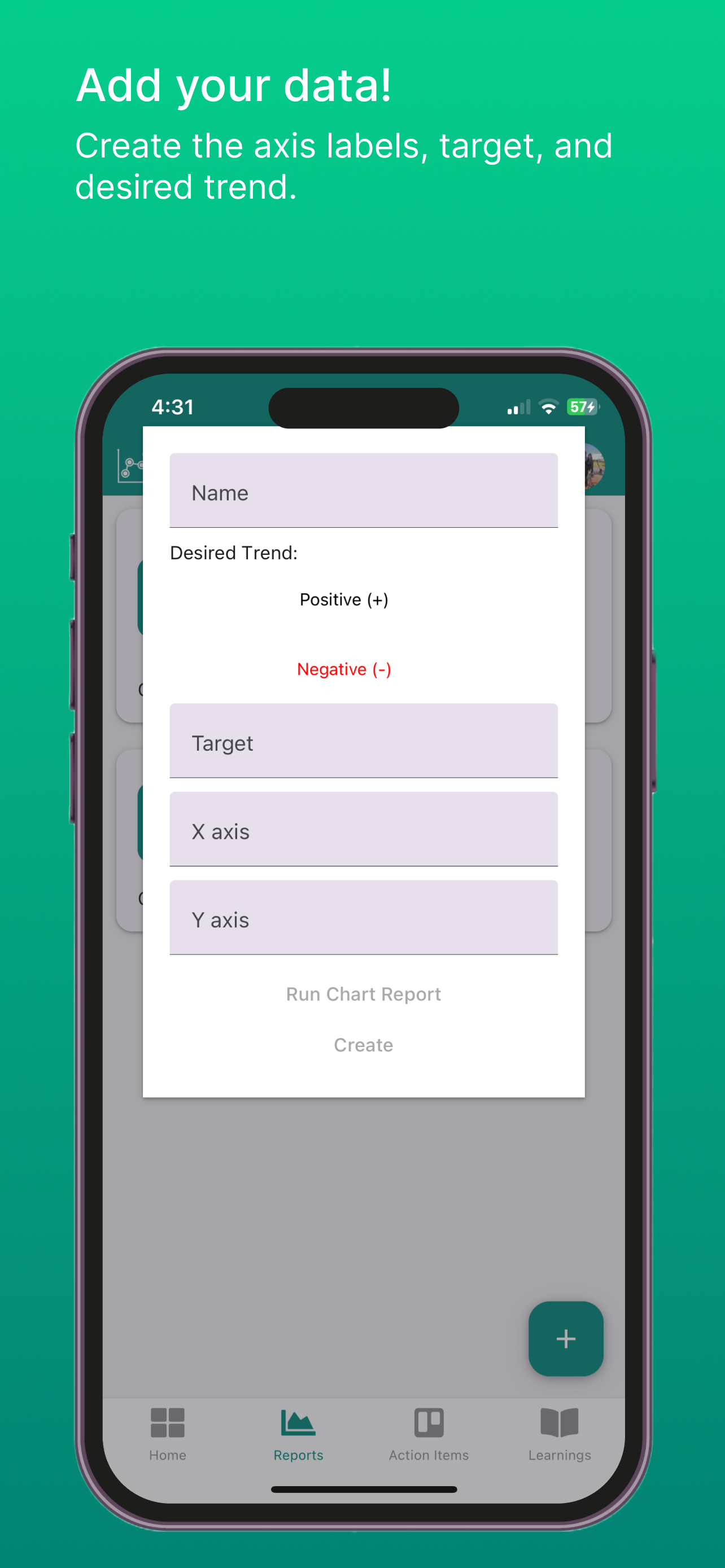
Access to the Run Chart tool/report to create x and y axis labels, a target or goal, add values and descriptions for each data point and date.
Receive awards for completing Action Items, Reports, etc.
Record, assign, and track Action Items with the visual management Kanban board.
View a Run Chart report displaying all data points relative to the dates identified.
Create the Run Chart report and share via PDF.
Take a Quiz to determine knowledge attainment.
Review a video tutorial to assist in understanding how the app works.
Hide
Show More...
The Dynamic Kanban Action Item Board allows Action Items to be visually managed using 4 “buckets” of To Do, In Progress, In Review, and Done allowing for Assignor to track progress by a simple drag and drop function to each bucket. Emails are automatically sent to Assignee(s) for all Action Items.
The 4 buckets functions as follows:
To Do – The Assignor will create the Action Item and reside there until the Assignee receives the email notification and acknowledges receipt to the Assignor via email or text. The Assignor then moves it to In Progress.
In Progress – The Assignee will work on the Action Item and once completed notify the Assignor. The Assignor then moves it to In Review.
In Review – The Assignor will ensure the Action Item is completed and move it to Done, or if not completed, make comments and move it back to In Progress, and subsequently notify the Assignee.
Done – The Assignor moves the Action Item to Done once they are satisfied that it has been fully completed.
Beyond educational purposes, this app provides a platform for creating a customizable and standardized use of the Run Chart report and Action Item tracking.
This app features:
An overview (Learnings) of the Run Chart.
A standardized approach and application of the Run Chart Report.
Access to Sensei tips for further understanding.
Access to the Run Chart tool/report to create x and y axis labels, a target or goal, add values and descriptions for each data point and date.
Receive awards for completing Action Items, Reports, etc.
Record, assign, and track Action Items with the visual management Kanban board.
View a Run Chart report displaying all data points relative to the dates identified.
Create the Run Chart report and share via PDF.
Take a Quiz to determine knowledge attainment.
Review a video tutorial to assist in understanding how the app works.
Screenshots






Lean Run Chart Rpt FAQ
-
Is Lean Run Chart Rpt free?
Yes, Lean Run Chart Rpt is completely free and it doesn't have any in-app purchases or subscriptions.
-
Is Lean Run Chart Rpt legit?
Not enough reviews to make a reliable assessment. The app needs more user feedback.
Thanks for the vote -
How much does Lean Run Chart Rpt cost?
Lean Run Chart Rpt is free.
-
What is Lean Run Chart Rpt revenue?
To get estimated revenue of Lean Run Chart Rpt app and other AppStore insights you can sign up to AppTail Mobile Analytics Platform.

User Rating
5 out of 5
2 ratings in United States
5 star
2
4 star
0
3 star
0
2 star
0
1 star
0
Ratings History
Lean Run Chart Rpt Reviews
App doesn't have any reviews yet
Store Rankings
Ranking History
App Ranking History not available yet
Category Rankings
App is not ranked yet
Lean Run Chart Rpt Installs
Last 30 days
Lean Run Chart Rpt Revenue
Last 30 daysLean Run Chart Rpt Revenue and Downloads
Gain valuable insights into Lean Run Chart Rpt performance with our analytics.
Sign up now to access downloads, revenue, and more.
Sign up now to access downloads, revenue, and more.
App Info
- Category
- Productivity
- Publisher
- MCS Media
- Languages
- English
- Recent release
- 1.0 (1 year ago )
- Released on
- May 24, 2024 (1 year ago )
- Also available in
- United States , South Africa , Ireland , Türkiye , Australia , United Arab Emirates , Azerbaijan , Belgium , Denmark , Dominican Republic , Algeria , Ecuador , Spain , Finland , South Korea , Lebanon , Mexico , Norway , Peru , Sweden , Russia , Saudi Arabia , Singapore , Angola , Austria , United Kingdom , Indonesia , Romania , Bulgaria , Switzerland , Canada , Chile , Belarus , China , Colombia , Czechia , Germany , Netherlands , Hungary , Egypt , Israel , Nigeria , Japan , Kazakhstan , Kuwait , North Macedonia , Malaysia , Philippines , Vietnam , Thailand , Pakistan , Italy , India , Portugal , Poland , Ukraine , Taiwan , Argentina , Greece , New Zealand
- Last Updated
- 3 weeks ago
This page includes copyrighted content from third parties, shared solely for commentary and research in accordance with fair use under applicable copyright laws. All trademarks, including product, service, and company names or logos, remain the property of their respective owners. Their use here falls under nominative fair use as outlined by trademark laws and does not suggest any affiliation with or endorsement by the trademark holders.