Description

For creators who love to shoot video.
Smoothly streamline your video production workflow, from script writing to editing!
From dramas and documentaries to music videos and dance clips in the entertainment genre, LUMIX Flow is easy to use even for beginners and supports a smooth video production process.
【LUMIX Mode】
Easily create scripts, storyboards, and shot lists. Use the app to visually sketch out scenes, illustrating your subject's position, direction, shot angle and more.
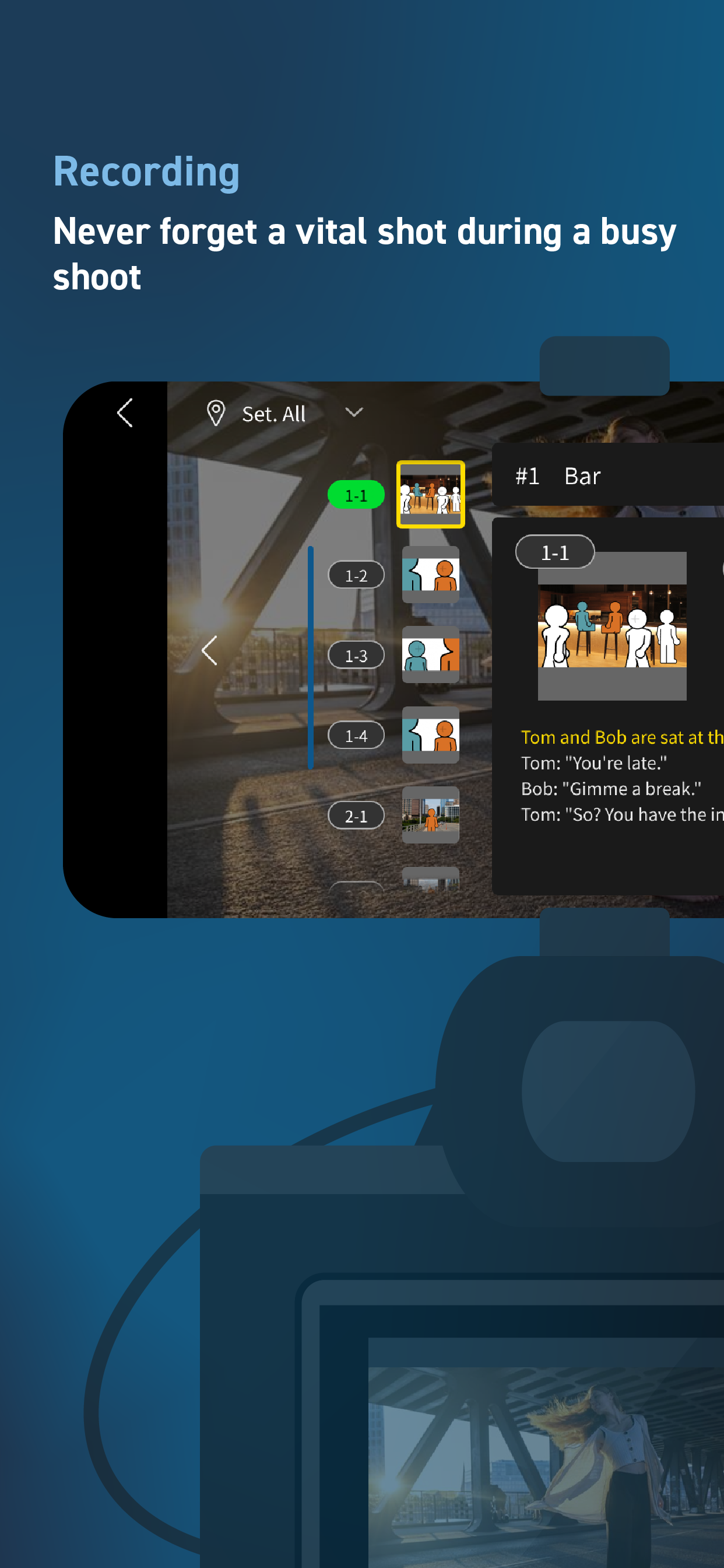
Use your smartphone as an external monitor for your LUMIX camera. Check your shot list and storyboard on your smartphone while shooting. You can easily see which shots have already been taken at a glance, ensuring you never forget a key shot and allowing you to work through your shoot smoothly and efficiently.
Shooting files are automatically divided into folders based on your ' OK / KEEP / BAD' rating by importing XML files from the app into your video editing software. Efficiently organize files after shooting and shorten the time you spend editing.
【Smartphone/Tablet Mode】
You can script, shoot, and edit a short drama or documentary video using just your smartphone, enjoying all the fun of filmmaking without the need for a camera or computer.
【External Monitor】
Connect your smartphone to your LUMIX camera to use it as an external monitor while shooting. Quickly check focus on-site.
Compatible with: DC-S1RM2, DC-S1M2, DC-S1M2ES, DC-S5M2, DC-S5M2X, DC-GH7
OS Compatibility: iOS 15.4 or higher
*Recommended for models with a USB Type-C connector. To connect with a Lightning cable, a genuine Apple 'Lightning-USB Camera Adapter' or 'Lightning-USB3 Camera Adapter' is required.
[Notes]
・Be aware that when using the location information recording function, continued use of the GPS function can lead to a dramatic decrease in battery capacity.
・For information on using this app or compatible models, visit the following support page.
https://panasonic.jp/support/global/cs/soft/lumix_flow/index.html
・Please understand that we will not be able to contact you directly even if you use the “Email Developer” link.
Hide Show More...

Screenshots

Panasonic LUMIX Flow FAQ

  • Is Panasonic LUMIX Flow free?

    Yes, Panasonic LUMIX Flow is completely free and it doesn't have any in-app purchases or subscriptions.

  • Is Panasonic LUMIX Flow legit?

    🤔 The Panasonic LUMIX Flow app's quality is mixed. Some users are satisfied, while others report issues. Consider reading individual reviews for more context.

    Thanks for the vote

  • How much does Panasonic LUMIX Flow cost?

    Panasonic LUMIX Flow is free.

  • What is Panasonic LUMIX Flow revenue?

    To get estimated revenue of Panasonic LUMIX Flow app and other AppStore insights you can sign up to AppTail Mobile Analytics Platform.

User Rating
App is not rated in Croatia yet.
Ratings History

Panasonic LUMIX Flow Reviews

连接松下s1r2m的一些问

爱迪生12600 on

China

相机切换到vlog模式时,屏幕无法显示还原lut作为监看,相机的屏幕上是还原的,手机作为显示器还是原始灰片~

请修复bug

DukeSU on

China

是个好app,但请把无法导出完整脚本pdf的bug修改了,谢谢

请求支持GH7机型

帅哥茅 on

China

什么时候可以更新GH7等别的机型

什么时候gh7能开放啊 求求了

OLAAAAAAAAF on

China

什么时候gh7能开放啊 求求了 作为m43旗舰为啥还不开放 你对得起我这10年松粉吗

强烈建议开发lut还原功能!

KenLiew515 on

China

能连接上flow的用户群体其实大概率是拍log格式的,希望能尽快上线lut预览的功能

s5m2

透明的你886 on

China

s5m2什么时候可以用到这个app 更新太慢了 工作效率呢 挤牙膏

开发组加油!

S9用户甲 on

China

希望后续可以支持更多机型,主要是S9,哈哈

同步功能

Aneurin158 on

China

其实这点可以学习大疆,可以通过登陆帐号实现多设备同步,因为目前没法在手机与平板之间同步,有时候的确会有点不是很方便,其次可以考虑做大疆天空之城内的论坛,一方面是可以方便用户分享拍照或视频的地点,另一方面可以作为专业人员的对前期堪景使用,社区流量其实也不小,可以破圈成为一个面向普通用户和专业人员的一款软件也不错

Gh7没法用手机监视器功能

1%1235461 on

China

垃圾

构思巧妙 很好用的app

666chenyujing999 on

China

作为纪录片拍摄的爱好者 大大优化了我的视频制作流程 typec to typec有线连接相机 把手机当外部监视器 而且还能设置相机参数真是太方便了

Store Rankings

Ranking History
App Ranking History not available yet
Category Rankings
Chart
Category
Rank
Top Free
486

Panasonic LUMIX Flow Installs

Last 30 days

Panasonic LUMIX Flow Revenue

Last 30 days

Panasonic LUMIX Flow Revenue and Downloads

Gain valuable insights into Panasonic LUMIX Flow performance with our analytics.
Sign up now to access downloads, revenue, and more.

App Info

Category
Photo Video
Languages
Italian, Chinese, Korean, French, Japanese, English, Dutch, Russian, Spanish, German
Recent release
1.4.0 (2 weeks ago )
Released on
Feb 25, 2025 (9 months ago )
Last Updated
1 month ago
This page includes copyrighted content from third parties, shared solely for commentary and research in accordance with fair use under applicable copyright laws. All trademarks, including product, service, and company names or logos, remain the property of their respective owners. Their use here falls under nominative fair use as outlined by trademark laws and does not suggest any affiliation with or endorsement by the trademark holders.