사진 마크업 - 사진에 그리기

이미지 주석 및 마커 도구

Published by: Raghvendra Bhargava

Description

Photo Markup은 사용하기 쉽고 강력한 무료 사진 마크업 도구입니다.
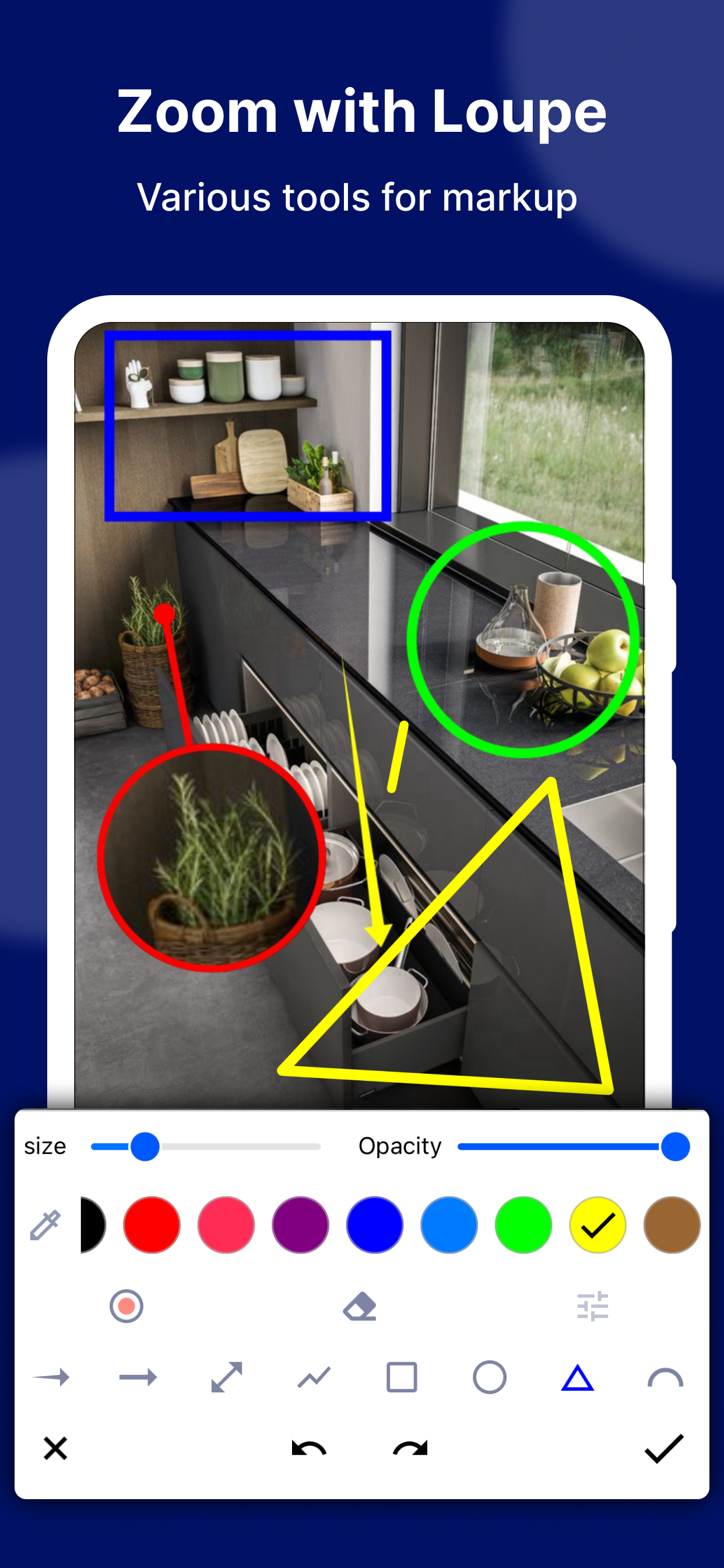
Photo Markup은 자르기, 텍스트 추가, 픽셀화된 이미지, 그리기 화살표, 사각형, 원 등과 같은 다양한 주석 기능을 제공합니다.
사진을 쉽게 편집하고 마크업하여 친구들과 빠르게 공유하세요!
이점:
1. 사용이나 광고에 대한 제한 없이 완전히 무료입니다.
2. 손실 없이 고화질 저장, PNG 포맷 지원
3. 다양한 이미지 주석 기능
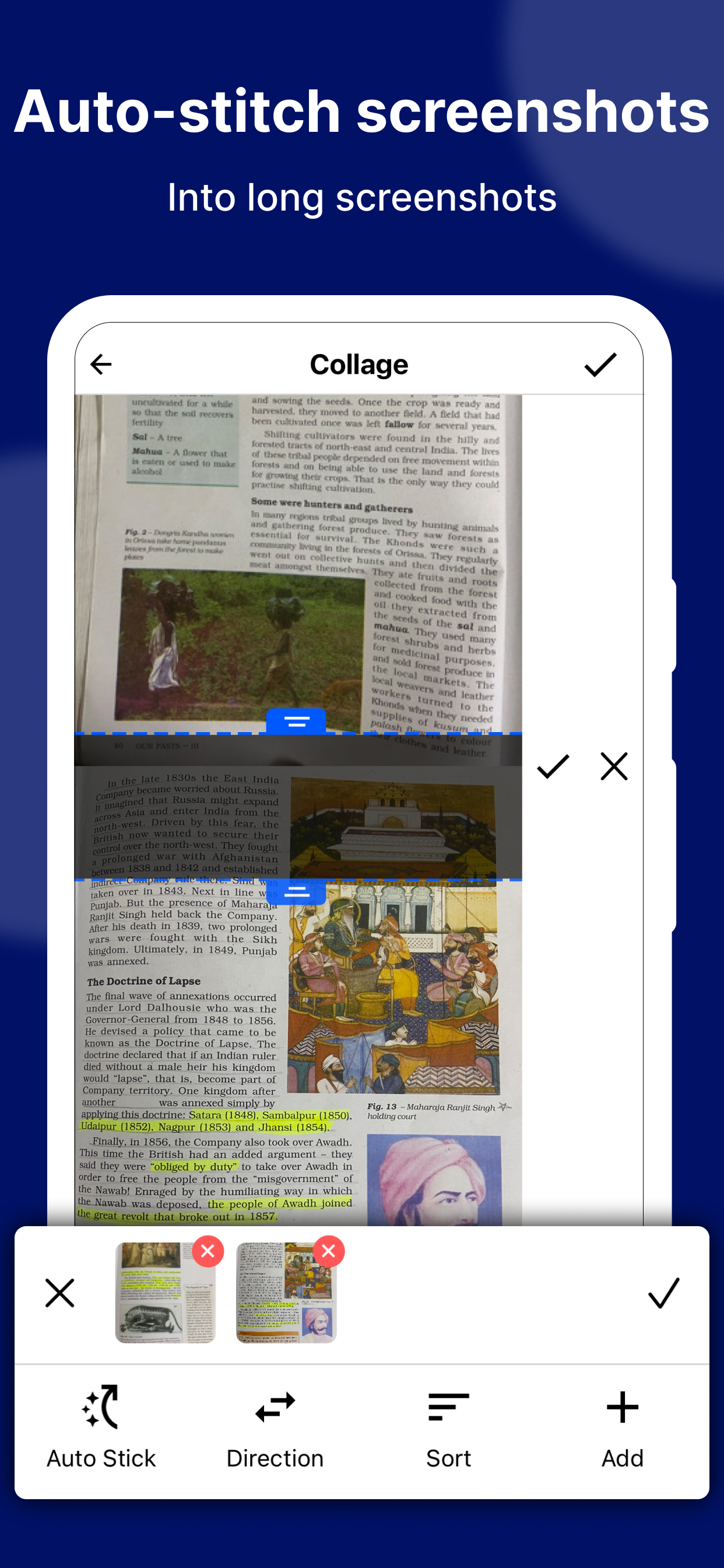
4. 긴 스크린샷 및 스티칭 사진 지원
5. 웹 페이지 전체 캡처, 웹 페이지를 이미지로 빠르게 저장
작은 크기, 10MB 미만
주요 특징들:
- 이모티콘 스티커 추가: 사진을 생동감 있고 흥미롭게 만듭니다.
- 사진에 텍스트 추가: 텍스트 색상, 배경, 그림자, 획, 스타일, 크기 등을 사용자 지정할 수 있습니다.
- 화살표, 사각형, 원, 펜, 삼각형, 곡선, 확대경으로 확대/축소, 선 등 필요한 모든 도구를 사용하여 그림에 주석을 답니다.
- 큰 그림은 직접 주석을 달 수 있으며 먼저 잘라낼 필요가 없습니다.
- 갤러리에서 사진을 가져오고, HD 저장하고, 친구들과 공유할 수 있습니다.
사진 마크업:
- 이미지 자르기 및 회전: 직사각형, 원형, 별, 삼각형 및 기타 모양으로 자를 수 있습니다.
- Spotlight 주요 정보: Spotlight로 무언가를 강조 표시합니다.
- 블러 이미지: 이미지를 픽셀화하여 보여주고 싶지 않은 영역을 가립니다.
- 이미지 확대 : 선택한 부분을 확대경으로 확대합니다.
- 이모티콘 스티커 추가: 사진을 생동감 있고 흥미롭게 만듭니다.
- 화살표, 직사각형, 원, 펜, 삼각형, 곡선, 루페로 확대/축소, 선 등 필요한 모든 도구를 사용하여 그림에 주석을 답니다.
- 큰 그림은 직접 주석을 달 수 있으며 먼저 잘라낼 필요가 없습니다.
- 스크린샷뿐만 아니라 모든 사진이 지원되며, 갤러리에서 사진을 가져오고, HD 저장하고, 친구들과 공유할 수 있습니다.
바느질 사진:
- 수평 및 수직으로 스티칭할 수 있는 파노라마 이미지에 여러 장의 사진 스티칭 지원
웹페이지 및 지도 주석:
- 웹 페이지와 지도에 쉽게 표시하고 친구들과 공유하여 아이디어를 보여주세요.
Photo Markup 사진 편집기 도구에 대한 의견과 제안 사항을 아래 댓글에 남겨주세요.
질문이 있는 경우 [email protected]으로 문의하세요.
Hide Show More...

In-Apps

Remove Ads
5.50 ₩

Screenshots

사진 마크업 FAQ

  • Is 사진 마크업 free?

    Yes, 사진 마크업 is free to download, however it contains in-app purchases or subscription offerings.

  • Is 사진 마크업 legit?

    🤔 The 사진 마크업 app's quality is mixed. Some users are satisfied, while others report issues. Consider reading individual reviews for more context.

    Thanks for the vote

  • How much does 사진 마크업 cost?

    사진 마크업 has several in-app purchases/subscriptions, the average in-app price is 5.50 ₩.

  • What is 사진 마크업 revenue?

    To get estimated revenue of 사진 마크업 app and other AppStore insights you can sign up to AppTail Mobile Analytics Platform.

User Rating

4.35 out of 5

17 ratings in South Korea

5 star
12
4 star
1
3 star
3
2 star
0
1 star
1
Ratings History

사진 마크업 Reviews

스티커

원숙자 on

South Korea

오늘 첨 써보는거라 좀 더 써보겠습니다

To bar does not appear when using a photo. Great ads though.

Corno35 on

United States

Couldn’t do a simple photo markup with this app. The tool bar would not appear in photo mode. Crazy

Cannot make ad go away, trying to save project

satsteve on

United States

I would give this app a five it’s fantastic but it’s so annoying that you cannot make the ad go away. I don’t mind watching the ad for a minute or so, but having to keep playing around trying to make it go away so I can save my project is very frustrating, I will give you a five if you can just tell me how to do this will come back and give it a one if no response

Confusing and ads

jcfathome on

United States

This would accomplish everything I need, but could not locate photo after saved and could not get out of the ads without closing the app completely and restarting. I was going to go pro, but the initial test and with around 100+ photos to work on … forget it! At least give people a few photos for a free trial before throwing in the ads and such. I don’t have time for games.

Love this app but DANG the ads!

Libbagray on

United States

Look, I love this app I love everything it does except the ad when you want to save a photo or so long and drawn out and so many of them and you have to wait and you have to wait and you have to wait and then you have to wait some more. I have looked all over the place trying to upgrade or something so I don’t have to deal with that but I can’t even find where to do that.! so I guess I uninstall it. I look for a program that I can buy, that doesn’t have all that. There is no support to email. There’s nobody to ask if you can buy it so you don’t have to endure those horrific ads every time you wanna say something.

Takes me to another app

CocoCGld on

United States

This keeps directing me to a clean up app that I don’t need or want. Can’t save edit.

Markup or … markup?

PhelineCat on

United States

The iOS markup is on your Apple devices and it does most of what this claims to do. Add Stitch Photo and it is all there with lesser clutter and less frustration. Markup doesn't have “zoom with loupe” or the tool for enhancement of a particular area but it's easy to get the same results. Stitch Photo is the easiest and most versatile photo stiitcher I've found so you’ll probably prefer it over any other.

So Unintuitive

UsernameSteveIsTaken on

United States

It opens with a plane white windo with no indication of how to paste or uplaod an image. Honestly I thought there was a load error. Nope, it opened that way three times in a row.

Does not save. Save button is a link to ads🙁

pandjbruno on

United States

Doesn’t save. Save button links to ads🙁

Can’t bend arrows

LC46394 on

United States

Can’t curve or bend arrows or lines, and you can’t change the orientation of boxes.

Store Rankings

Ranking History
App Ranking History not available yet
Category Rankings
App is not ranked yet

Keywords

사진 마크업 Competitors

Photo Markup Installs

Last 30 days

Photo Markup Revenue

Last 30 days

사진 마크업 Revenue and Downloads

Gain valuable insights into Photo Markup performance with our analytics.
Sign up now to access downloads, revenue, and more.
This page includes copyrighted content from third parties, shared solely for commentary and research in accordance with fair use under applicable copyright laws. All trademarks, including product, service, and company names or logos, remain the property of their respective owners. Their use here falls under nominative fair use as outlined by trademark laws and does not suggest any affiliation with or endorsement by the trademark holders.