SMS Signature+

Published by: Maximilian Litteral

Description

The original app that allows you to add a signature to your texts!
Have you ever wanted to set a signature while texting or iMessaging your iPhone, iPod or iPad? Well now you can with SMS Signature!
SIGNATURES
You can create as many signatures as needed. Just select the one you want to use and whenever you send a text from our app, your signature will be appended at the end!
MESSAGES APP
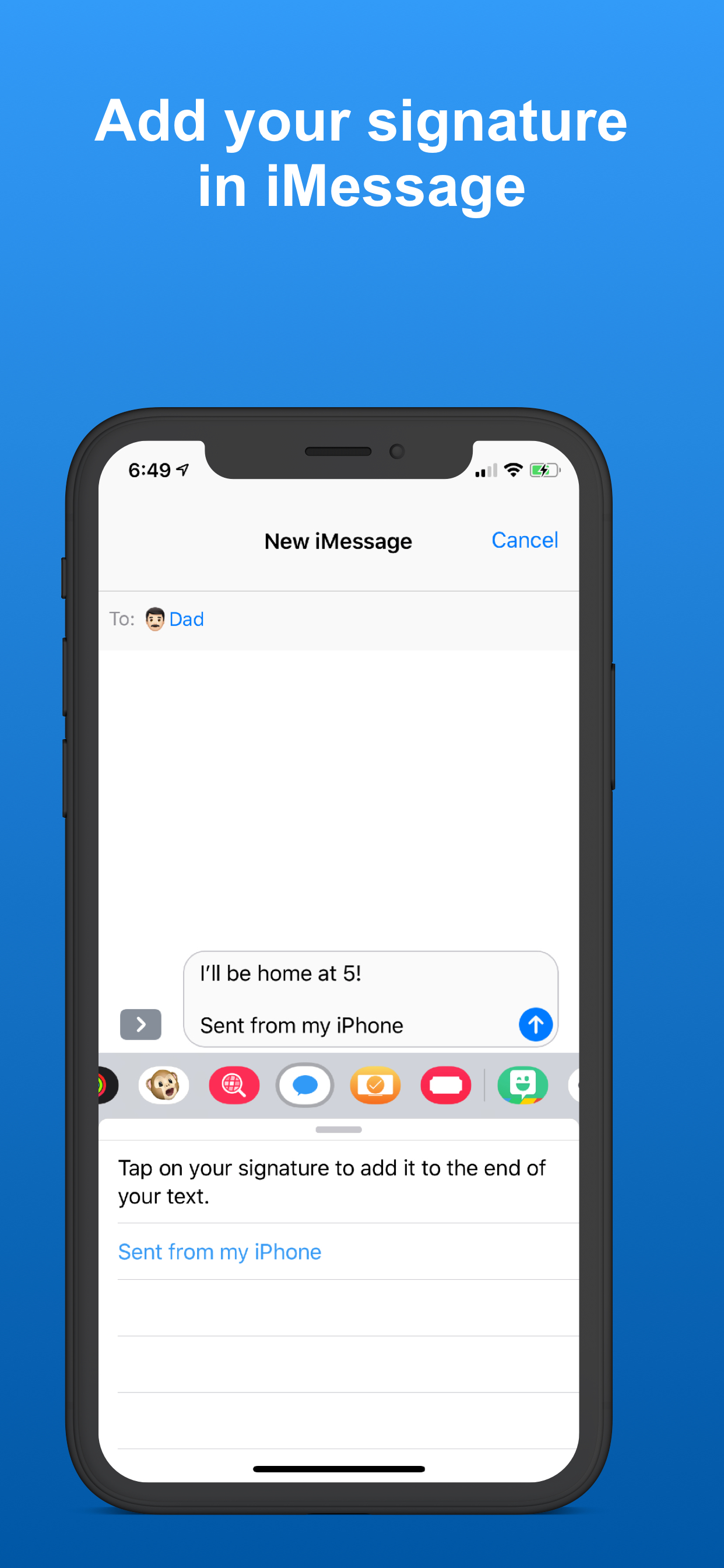
You can now access and append your signature from the Messages app! After composing a text message, open the SMS Signature iMessage app, tap the signature you want to use, and voilà, your signature has been added
FAVORITES
You can add your favorite contacts in the app to quickly send messages too with your signature automatically appended.
To get started just tap "Send Text" in the top right, enter the recipient and enter your message! The signature Is automatically added.
Hide Show More...

Screenshots

SMS Signature+ FAQ

  • Is SMS Signature+ free?

    Yes, SMS Signature+ is completely free and it doesn't have any in-app purchases or subscriptions.

  • Is SMS Signature+ legit?

    ⚠️ The SMS Signature+ app has poor ratings and negative feedback. Users seem unsatisfied with its performance or features.

    Thanks for the vote

  • How much does SMS Signature+ cost?

    SMS Signature+ is free.

  • What is SMS Signature+ revenue?

    To get estimated revenue of SMS Signature+ app and other AppStore insights you can sign up to AppTail Mobile Analytics Platform.

User Rating
App is not rated in Hong Kong SAR China yet.
Ratings History

SMS Signature+ Reviews

To Rate this application

Successful Oka on

United States

I don’t really know how to use it and I need an explanation on how to use this app i bought with own money


Can I get a refund? lol

Pointless sms signature app on

United States

Yeah what the other review said, this is pointless, I have to text through the app… I might as well stick to my normal default sms and just type in my signature at the end of every message lol… or better yet go to settings >general >keyboard >text replacement … click the + symbol, type my signature in the ‘phrase field’, type a 2-3 letter shortcut in the shortcut field, hit save in the top corner and boom I have a signature i I can quickly add in to every message… lawl I should’ve googled before going to the App Store 👁️🫦👁️ (my displeased face btw)

Fine

Rankinl on

United States

Seems to work fine. Zero complaints.

Priceless tool

BigHurt™️ on

United States

Awesome App

SMS signature

Tinamariesells on

United States

I didn’t like that you’re unable to remove signatures if you want to edit.

Not worth a dime

BMutch24 on

United States

Can't even add line breaks to include address, etc.

ehhhh

*⋆vani})i({⋆✰* on

United States

not worth paying for it's like all the other iPhone texting apps... you have to open app to send a message... it's doesn't work like go sms or chomp where you send and receive msgs thru the app... was pretty disappointed...

awesome

D.j. Wallace on

United States

I like it alot,but I would love to be able to add signatures to individual contacts instead of one for all. And receive through the app.

Wasted a dollar

SLS98 on

United States

Whats the point if it doesn't work with the real text message app total waste I Want A Refund! Please 😒

Inconvenient

Dramacious on

United States

You have to use this app to send a text with a Signature...and then you have to open your default text messaging app to follow the conversation. Not impressed.

Store Rankings

Ranking History
App Ranking History not available yet
Category Rankings

Keywords

SMS Signature+ Competitors

SMS Signature+ Installs

Last 30 days

SMS Signature+ Revenue

Last 30 days

SMS Signature+ Revenue and Downloads

Gain valuable insights into SMS Signature+ performance with our analytics.
Sign up now to access downloads, revenue, and more.

App Info

Languages
English, Spanish
Recent release
6.0 (6 years ago )
Released on
Oct 13, 2011 (14 years ago )
Last Updated
5 days ago
This page includes copyrighted content from third parties, shared solely for commentary and research in accordance with fair use under applicable copyright laws. All trademarks, including product, service, and company names or logos, remain the property of their respective owners. Their use here falls under nominative fair use as outlined by trademark laws and does not suggest any affiliation with or endorsement by the trademark holders.