

System Status Pro: hw monitor

CPU,battery,memory usage info

Published by: Jiri Techet

Description

An advanced tool for monitoring your iPhone and iPad performance.
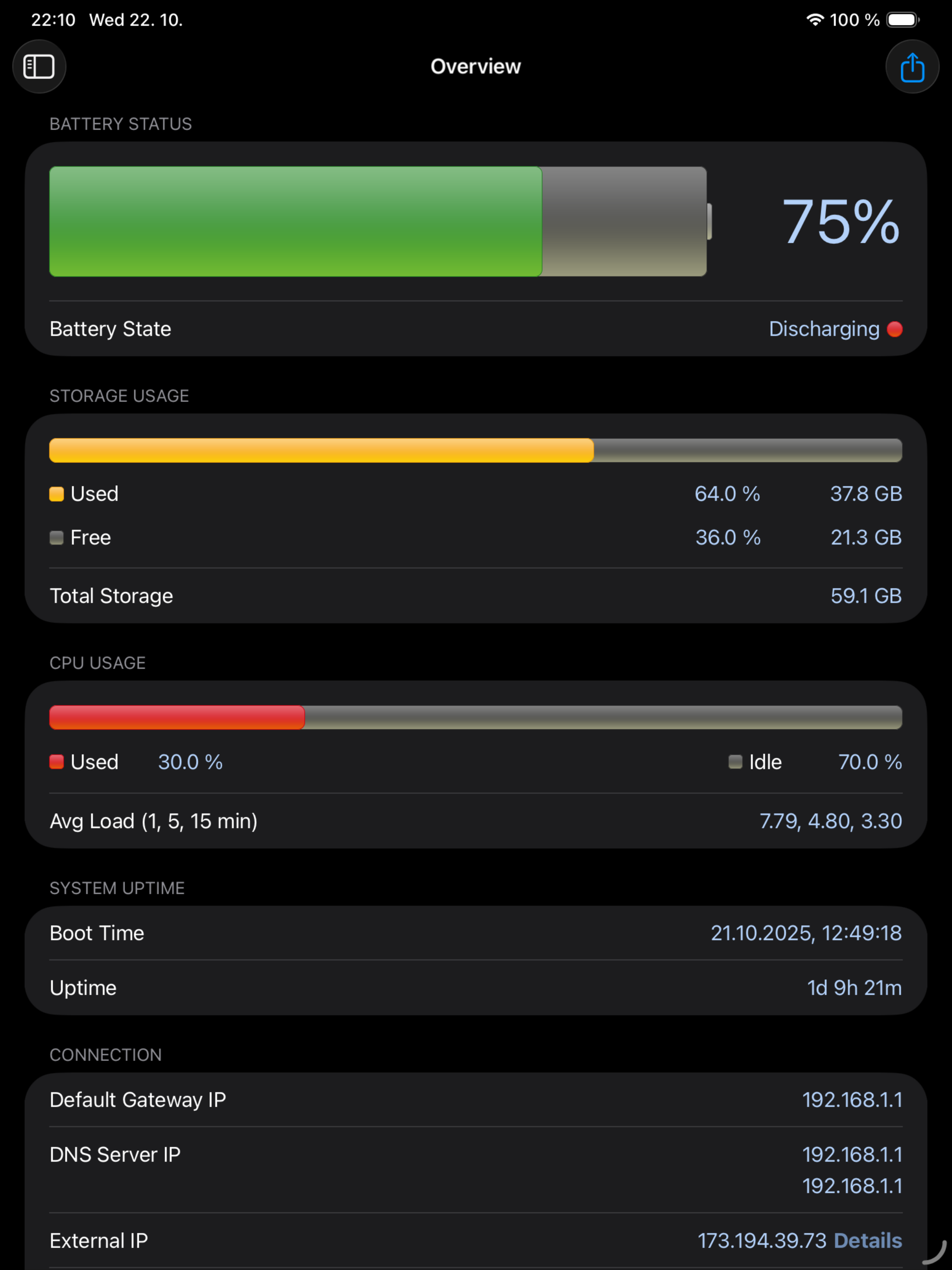
System Status provides graphical monitoring of all the device's resources such as CPU, memory, disk, battery and wifi/cell data usage. Further, it shows network-related info such as wifi/cell connection details and the routing table. Finally, System Status displays operating system details such as kernel version, memory page statistics and shows various hardware-related data.
BATTERY
• Graphical battery level display
• Battery state monitoring (discharging, charging, full)
• Estimated battery work time for different usage patterns (standby, audio and video playback, Wi-Fi and 3G browser usage, talk time)
• Adjustable battery health to make the estimated work times usable for older batteries
MEMORY & DISK
• Real time memory usage monitoring - graphical display of wired, active, inactive, and free memory
• Detailed page statistics including page ins and outs, page faults, page lookups, page purges and others
• Used and free disk capacity monitoring
• File statistics (number of songs, videos, podcasts, artists, genres, etc.)
• Mounted file system list
CELL & NETWORK
• Cell and Wi-Fi network connection information
• IP address of the current connection
• Carrier information such as network technology used
• External IP address
• DNS server, default gateway
• Received and sent wifi/cell data since last boot
• Routing table
CPU
• CPU usage updated in real time
• Average load over the last 1, 5, and 15 minutes
OPERATING SYSTEM & HARDWARE INFORMATION
• System boot time and uptime
• Operating system and kernel version
• Device model and user name
• Detailed CPU and GPU information - model, core number, CPU and BUS frequency, L1, L2 cache sizes, and others
• Hardware features of the device including display resolution, pixel density, battery voltage, battery capacity, front and rear camera resolution and many more
RESOURCE GRAPHS
• Possibility to record up to 3 minutes of background activity
• Pinch to zoom & pan
• Play/pause to see real-time or history data
MORE
• Real time updates of the display every time the monitored parameters change
• Export by email, AirPrint, and AirDrop for most info
• Light/dark theme
• Copy/paste support
• Detailed help
• Regular updates
Hide Show More...

Screenshots

System Status Pro FAQ

  • Is System Status Pro free?

    Yes, System Status Pro is completely free and it doesn't have any in-app purchases or subscriptions.

  • Is System Status Pro legit?

    ✅ The System Status Pro app appears to be high-quality and legitimate. Users are very satisfied.

    Thanks for the vote

  • How much does System Status Pro cost?

    System Status Pro is free.

  • What is System Status Pro revenue?

    To get estimated revenue of System Status Pro app and other AppStore insights you can sign up to AppTail Mobile Analytics Platform.

User Rating

4.74 out of 5

695 ratings in United Kingdom

5 star
554
4 star
114
3 star
18
2 star
3
1 star
6
Ratings History

System Status Pro Reviews

Amazing

Yamantony on

United Kingdom

Amazing

Great app

@jonny on

United Kingdom

Well worth paying for the pro version.

Status & Net Analyser: Two very good apps!

Core2lee on

United Kingdom

I really don’t normally bother with reviews, however these are two very well done iOS apps in my opinion. The “Status” app is a very quick and easy way to see stats you can’t otherwise see in iOS such as; System uptime, memory usage (along with a button to cleanup RAM), in-depth software/kernel release levels, hardware info, battery info.etc The status app does also give some basic network information including a button to get your external IP (useful if you’re connected to WiFi for example and want to know your non-NAT IP). However for anything more than that the Network Analyzer has a pretty cool set of tools as well - everything from a basic ping utility, to a very useful set of scanning tools which work similar to something like Nmap in Linux and will allow you to scan an entire subnet for devices and even scan a specific host for open network ports. For me these apps are worth every penny and if you’re even slightly a tech nerd should probably download them!

Mike

Mikejdawson on

United Kingdom

Excellent utility, installed on each of my iDevices

Status analyser app

Toats amaz on

United Kingdom

Great app would definitely recommend

Very pleased

Trulyeuro on

United Kingdom

The app has been so useful in backing up my experience when needed to prove my unstable connection

Use it often

DRGMBG on

United Kingdom

Nice stuff

No issues superb app that I use everyday to checkout mi iPhone 13

SmeeMight on

United Kingdom

No issues superb app that I use everyday to checkout mi iPhone 13

Need to know

Up garnet on

United Kingdom

A precise and useful tool. Good overall view of how every function is operating. Very handy.

Good!

Tan Tanna on

United Kingdom

Could be improved and make it even more exciting and enjoyable!

Store Rankings

Ranking History
App Ranking History not available yet
Category Rankings
Chart
Category
Rank
Top Paid
6
Top Paid
6
Top Paid
9
Top Paid
16
Top Paid
18

Keywords

System Status Pro Competitors

System Status Pro Installs

Last 30 days

System Status Pro Revenue

Last 30 days

System Status Pro Revenue and Downloads

Gain valuable insights into System Status Pro performance with our analytics.
Sign up now to access downloads, revenue, and more.
This page includes copyrighted content from third parties, shared solely for commentary and research in accordance with fair use under applicable copyright laws. All trademarks, including product, service, and company names or logos, remain the property of their respective owners. Their use here falls under nominative fair use as outlined by trademark laws and does not suggest any affiliation with or endorsement by the trademark holders.






