Type Nine - T9 Keyboard

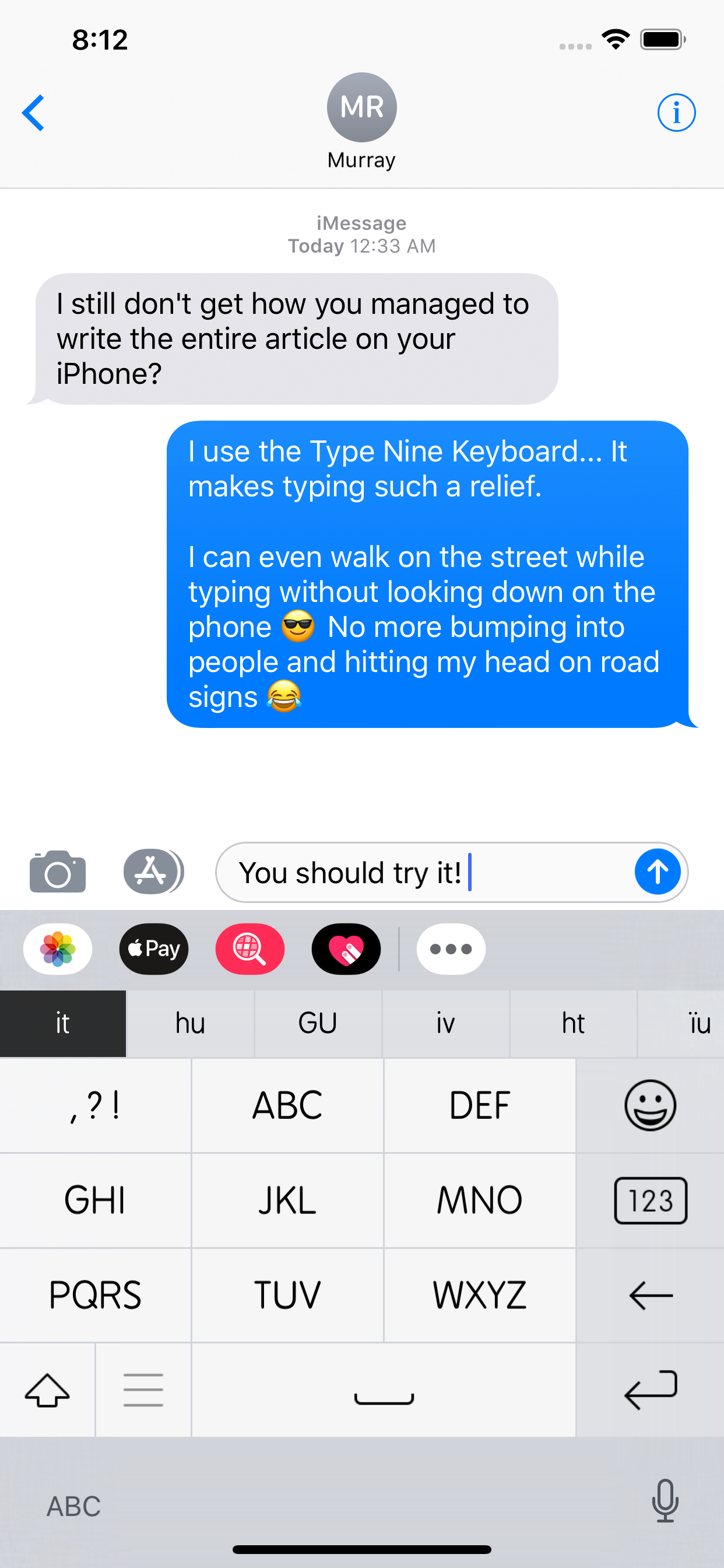
Type faster - without looking

Published by: Rasmus Porsager

Description

Automatic language detection:
Type Nine suggests words from multiple languages at the same time. No need to switch keyboard to type in a different Language.
Swiping:
Type Nine is the first keyboard ever to combine a keypad layout with swiping. Typing by swiping is a seamless experience and once you've picked up the movements, you will type faster and more effortlessly than ever before.
VoiceOver:
If you're using VoiceOver, Type Nine will be a pleasent improvement to your daily typing.
Remembers your words:
If a word is not in the dictionary you can type it manually with ease, and Type Nine will remember it for you. Every time you write a word, Type Nine will adjust its behavior so that the most used word is suggested first.
Easy to follow tutorials:
Getting started with Type Nine is easy. Everything is put together in an intuitive manner, and if you want to start using all the efficient hidden gems, there are tutorials to explain how to do that.
Themes:
Type Nine features a handfull of different themes to suite your mood or taste.
Emojis:
All the iOS emojis with easy access. Your most used smileys are easily accessed by a single swipe.
Delete so sweet:
The backspace button in Type Nine is nothing short of a miracle. By swiping left you delete an entire word, but by swiping slowly you can precision delete much better than simply holding down backspace. You can even undo what you deleted or cut it to a different position by swiping down on delete.
Moving the cursor:
No more cramps in your fingers trying to move the cursor to the correct position. Simply swipe left or right on space to move the cursor an entire word at a time, or swipe slowly to position precisely.
Resizing for big screens:
If you're using an iPhone 6 plus or an iPad, you can easily resize the keyboard to a better size for one-handed typing.
Supported languages:
English
Spanish
Portuguese
Arabic
Russian
German
Danish
French
Turkish
Italian
Dutch
Norwegian
Polish
Greek
Romanian
Bosnian
Catala
Czech
Basque
Finnish
Irish
Croatian
Hungarian
Lithuanian
Latvian
Slovak
Slovene
Albanian
Swedish
Serbian latin
Serbian cyrillics
Bulgarian
Scottish Gaelic
Galician
Manx
Hide Show More...

Screenshots

Type Nine FAQ

  • Is Type Nine free?

    Yes, Type Nine is completely free and it doesn't have any in-app purchases or subscriptions.

  • Is Type Nine legit?

    🤔 The Type Nine app's quality is mixed. Some users are satisfied, while others report issues. Consider reading individual reviews for more context.

    Thanks for the vote

  • How much does Type Nine cost?

    Type Nine is free.

  • What is Type Nine revenue?

    To get estimated revenue of Type Nine app and other AppStore insights you can sign up to AppTail Mobile Analytics Platform.

User Rating

3.92 out of 5

12 ratings in Malaysia

5 star
6
4 star
2
3 star
2
2 star
1
1 star
1
Ratings History

Type Nine Reviews

Works great!

Nozzle F. on

Malaysia

It works great! But it would be better if there's a setting to also learn words that are typed in manual mode. That would certainly speed up the word learning process.

Language

hhhjshshsjs on

Malaysia

No chinese input

Number typing should kept as previous version

Pika pong on

Malaysia

Interface of New version of type 9 look good.However for the number typing, I would suggest and think should keep the previous version. Where we just need to swipe down and not change to number interface. This slow down the typing process, and less efficient.

Worth the buy

JubiliAnilik on

Malaysia

Pros: Best layout and features compared to other T9 keyboards on App Store. Can turn off auto correct by tapping globe icon and selecting "Manual". Cons: Laggy when typing in search bar of Safari and Opera browser (Chrome and Firefox test okay). Also has slight delay (like 0.5 sec) for keyboard to appear.

Great app! Hoping for more in the next update!

rredd00 on

Malaysia

Loving the apps! Would be great if we can enable/disable the autocorrect/prediction setting. And add Bahasa Malaysia Language too! :D Please update fast!

Turn of the suggestions permanently

Ran_114 on

Malaysia

make it on the next update

Mr. Bald

CikTak on

Malaysia

Should be better if next update, user can enable/disable T9 function instead of always enable.

Autowords are annoying.

Syafiq azuan on

Malaysia

This is a great apps. Remind me of the keypad era before touch screen taking over. However, the autowords are annoying. Please make it easier to turn it off.

Great I love it

Adam🧪 on

United States

Amazing 😊

Text

Detrickhol on

United States

I love it using now

Store Rankings

Ranking History
App Ranking History not available yet
Category Rankings
Chart
Category
Rank
Top Paid
10
Top Paid
28
Top Paid
30
Top Paid
32
Top Paid
33

Keywords

Type Nine Competitors

Type Nine Installs

Last 30 days

Type Nine Revenue

Last 30 days

Type Nine Revenue and Downloads

Gain valuable insights into Type Nine performance with our analytics.
Sign up now to access downloads, revenue, and more.
This page includes copyrighted content from third parties, shared solely for commentary and research in accordance with fair use under applicable copyright laws. All trademarks, including product, service, and company names or logos, remain the property of their respective owners. Their use here falls under nominative fair use as outlined by trademark laws and does not suggest any affiliation with or endorsement by the trademark holders.