Vocal Extractor -Karaoke maker

Remove,Isolate,Cancel Vocal

Published by: Hikaru Tsuyumine

Description

Feature Overview
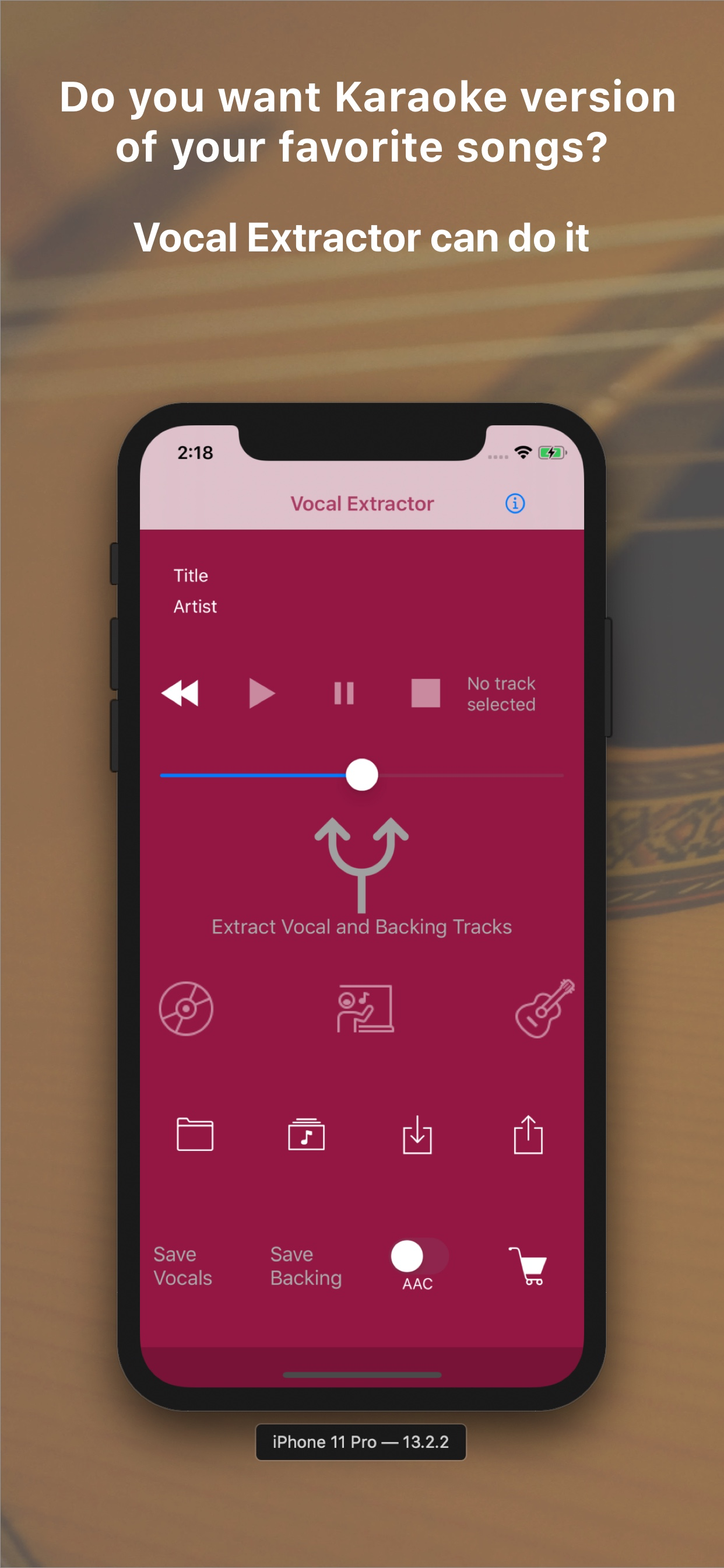
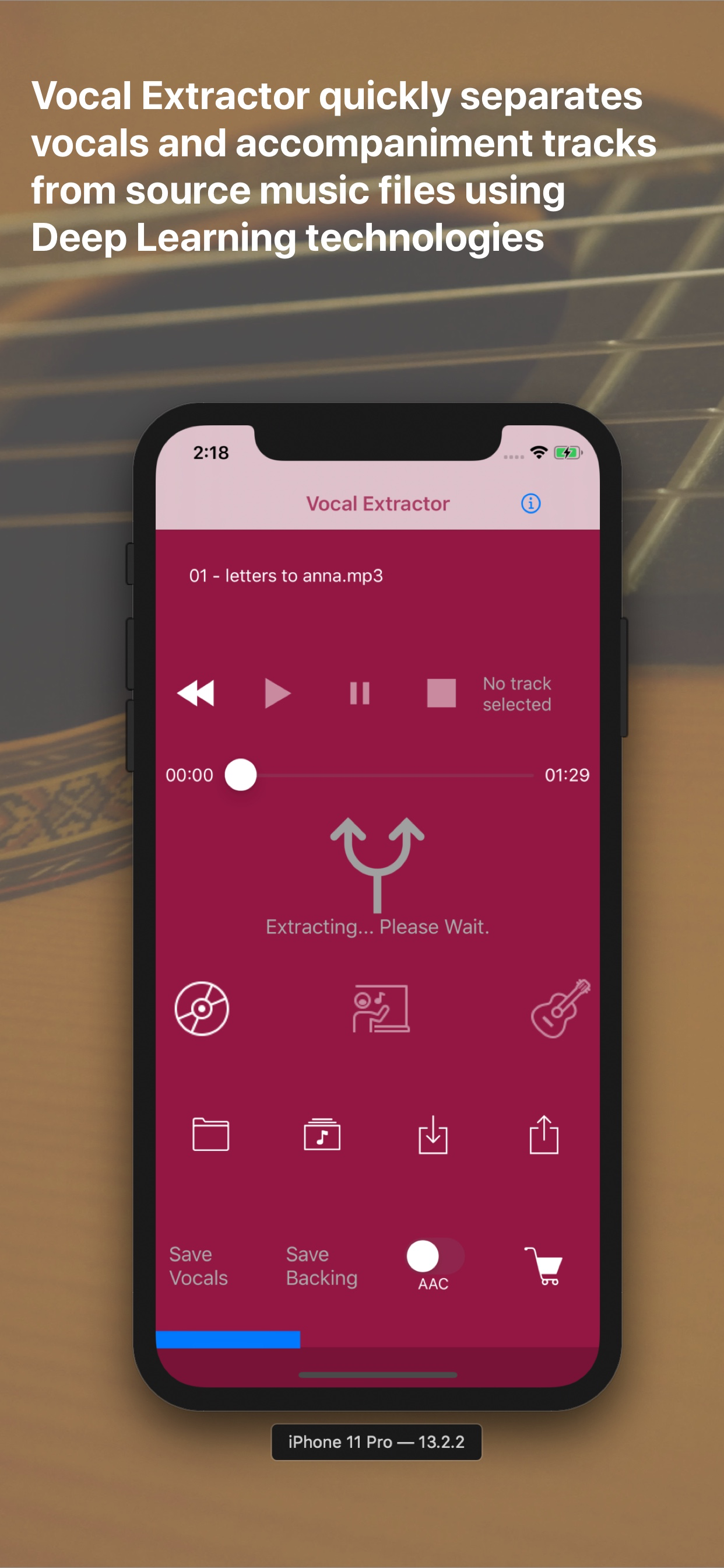
Vocal Extractor separates songs in your Music Library into vocals and accompaniment with just a tap of a button on the main screen (*1), instantly creating karaoke and a cappella tracks.
The generated vocal and backing (karaoke) tracks can be saved as files and exported to iCloud, Dropbox, Google Drive, and other platforms. This allows you to use the isolated tracks in other applications or on different platforms (*2).
Unlike traditional apps based on OOPS (Out of Phase Stereo) technology, Vocal Extractor leverages AI and deep learning to separate vocals from songs, including monaural recordings and tracks where the vocals are not center-panned—cases where traditional apps cannot remove vocals.
You can import music files in mp3, m4a, or wav formats from iCloud, Dropbox, Google Drive, and other sources. This includes live recordings created with other apps, allowing you to remove or extract vocals from them.
The embedded player allows you to toggle between the original, vocal, or backing tracks while playing the audio.
*1. Only songs downloaded to your device and not protected by DRM can be used as source data.
*2. Saved output files will have a sampling rate of 44.1kHz and be in m4a or wav format, either mono or stereo. Saving files is an in-app purchase feature. We recommend testing the vocal separation quality in the embedded player before purchasing.
How to Use
1.Launch the App
After the launch screen, the main screen will appear. Tap the Music Library button, select a song, and load it into the app.
2.Extract Vocals
Tap the Vocal Extract button in the center of the main screen. The extraction process will begin, and once completed, the Vocal, Backing, and Save buttons will become active.
3.Playback Tracks
Select either the Original, Vocal, or Backing track and tap the Play Back button to listen to the chosen track.
4.Save Tracks
After extraction, the Save Vocal and Save Backing buttons will be enabled. The first time you tap one of these buttons, the in-app purchase screen will appear. Before purchasing, we recommend confirming the quality of the vocal separation in the embedded player. Once purchased, the in-app purchase screen will no longer appear, and you can save files after confirming via a pop-up.
5.File Naming
Saved files will be named with the original file name (excluding the suffix) plus "_vocal.m4a" or "_backing.m4a". File renaming is not supported in this version. Output files are in 44.1kHz m4a or wav format.
6.Export Files
To export files from the app container, tap the Export button. A list of saved files will appear. Select a file and tap the Export menu in the navigation bar. The document provider screen will appear, allowing you to choose a location to save the file. A pop-up will confirm when the export has started successfully. Exporting occurs in the background.
7.Import Source Files
You can use m4a, mp3, and wav files as source data. Place these files in iCloud, Dropbox, Google Drive, or another document provider configured on your iPhone. Then, tap the Import button to add the file to the app's container.
8.Load Imported Files
After importing a file, tap the File button to see a list of imported files. Select a file and tap the Load menu in the navigation bar to load the content for extraction or playback.
9.Document Provider Compatibility
Import and export functions only work with document providers properly configured on your device.
For more information, visit http://vocalextractor.com/en/.
Some icons used on the main screen are sourced from Icons8. https://icons8.com
Hide Show More...

In-Apps

Save Tracks & Stereo Mode
£2.99

Screenshots

Vocal Extractor FAQ

  • Is Vocal Extractor free?

    Yes, Vocal Extractor is free to download, however it contains in-app purchases or subscription offerings.

  • Is Vocal Extractor legit?

    🤔 The Vocal Extractor app's quality is mixed. Some users are satisfied, while others report issues. Consider reading individual reviews for more context.

    Thanks for the vote

  • How much does Vocal Extractor cost?

    Vocal Extractor has several in-app purchases/subscriptions, the average in-app price is £2.99.

  • What is Vocal Extractor revenue?

    To get estimated revenue of Vocal Extractor app and other AppStore insights you can sign up to AppTail Mobile Analytics Platform.

User Rating

4.17 out of 5

63 ratings in United Kingdom

5 star
43
4 star
6
3 star
5
2 star
0
1 star
9
Ratings History

Vocal Extractor Reviews

Useless

Fitu on

United Kingdom

There is no explanation and iesnt to De d back and get a refund.

Doesn’t work

Rsc007 on

United Kingdom

Don’t get this app because when i go to extract vocals when it’s nearly done. Get kicked of the app tried the 3 times over and over again. Basically don’t get this app

Doesn’t work

Imabelieberheygirl1 on

United Kingdom

For some reason this app doesn’t work I extract my audio but it won’t separate the vocal and music. This was annoying because I had high hopes for this app.

Vocal Extractor

Dulcidelice on

United Kingdom

This app works very well at extracting vocals from tracks where vocals not mixed with vocoders etc and it includes the harmony vocals so I give it a 5 star and would be great if piano drums etc could be extracted as an next stage in this app

Potential but.....

Gilesey36 on

United Kingdom

Ok so this app has great potential but I really can’t see the point of having an app that says it splits vocals and audio but then only lets you take the first minute and a half of the song?? Why not the whole song? To me that’s stupid and a waste of time

Does the work. Happy to use it.

Sanjeev T on

United Kingdom

Excellent.

Great app

..,.Dax on

United Kingdom

Some good results on some songs

Robbed

was_d on

United Kingdom

It’s working only a 1 min

Couldn’t believe it

morbazan87 on

United Kingdom

WOW! I have tried many other apps like this which were rubbish but this one does exactly what you want it to and quickly, you can separate vocals from backing in seconds, export and sing along to within a minute. The price is fair in my opinion. Brilliant little app

Sickkkkk

opipkop on

United Kingdom

10000000000000/10000000 best vocal remover

Store Rankings

Ranking History
App Ranking History not available yet
Category Rankings
Chart
Category
Rank
Top Free
416
Top Free
455
Top Free
480

Keywords

Vocal Extractor Competitors

Vocal Extractor Installs

Last 30 days

Vocal Extractor Revenue

Last 30 days

Vocal Extractor Revenue and Downloads

Gain valuable insights into Vocal Extractor performance with our analytics.
Sign up now to access downloads, revenue, and more.
This page includes copyrighted content from third parties, shared solely for commentary and research in accordance with fair use under applicable copyright laws. All trademarks, including product, service, and company names or logos, remain the property of their respective owners. Their use here falls under nominative fair use as outlined by trademark laws and does not suggest any affiliation with or endorsement by the trademark holders.