WebSSH - SSH, SFTP & Tools

All-in-One Sysadmin Toolbox

Published by: MENGUS ARNAUD

Description

Whether you’re on the go or at your desk, WebSSH keeps you connected—anytime, anywhere! ٩(^‿^)۶
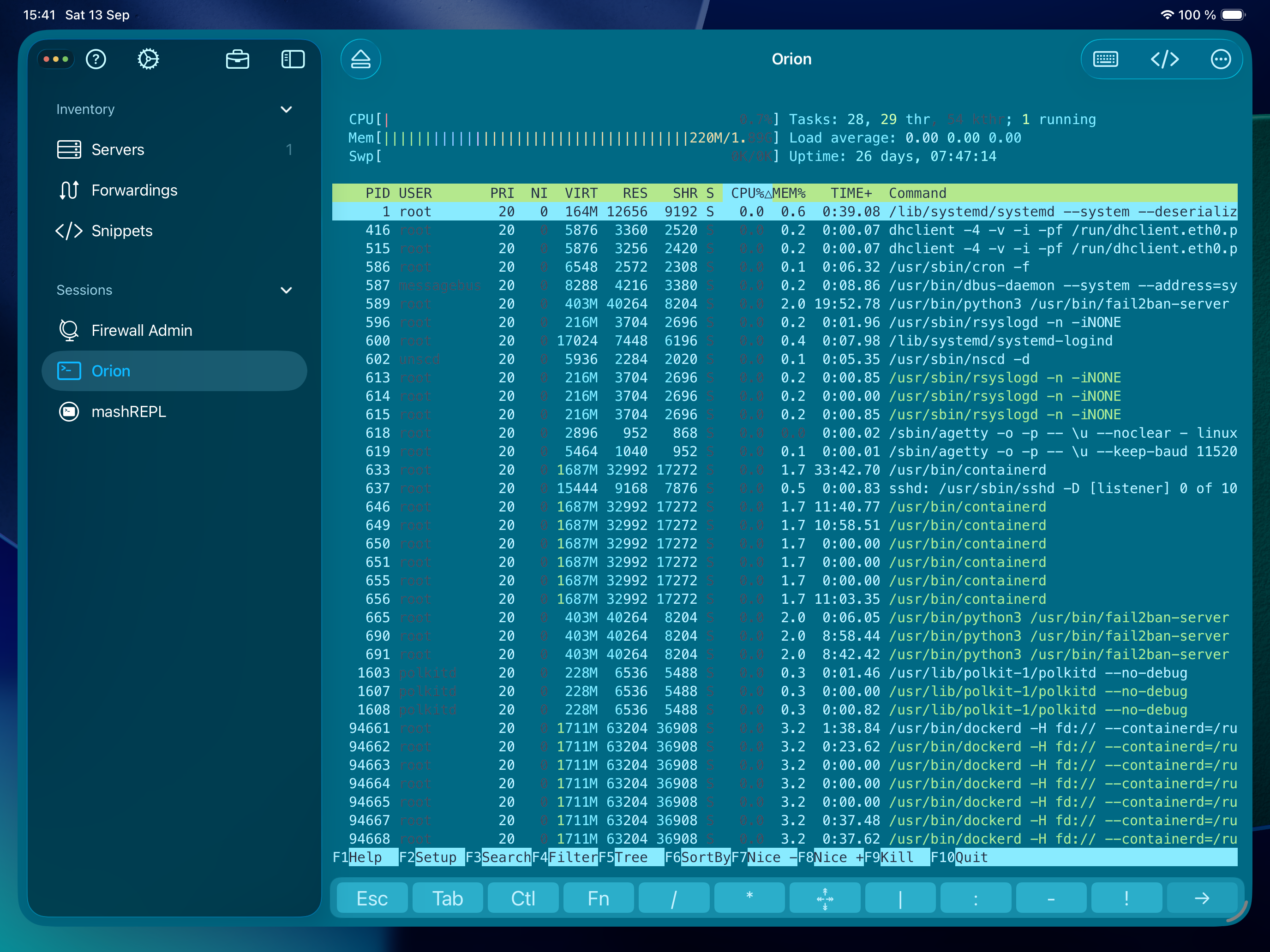
WebSSH is a powerful and user-friendly SSH, SFTP, Telnet, and Port Forwarding client for iOS and macOS. It allows developers, system administrators, and IT professionals to manage servers securely and efficiently, wherever they are.
With WebSSH, you can connect to your servers using modern authentication methods including password, two-factor challenge, or keys (RSA, DSA, ED25519, PuTTY). Connections are fast and reliable, with support for local port forwarding, automatic command execution at startup, and full terminal emulation (XTERM-COLOR256, XTERM, VT100). Profiles let you customize themes, colors, fonts, and keyboard behavior to perfectly fit your workflow.
Managing files on remote servers is simple thanks to the integrated SFTP client. You can browse directories, create or rename files, upload documents from your device, download files locally, and even edit text files directly within the app.
Beyond SSH and SFTP, WebSSH also supports Telnet and Serial connections, making it a versatile tool for a wide range of use cases. Serial connections can be fully configured (baud rate, data bits, parity, stop bits, flow control), while Telnet connections support both direct and interactive authentication.
For quick diagnostics, WebSSH includes built-in sysadmin tools such as Ping, Whois, Traceroute, and DNS Lookup. And if you need a terminal even without internet access, the mashREPL feature gives you a local shell with essential commands like ls, grep, curl, ping, tar, and many more.
WebSSH supports multiple protocols (SSH, SFTP, Telnet, Serial) and channel types (Shell sessions, SFTP sessions, Local Port Forwarding), ensuring compatibility with most professional scenarios.
____
Why WebSSH?
Unlike basic terminal clients, WebSSH combines professional-grade features with a polished, mobile-first design. It is secure, reliable, and easy to use — the all-in-one solution to keep your servers close at hand, no matter where you are.
____
Download WebSSH today and experience secure, seamless server management on iOS and macOS.
Hide Show More...

In-Apps

WebSSH PRO
$9.99

Screenshots

WebSSH FAQ

  • Is WebSSH free?

    Yes, WebSSH is free to download, however it contains in-app purchases or subscription offerings.

  • Is WebSSH legit?

    ✅ The WebSSH app appears to be high-quality and legitimate. Users are very satisfied.

    Thanks for the vote

  • How much does WebSSH cost?

    WebSSH has several in-app purchases/subscriptions, the average in-app price is $9.99.

  • What is WebSSH revenue?

    To get estimated revenue of WebSSH app and other AppStore insights you can sign up to AppTail Mobile Analytics Platform.

User Rating

4.76 out of 5

33 ratings in New Zealand

5 star
28
4 star
4
3 star
0
2 star
0
1 star
1
Ratings History

WebSSH Reviews

Easy to use and fully functional

Xhanky on

New Zealand

Absolutely love this App. Its everything you need from an ssh/sftp client. Coming from Linux, a decent ssh app was a deal breaker for me in using OS devices. Looked at most available and price/performance this one came up out on top. The tunneling functionality is also great as a bonus. Price is definitely reasonable as far as iOS apps go for this functionality. The only limitation i have found so far is connecting to ssh/tunnel servers where 2 factor auth is required, this could be related to the scripting of the initial connection setup. All in all, very happy with it and thank you for the excellent app!

Abandon ware

Stephane Busso on

New Zealand

Same issue for many months , cant display active line on ipad 12.9, useless, not pro

Need remote SSH access - get this!

Adydas on

New Zealand

Simple really need to store and quick access servers and services using SSH etc - this is the tool you need

Great

tbx32 on

New Zealand

great and well supported!

Simple yet useful

KiwiHoria on

New Zealand

This SSH client is fairly handy, and works well. For my use, I wish the function keys were easier to reach (directly rather than through the Fx control) for faster session creation/switching. Also, I wish it would scroll stdout better than just the visible portion on the iPad screen.

WebSSH Review

marknzl on

New Zealand

Best SSH tool on the mobile platform. So useful and best of all it's free.

.

jonnowood on

New Zealand

.

Does what it says

Ypout on

New Zealand

Works great for me. Thanks

Wi-Fi

AP9891 on

United States

Great

Amazing All Around Tool

Pandapunk9 on

United States

This tool is an amazing tool to have for any sysadmin! With the free option you still have a ton of functionality to do whatever! One of the few tools I have actually purchased just to support the development.

Store Rankings

Ranking History
Category Rankings
Chart
Category
Rank
Top Grossing
10
Top Grossing
14
Top Grossing
22
Top Free
22
Top Grossing
32

Keywords

WebSSH Competitors

WebSSH Installs

Last 30 days

WebSSH Revenue

Last 30 days

WebSSH Revenue and Downloads

Gain valuable insights into WebSSH performance with our analytics.
Sign up now to access downloads, revenue, and more.

App Info

Publisher
MENGUS ARNAUD
Languages
English, Danish, French, German, Italian, Japanese, Korean, Polish, Portuguese, Russian, Chinese, Spanish, Swedish, Turkish, Ukrainian
Recent release
30.6 (3 weeks ago )
Released on
Mar 8, 2012 (13 years ago )
Last Updated
2 days ago
This page includes copyrighted content from third parties, shared solely for commentary and research in accordance with fair use under applicable copyright laws. All trademarks, including product, service, and company names or logos, remain the property of their respective owners. Their use here falls under nominative fair use as outlined by trademark laws and does not suggest any affiliation with or endorsement by the trademark holders.