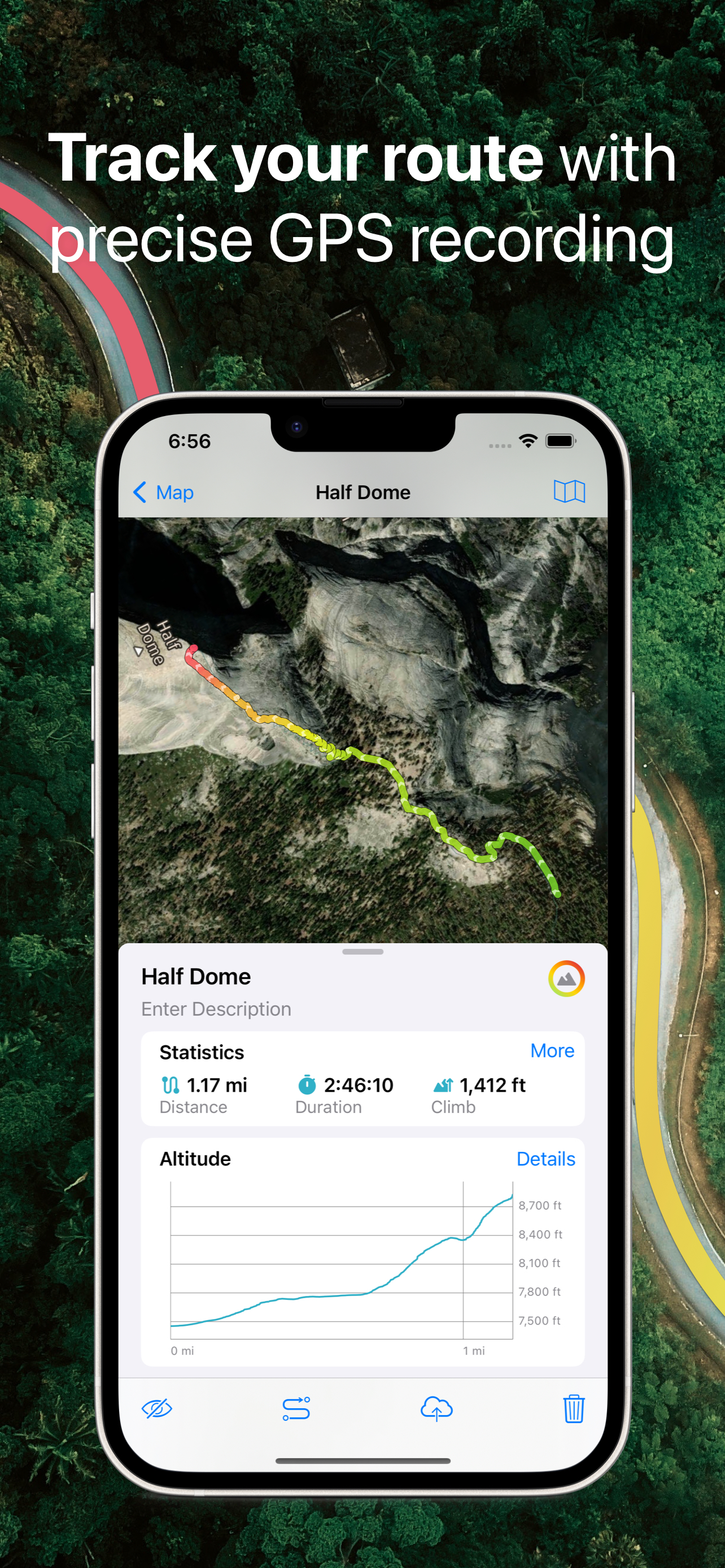
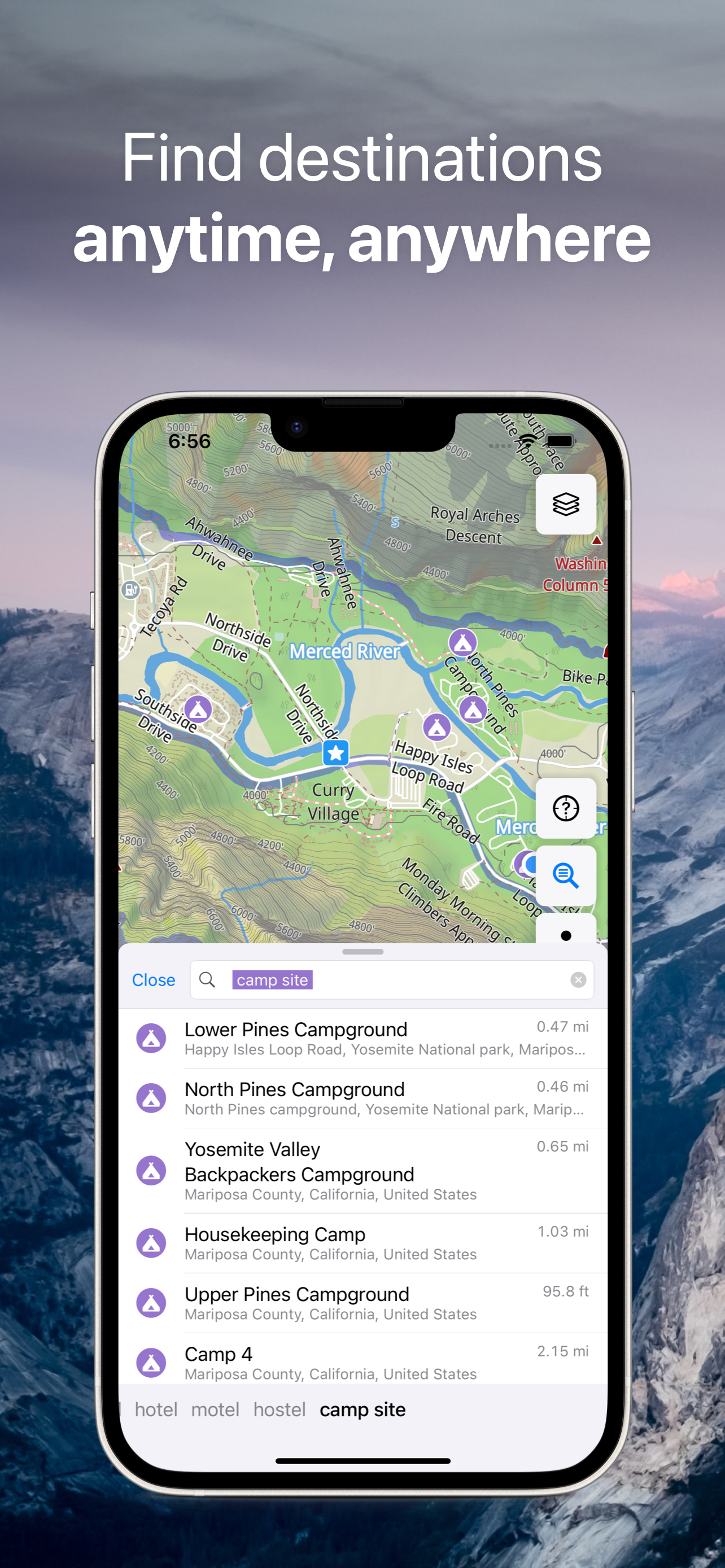
Discover detailed and user-friendly offline maps featuring millions of points of interest (POI). Record your GPS tracks and bookmark your favorite locations for easy access.
OFFLINE NAVIGATION
• Turn-by-turn driving guidance.
• Voice instructions available in nine languages during navigation.
• Routing options for driving, cycling, walking, or shortest distance.
• Automatic rerouting to keep you on track.
• Support for intermediate points on your route.
OFFLINE MAPS
• Highly-detailed maps encompassing the entire world.
• Utilizes open data from the OpenStreetMap project.
• One-time download for unrestricted offline use.
• Regular monthly updates for the latest fixes and additions.
GPS TRACKS
• Continuously record your trips, even when the app runs in the background.
• Real-time monitoring of speed, distance, time, and altitude directly on the map during your trip.
• Choose from seven solid track colors or altitude and speed gradients.
OFFLINE SEARCH
• Instant results as you type, ensuring fast searches.
• Multiple search options: address, object name, category, or GPS coordinates.
• Simultaneous search in multiple languages for added convenience.
BOOKMARKS
• Easily save favorite places on your map.
• Choose from a variety of map icons.
SYNCHRONIZATION
• Seamless data syncing across multiple devices.
• Data stored on a server for backup purposes.
IMPORT AND EXPORT
• Effortlessly export your tracks, bookmarks, or entire travel collection as KML or GPX files.
• Organized collections for simple access.
• Import offline maps from sqlitedb/mbtiles formats.
ADDITIONAL FEATURES
• Support for .GeoJSON file format to display map overlays.
• One-finger zoom functionality.
• Built-in trip computer with speed and altitude.
• Tracking mode.
• Display of coordinates and map scale.
• Customizable object visibility.
• 11 different map language options.
• Adjustable label size.
ONLINE MAP SOURCES (thunderforest.com):
OpenCycleMap, Outdoors, Transport, Transport Dark, Landscape, Mobile Atlas, Neighbourhood, etc.
Link your Guru Maps Pro purchase to your Guru Maps account to enjoy Pro features on other platforms without additional purchases.
AusblendenMehr anzeigen...
Screenshots
Guru Maps Pro & GPS Tracker Häufige Fragen
Ist Guru Maps Pro & GPS Tracker kostenlos?
Ja, Guru Maps Pro & GPS Tracker ist komplett kostenlos und enthält keine In-App-Käufe oder Abonnements.
Ist Guru Maps Pro & GPS Tracker seriös?
✅ Die Guru Maps Pro & GPS Tracker-App scheint von hoher Qualität und legitim zu sein. Die Nutzer sind sehr zufrieden.
Danke für die Stimme
Wie viel kostet Guru Maps Pro & GPS Tracker?
Guru Maps Pro & GPS Tracker ist kostenlos.
Wie hoch ist der Umsatz von Guru Maps Pro & GPS Tracker?
Um geschätzte Einnahmen der Guru Maps Pro & GPS Tracker-App und weitere AppStore-Einblicke zu erhalten, können Sie sich bei der AppTail Mobile Analytics Platform anmelden.
Benutzerbewertung
4.84 von 5
276 Bewertungen in Vereinigtes Königreich
5 star
240
4 star
31
3 star
3
2 star
0
1 star
2
Bewertungsverlauf
Guru Maps Pro & GPS Tracker Bewertungen
Excellent
An excellent App with a lot of useful features. Allows you to import or create tracks and gives altitude graphs plus a load of other information about your trips. On top of that you can save your own locations.
Supports Google maps. One feature would make it even better, the ability to go down to street view for a look around.
Backs up to Dropbox or iCloud and syncs to other devices.
All in all, I can highly recommend this App and have no hesitation in giving 5 stars.
not private, so why bother?
...it shares your personal un-anonymised data with facebook. instead use privacy respecting companies like, osmand, organic maps, organic earth or pocket earth.
Excellence in digital mapping and navigation
After over 6 years use when it was called Galileo, this is still my app of choice for use on hiking and snowshoeing holidays where I want to use my own offline custom raster maps together with Guru’s OSM-based offline maps for viewing and navigation in the car or on foot. The contour and hill shading overlays are helpful too. Large choice of on-line mapping and satellite imaging which is cached for viewing when off-line. The app’s use of folders and subfolders and the management of viewing/hiding routes and waypoints is exemplary. It can easily catalogue hundreds of these. Unlike some other apps, the importation of a GPX file containing multiple tracks (e.g. from exporting a Garmin BaseCamp List keeps them a separate. Works smoothly and is very stable in use. On the few times I’ve needed them, the Support desk has been helpful and responsive. All of this and it now supports Car Play. Awesome!
Personal Mapping
This is an amazing app, one of the great things is to store routes and places in folders, so a holiday trip for example can have all the hotels, walking routes all saved in a folder which can be toggled on or off or individually. Look back at previous holidays etc. So like a real map but you can mark unmarked and remark. You can go from point A to B and then save as a route marked on a map so you can navigate by simply looking at the blue dot and the route. The folder feature means I use it as an address book with built in maps rather than the apps address. You can even add a phone number and any other details to the 2 text fields name and details. I use it on all holidays and most weeks in between. Just get it!
Faultless
Everything you need to plan, record and enjoy your travel. Works smoothly and faultlessly. Particularly useful is it’s availability offline.
Regular updates, I love the recent one, and very responsive developer. It’s the app I’d most hate to be without.
Précision not as good as claimed
It says you can know which lane you’re on
Pure marketing or not deployed in UK
Great mapping system on iPad
My only criticism/recommendations. It shows the grid reference very small at the bottom of screen (mgrs). I feel this should also double up as a button to enlarge on screen if needed in a hurry. If I needed to relay my mgrs grid I’d have to get fairly close to my screen to be able to get the grid. Even more so if I wanted to break it into 6/8 figure grid references. Additionally I feel a speed warning facility would be highly useful to alert me if my driver was speeding. The speed can be monitored but an adjustable, audible speed warning would be very handy
Other than that, I rate the app 9/10 as it meets all requirements for my current role
The best mapping app
The best mapping app - the only one that reliably shows everything you need. Unlike Google in particular which shows little other than businesses that advertise on Google, and omits walking paths in parks and wilderness. Amazing.
My favourite off-line maps app
The functionality is clear and comprehensive, all runs smoothly.
First Rate
Lovely App. Keeps getting better. Beautiful variety of rendered OSM. Great route tracking and export/import options. Responsive developer. Offline caching of maps is an absolute boon when travelling, and ability to only download States or parts of country helps to stop eating up data on phone. All it needs is an OS GB Eastings/Northings option to achieve perfection to go with the variety of other formats.
Guru Maps Pro & GPS Tracker Einnahmen und Downloads
Gewinnen Sie wertvolle Einblicke in die Leistung von Guru Maps Pro & GPS Tracker mit unserer Analytik. Melden Sie sich jetzt an, um Zugriff auf Downloads, Einnahmen und mehr zu erhalten.
This page includes copyrighted content from third parties, shared solely for commentary and research in accordance with fair use under applicable copyright laws. All trademarks, including product, service, and company names or logos, remain the property of their respective owners. Their use here falls under nominative fair use as outlined by trademark laws and does not suggest any affiliation with or endorsement by the trademark holders.