VideoShow - 簡単の音楽ビデオ編集

ビデオ加工アプリ

Veröffentlicht von: VIDEOSHOW PTE

Beschreibung

VideoShow - AI Video Editor & AI Video Generator helps you create stunning videos effortlessly. Transform your favorite moments into beautiful videos with photos, music, stickers, filters, and AI effects—making every memory unforgettable.
Key Features:
AI Video Generator: Turn photos or text into amazing AI-powered videos. Generate from photo to video, image to video, or text to video instantly. Create stylish story clips or viral effects with ease.
AI Video Editing: Choose your content and let AI automatically add effects, filters, transitions, and subtitles—crafting cinematic videos with visuals, voiceovers, and captions in one tap.
Trending AI Effects: Explore viral templates like AI Anime, AI Hug, AI Dance, and more! Create unique, eye-catching AI videos that stand out on TikTok, Instagram, and Facebook.
Smart Video Editing: Merge, crop, split, reverse, copy, or rotate clips easily. Adjust video speed, zoom in/out, or blur backgrounds to focus attention.
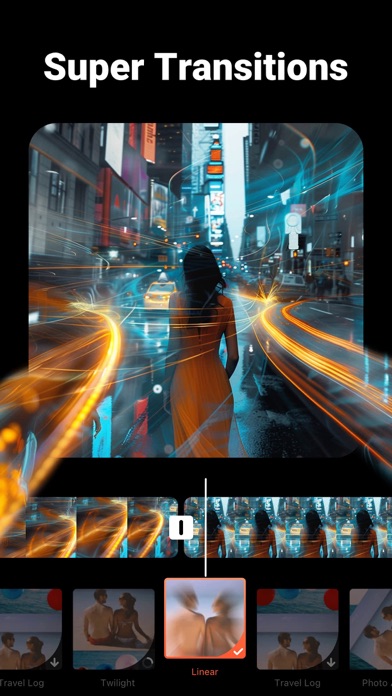
Creative Elements: Enjoy 30+ filters, fun stickers, dynamic transitions, GIFs, and stylish text options. Access the best content center with themes, effects, stickers, emojis, and sound FX.
AI Cutout Tools: Instantly remove video or image backgrounds with AI-powered Video Cutout & Image Cutout, simplify editing and create professional-quality results.
Compress & Optimize: Reduce video size in seconds without losing quality. Export in 720P/1080P/4K HD—fast, clear, and smooth.
AI Music Generator: Transform text into unique music tracks with AI. Generate original melodies from your words for vlogs, short films, or storytelling.
AI Photo Enhancer: Bring photos to life with AI-powered upscaling and detail enhancement.
AI Colorizer: Turn old black & white photos into colorful, vibrant images using intelligent color restoration.
AI Object Removal: Perfect your videos or photos by removing unwanted objects instantly with precision AI.
AI Voice Changer: Change your voice to cute, mature, robotic, or funny tones—add personality and fun to your videos.
Music & Sound: Choose from hundreds of background tracks or import your own music to match your vibe.
VideoShow makes editing and AI generation easy, fun, and powerful—all in one app. Whether you want to edit, enhance, or create videos from text or photos, VideoShow turns imagination into stunning reality!
[VideoShow VIP Membership Service]
Unlock all premium features. Payment is charged to your iTunes account and renews automatically unless canceled 24 hours before the current period ends. Manage or cancel anytime in iTunes settings.
Privacy Policy: https://d10nkoc3mu17gd.cloudfront.net/privacy/VideoShow_Privacy_Policy_ios_en.html
Terms of Use: https://d10nkoc3mu17gd.cloudfront.net/privacy/videoshow_user_agreement_ios_en.html
Ausblenden Mehr anzeigen...

In-App-Käufe

VideoShow毎月のVIP
¥550.00
年間VIP
¥3.50
「永続的に透かしを削除」権限
¥600.00
VIP権限
¥6.00
「一度だけ透かしを削除」権限
¥100.00
音楽特権
¥300.00
VIP Privilege Yearly
¥2.40

Screenshots

VideoShow Häufige Fragen

  • Ist VideoShow kostenlos?

    Ja, VideoShow ist kostenlos herunterzuladen, enthält jedoch In-App-Käufe oder Abonnements.

  • Ist VideoShow seriös?

    ⚠️ Die VideoShow-App hat schlechte Bewertungen und negatives Feedback. Die Nutzer scheinen mit der Leistung oder den Funktionen unzufrieden zu sein.

    Danke für die Stimme

  • Wie viel kostet VideoShow?

    VideoShow bietet mehrere In-App-Käufe/Abonnements, der durchschnittliche In-App-Preis beträgt ¥223.13.

  • Wie hoch ist der Umsatz von VideoShow?

    Um geschätzte Einnahmen der VideoShow-App und weitere AppStore-Einblicke zu erhalten, können Sie sich bei der AppTail Mobile Analytics Platform anmelden.

Benutzerbewertung

4.59 von 5

16,306 Bewertungen in Japan

5 star
13,015
4 star
1,599
3 star
723
2 star
253
1 star
716
Bewertungsverlauf

VideoShow Bewertungen

2025.08 超多BUG

pepevip55 on

Japan

BUG越來越多!!怎麼辦~ 救救我~~~~

楽しい動画ができる

爺さぁん on

Japan

簡単で編集メニューが豊富なアプリです

フォーカスシフトで

蘭々キー on

Japan

大変使いやすく毎月趣味で動画作成していますが、フォーカスシフトを使うと作成途中で必ず落ちてしまいます。タイミングよく落ちない時もありますが動画をいくつか連続でフォーカスシフトを使うと落ちます。対策お願いします。

お試しで年間費

りりなないぶ on

Japan

お試しで年間費請求されてます

不親切

むーとン on

Japan

動画のノイズ削除をしたくて使ってみたが操作がわかりにくすぎる。 いくつものサイトのレビューで余分な音を消せると紹介されていたが音の追加しかできないならアプリの紹介にノイズ除去できますだなんて書かないで欲しい

はあ

sskvl on

Japan

何故か知らないですがエクスポートが上手くいかないことがあり、調べても原因不明なので、作り直すしか方法ないので困ってはいます

アプデとは?

猫べる on

Japan

動画を作っていると固まる。 文字入れしても文字が出てこない。 確定してもないのに確認したモーションの文字が消えない。 編集で消そうとするとアプリが落ちる。 初めから再編集しようとするとどこをタップしても動かない。 改悪ですね。 VIPの意味がない。

改善願います!

みぃ104 on

Japan

動画編集に使っているのですが抽出した曲を付けて一旦保存してそれをあとからアプリの保存してある所を 開いても曲が付かず無音です。 編集の曲をくっ付けた跡が残る だけで無音です。 またテーマを使用し、曲を違うのに 変えたい場合も一旦保存すると 元のテーマの曲に戻ります。 携帯の方に保存したデータは 編集が効かないのでできるように してもらわないと大変不便です。 用があったりして一旦保存を したらせっかくの編集がぱーです。 また動画中に切り取った画像を 使うとアプリ内に保存した 画像は切り取る前の画像に 戻ることが多いです。 改善ねがいます。

nice

もう無理かも。 on

Japan

Cute nmn 8to

強制終了多い

gm5485 on

Japan

不具合も多い

Store-Rankings

Ranking-Verlauf
App-Ranking-Verlauf noch nicht verfügbar
Kategorien-Rankings
Diagramm
Kategorie
Rang
Top Umsatz
72
Top Kostenlos
96
Top Kostenlos
132
Top Kostenlos
163
Top Kostenlos
174

Schlüsselwörter

VideoShow Konkurrenten

VideoShow AI Video Editor Installationen

Letzte 30 Tage

VideoShow AI Video Editor Umsatz

Letzte 30 Tage

VideoShow Einnahmen und Downloads

Gewinnen Sie wertvolle Einblicke in die Leistung von VideoShow AI Video Editor mit unserer Analytik.
Melden Sie sich jetzt an, um Zugriff auf Downloads, Einnahmen und mehr zu erhalten.

App-Informationen

Kategorie
Photo Video
Herausgeber
VIDEOSHOW PTE
Sprachen
Turkish, German, Arabic, Chinese, Danish, Indonesian, French, Hindi, Dutch, Japanese, Korean, Polish, Hungarian, Malay, Portuguese, Russian, Thai, Ukrainian, Vietnamese, Greek (modern), Czech, Hebrew (modern), English, Spanish, Swedish, Italian
Letzte Veröffentlichung
5.10.13.1 (vor 1 Woche )
Veröffentlicht am
Dec 12, 2014 (vor 11 Jahren )
Zuletzt aktualisiert
vor 3 Monaten
This page includes copyrighted content from third parties, shared solely for commentary and research in accordance with fair use under applicable copyright laws. All trademarks, including product, service, and company names or logos, remain the property of their respective owners. Their use here falls under nominative fair use as outlined by trademark laws and does not suggest any affiliation with or endorsement by the trademark holders.