Watch Calendar - Monthly

Wrist, widget, complication

Veröffentlicht von: Marcel Mendes Filho

Beschreibung

Integration features:
- full integration with your phone's calendars and reminders
- select which calendars and reminders you want to see on your watch
- set calendar priorities for complications when there's conflict between appointments on different calendars
- mark reminders as done on your watch
- next event on Siri watch face
Scenes:
- AI generated colors for your calendars (try for free then purchase tokens for additional AI usage)
- 10 built-in scenes with beautiful month view and complication colors
- create your own colors combination then save as a scene
- set up time slices to apply on appointments and reminders
- set up badges to use them on your widgets (perfect for identifying multiple widgets on your Home Screen)
- Scenes also saves your selected calendars, reminders and all other configurations
- match scenes to band and watch face colors
- match scenes to calendars
- match scenes to focus filters
Focus filters:
- activate scene on widgets when focus filter is engaged
Complications:
- exclusive rectangular complications:
1) Day View: see all your daily appointments and reminders together in a timeline on your watch face. Tap it and the app will display your next appointment. Supports up to four simultaneous events at a given time.
2) Week View: see all your work week events at once (Monday-Friday 7am-10pm window).
3) Compact View: see up to 2 events at once.
- exclusive circular complication:
1) Day View: see all your daily events together in a 24-hour clock on your watch face. Recommended for single and sequential events.
- see next events on all complications
- see today's date, event date or 24-hour digital clock on all complications
Events list:
- tap the month view to list all your events (appointments and reminders)
- your next event will be displayed by default
- tap an event to see event details
- tap on the map to start navigation when the event has a location
Month view:
- scroll through the months with crown or swipe up and down
- force touch on month view to time travel to any month and year, future or past
- switch between plain view or heat map view
- preview month view in iOS app
Week view:
- scroll through the weeks with crown or swipe up and down
- see full week or work week
- week can start on Sunday or Monday
Heatmap:
- Activate heat map on your watch to glance the busiest days on month view
- Choose the color scale for heat map and save it in a Scene
Widgets:
- Calendar view, week view, day view and event list view are available as small and medium widgets
- All widgets are fully customizable and can have their own scenes or mirror watch
- Widgets are available as in-app purchases
- Preview month view widget in iOS app
- Tap on Reminder to mark as done (iOS 17 exclusive feature)
Customizations:
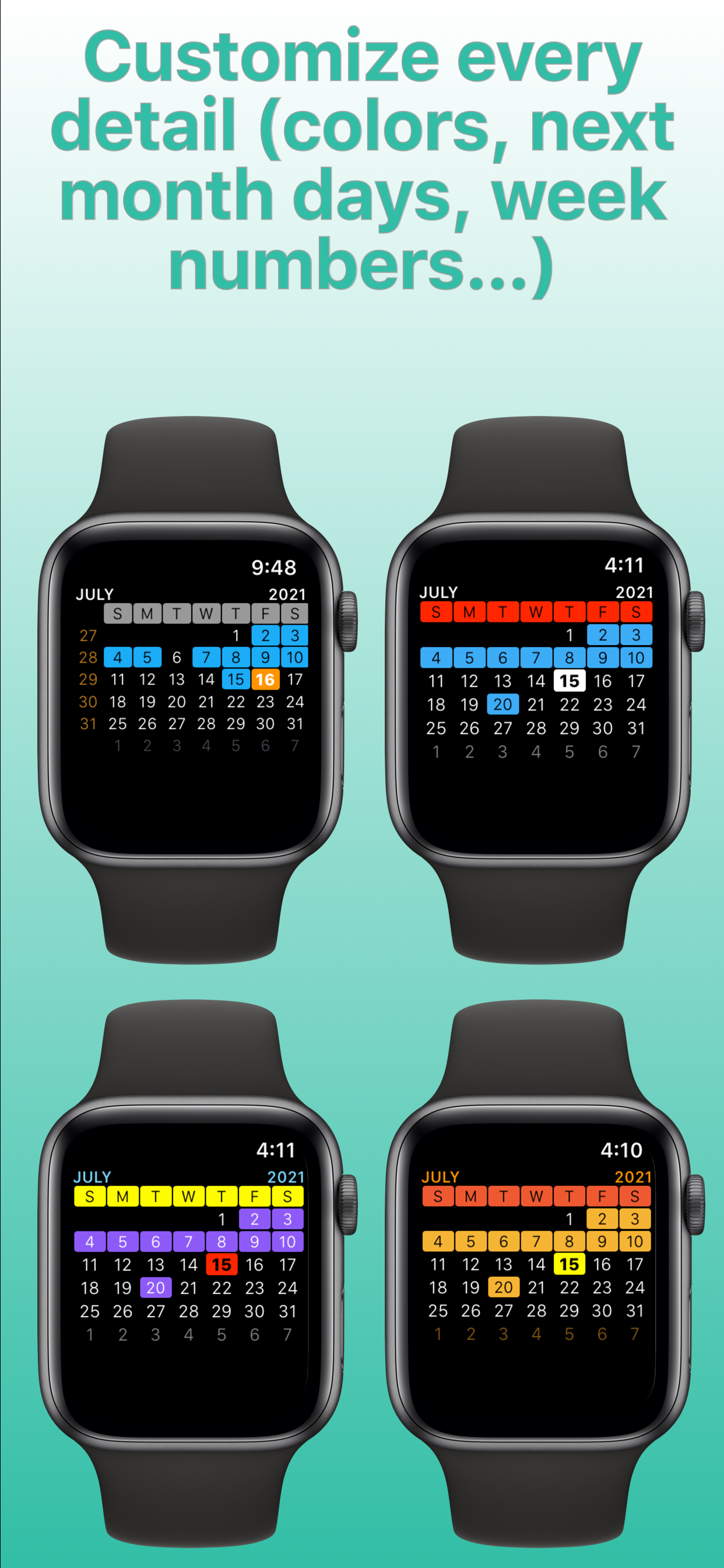
- all calendar colors (today, next month days, events, event today, week day, weekend day, calendar week, month, year)
- corner, circular and rectangular complications colors
- event list and detail font size
- customize "no more events" message on complications
- customize "no more events" color on corner complication
- show/hide all day events on complications
- show/hide location on modular watch faces
- choose when week starts: on Sunday or Monday
- show/hide calendar weeks
- regular or compact event list
- turn on/off haptic feedback while scrolling with crown
- turn on/off privacy to hide complications when watch screen is locked
- use English names for months and week days instead of device's default language
... and much more
Have fun customizing your calendar to your needs!
And you may discover you don't need stock Calendar app anymore ;-)
Follow us on Twitter: @ios_watch
End User License Agreement: https://www.apple.com/legal/internet-services/itunes/dev/stdeula/
Privacy Information: https://www.shopcolecao.com/AWC/privacy.html
Ausblenden Mehr anzeigen...

In-App-Käufe

140 tokens
USD 3.99
100 tokens
USD 2.99
70 tokens
USD 1.99
All 2 large widgets
USD 1.99
Weather Forecast
USD 0.99
Large event list widget
USD 0.99
Large Calendar Event Widget
USD 0.99
Double Event List Widget
USD 0.99
2 weeks worth donation
USD 29.99
1 month worth donation
USD 89.99

Screenshots

Watch Calendar Häufige Fragen

  • Ist Watch Calendar kostenlos?

    Ja, Watch Calendar ist kostenlos herunterzuladen, enthält jedoch In-App-Käufe oder Abonnements.

  • Ist Watch Calendar seriös?

    🤔 Die Qualität der Watch Calendar-App ist gemischt. Einige Nutzer sind zufrieden, während andere Probleme melden. Ziehen Sie in Betracht, einzelne Bewertungen für mehr Kontext zu lesen.

    Danke für die Stimme

  • Wie viel kostet Watch Calendar?

    Watch Calendar bietet mehrere In-App-Käufe/Abonnements, der durchschnittliche In-App-Preis beträgt USD 13.49.

  • Wie hoch ist der Umsatz von Watch Calendar?

    Um geschätzte Einnahmen der Watch Calendar-App und weitere AppStore-Einblicke zu erhalten, können Sie sich bei der AppTail Mobile Analytics Platform anmelden.

Benutzerbewertung
Die App ist in Usbekistan noch nicht bewertet.
Bewertungsverlauf

Watch Calendar Bewertungen

Great utility.

Tweakphile on

Vereinigte Staaten

This gem keeps me off my phone. I often need to look up week numbers. This application gets it done. Great response from the developer.

Nothing shows up on my watch

Calliexw on

Vereinigte Staaten

I bought the app, bought the extra widgets, set the up in complications, but that section on my watch face is just blank. When I tap it nothing happens.

Excellent App

Dougskelly on

Vereinigte Staaten

The watch calendar provides a complete set of options to provide concise information at a glance. It’s the best watch calendar by far. Also, the customer service is responsive, amenable to requesting changes, and without a doubt, excellent! I’ve had this app for several years and couldn’t ask for more in an Apple Watch app. Absolutely worth the price!

Nice watch calendar

D Hawk on

Vereinigte Staaten

Nice replacement for watch calendar.

Awful App the worst do not buy.

Wolftraxx5150 on

Vereinigte Staaten

All I wanted was a calendar on my watch that would show me my schedule and appointments just for work. 1. Never show any data 2. Overly cumbersome. 3. Sync ? What sync. 4. None of the complication work. Please do not answer my feed back. You have wasted enough of my time and energy.

If you Love Complications

DON_FELE on

Vereinigte Staaten

Well thought Complications. Circular Complication provides a 24 hour calendar event view at a glance. Color coded as well. Tapping into this circular complication takes you to a monthly Calendar View. Where you can adjust its colors. Allowing for a quick understanding of your monthly schedule. NOTE: This App was difficult to find in the App Store. (Even when typing Calendar) It needs exposure, people will LOVE this product once they give it a chance. TO DEVELOPER: You have something special going with this app.

Almost very good

Rick_6857463524 on

Vereinigte Staaten

This app is highly customizable, which is really good. But it does not have one specific customizable feature that makes it useless to me - it only displays the time in my complications in 24 hour format. I cannot find where it can be set for 12 hr format with am and pm. As a result I won’t use the app even though it is great in other ways. Hope 12 hr format comes with an update soon, so I don’t feel like I wasted my money.

Widgets cost extra

Yogfddjkk on

Vereinigte Staaten

Love how you buried that widgets cost extra deep in the description. Classy. Response to Dev: That’s not the issue. The issue is that you imply widgets are part of the base price with your promotional screenshot that just says “Widgets! Watch Calendar comes to your device” alongside images of other features that ARE included with the base price. It’s misleading. You know those promotional screenshots are the main driver of sales (that’s why you have 10 of them) and yet you fail to disclose that two of those promoted features (Reminders integration and Widgets) are not included in the base price within the promotional screenshot. If it’s an honest mistake, fix it so customers aren’t misled. I’ll change my review and rating if you do, because otherwise it’s a good app. I set a weekly reminder. I’ll update the review when the screenshots are corrected.

⭐️⭐️⭐️⭐️⭐️

MilanStojanov on

Vereinigte Staaten

Great app and awesome developer! I wrote to Marcel about a feature idea, which he managed to implement in record time. The app is robust and well optimized, but where it excels are the complications. Highly customizable and available for every type of watch face. All the best to the developer, keep putting the users first 😊

Almost great

Jobob88 on

Vereinigte Staaten

Not sure how others use calendars. I use mine to track meetings I need to attend. This app will not handle this use case, citing “calendar has too many events”. I get the memory and processing power is limited in the watch, but isn’t there a solution like maybe only loading a days worth of events each day? I like the compact view, but I really wish I could view more simultaneous events in a manner similar to the timeline view while also being able to limit the view from showing the next days events. As it is, no view will show my work calendar accurately with most views showing no events even though I clearly have some. To be completely fair, this app is well thought out and has lots of features, it just isn’t quite there for what I’m looking for. I also haven’t found a working app that does. 3.5 stars, rounding to 4 because I empathize with developers. Not mad about the 2.99, just a drop in the bucket of cash I’ve spent in my fruitless effort to find a calendar complication that will do what I want.

Store-Rankings

Ranking-Verlauf
App-Ranking-Verlauf noch nicht verfügbar
Kategorien-Rankings
Diagramm
Kategorie
Rang
Top Bezahlt
159
Top Bezahlt
265
Top Bezahlt
332
Top Bezahlt
334
Top Bezahlt
344

Watch Calendar Konkurrenten

Watch Calendar Installationen

Letzte 30 Tage

Watch Calendar Umsatz

Letzte 30 Tage

Watch Calendar Einnahmen und Downloads

Gewinnen Sie wertvolle Einblicke in die Leistung von Watch Calendar mit unserer Analytik.
Melden Sie sich jetzt an, um Zugriff auf Downloads, Einnahmen und mehr zu erhalten.
This page includes copyrighted content from third parties, shared solely for commentary and research in accordance with fair use under applicable copyright laws. All trademarks, including product, service, and company names or logos, remain the property of their respective owners. Their use here falls under nominative fair use as outlined by trademark laws and does not suggest any affiliation with or endorsement by the trademark holders.