ZoomNotes Lite

Notetake, Sketch, PDF, Present

Разработчик: Deliverance Software

Описание

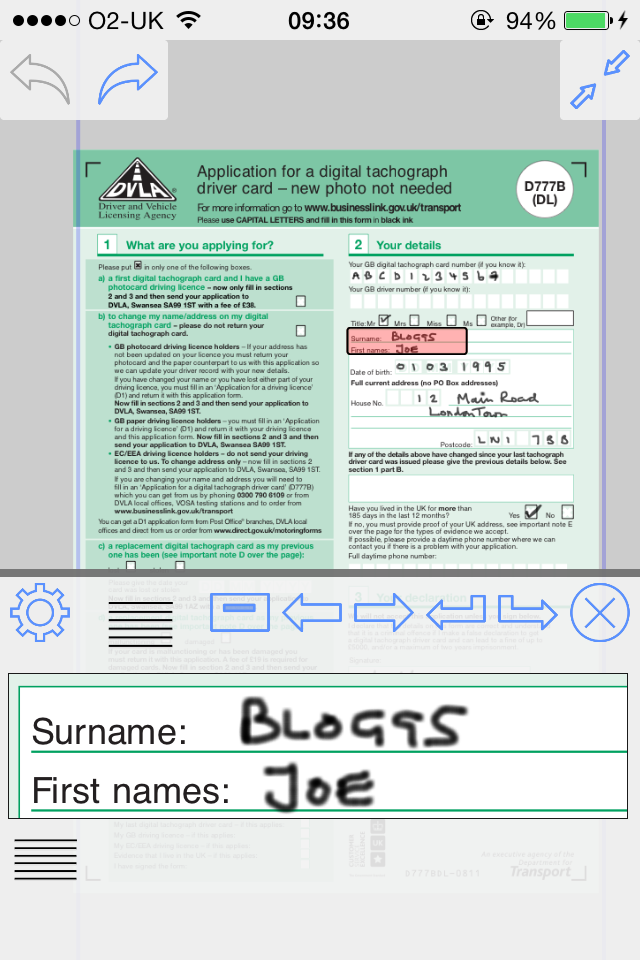
ZoomNotes Lite is an iPad/iPhone visual note-taking app. It lets you quickly make handwritten notes and sketches on virtual paper, on PDF files, on MS Word, Excel and Powerpoint docs (via GoogleDrive), and over images. Uniquely, it also lets you zoom in and out without arbitrary limits, an invaluable feature for this type of app. It has a free fully functioning pen (although you will be able to try the pens too), and more available as in-app purchases. It has unlimited paper sizes/styles, unlimited colours and line thicknesses, and a large range of ways to share its documents making ZoomNotes the most versatile handwriting/drawing app.
ZoomNotes Desktop for Mac now also available.
ZoomNotes is much more than a replacement for your trusted paper notebook!
Compatible with any capacitive stylus pen (although fingers work well too).
Here some reviews of the app store of the full version-
The best note taking app available! *****
by MarkNance – Version 7.1.4 – Jul 6, 2016
Don’t be put off by all its features! *****
by Stevearcher – Version 7.1.3 – May 24, 2016
Most complete Note app I’ve tried *****
by ItsDartstx – Version 7.1.3 – Apr 20, 2016
Most effective note taking app *****
by John25642 – Version 7.1.3 – Jul 7, 2016
Full featured and innovative *****
by music-major – Version 7.1.3 – May 15, 2016
Hands(writing)-down, best notepad replacement out there. *****
by Jed123zz – Version 7.1.3 – Mar 23, 2016
Free features include:
-1 Pen type - Felt tip.
-Huge Zoom Range and Whiteboard page style
-Rotatable views
-Split screen mode (edit 2 documents at once)
-Digital planning with links, which can also show events and reminders from the Calendar and Reminder apps
-Write over PDF file
-Write over MS Word, Powerpoint and Excel files (via GoogleDrive)
-Calendar events/reminders :add events linked to your documents, possibly with alarms. The URL in the event links back to the document in ZoomNotes.
-Typed text- limited to a single font, fills and borders
-Regular shapes and arrows
-Symbol library
-Select, scale, rotate and shift
-Cut, copy, paste (including between documents, pages and other apps)
-Write over pdf files (markup)
-Configurable paper types
-Intuitive folder interface for documents
-Sharing as PDF files, images, videos or ZoomNotes documents (via email, iTunes, clipboard, Dropbox, Twitter and Evernote)
-In app printing
-VGA compatible for use with projectors, monitors and AirPlay
-Universal app - iPhone and iPad
-iCloud support
-Geo-located documents; documents can be optionally geo-located and viewed as pins on a map.
-Layers let you control what is visible on a page, also options for 'master layers' which show on all pages.

In app purchases features include:
-7 extra Pen types, including Italic, Gel, Nib, Pencil and Watercolour.
-Sub-pages (pages within pages within...)
-Typed text- fully configurable fonts, colours, fills and borders
-Unlimited colours and line styles
-Bookmarks with animated playback
-Insert images from camera or photo library
-Insert web pages
-Insert videos from camera or photo library
-Edit inserted images, including masking and cropping
-Record and playback sounds, including import and export of caf files
- Handwriting recognition (14 different languages).
Please note that the full version of ZoomNotes is equivalent to the Lite version with all the in-app purchases.
There are lots more details including some videos of the app in action at www.zoom-notes.com
Please remember to leave us a review. If you wish, you can send us feedback directly, we reply to every email sent to [email protected].
If you experience any problems or bugs in the app, please email us your device information, which iOS version you are running to [email protected] and we will fix it asap.
Twitter - @zoomnotes
Скрыть Показать больше...

Встроенные покупки

All features
58.00 H$
All Pens
22.00 H$
Images
8.00 H$
Text
8.00 H$
Sub-documents
8.00 H$
Bookmarks
8.00 H$
Sounds
8.00 H$
Highlighter pen
8.00 H$
Tables
8.00 H$
Nib pen
8.00 H$

Скриншоты

ZoomNotes Lite Частые Вопросы

  • Приложение ZoomNotes Lite бесплатное?

    Да, ZoomNotes Lite можно скачать бесплатно, однако в приложении есть встроенные покупки или подписки.

  • Является ли ZoomNotes Lite фейковым или мошенническим?

    🤔 Качество приложения ZoomNotes Lite спорное. Некоторые пользователи довольны, в то время как другие сообщают о проблемах. Рекомендуем ознакомиться с отдельными отзывами для получения более полной картины.

    Спасибо за ваш голос

  • Сколько стоит ZoomNotes Lite?

    ZoomNotes Lite имеет несколько покупок/подписок внутри приложения, средняя цена покупки составляет 14.40 H$.

  • Сколько зарабатывает ZoomNotes Lite?

    Чтобы получить оценку дохода приложения ZoomNotes Lite и другие данные AppStore, вы можете зарегистрироваться на платформе мобильной аналитики AppTail.

Оценки пользователей

3.69 из 5

16 оценок в Гонконг (САР)

5 star
8
4 star
2
3 star
2
2 star
1
1 star
3
История оценок

ZoomNotes Lite Отзывы Пользователей

Good ZoomNote using experience

Kenttaipapa on

Гонконг (САР)

wish the sync or working same file under diff device can be improved.

Amazing networked notes like roam research for handwriting, poor UI

Clement Tong on

Гонконг (САР)

Great functionality, but Ui needs significant improvement so it will be easier to learn. This should be the default app for note taking instead of GoodNotes or notability, if only it has a better UI Don’t be afraid to use words for Icons. Just pure icons are confusing and hard to interpret. Thanks!

Pen not work at iPad mini 4, ios 12.1

yt2000 on

Гонконг (САР)

Pens draw lines which becomes unvisible on main pages but the lines can be seen in zoom view.

Lagging

hibyetoday on

Гонконг (САР)

Sometimes when I used it to teach my class and projected the material onto the projector’s screen of my class through Apple TV, I saw part of the thing I drew or wrote was disappeared on my iPad Pro’s screen, but the disappeared part was projected on the projector’s screen. Should both screens be shown in real time? If it could not be real time, my iPad Pro’s screen should have shown more than the projected screen. At first, I thought my Apple Pen was not working properly. I wrote once again on my iPad Pro. My students yelled and asked me why I wrote it again. Then I found out it had been shown doubled on to the projected screen but not on my iPad Pro’s screen. So I needed to look at the projected screen to write or drew things instead of my iPad Pro’s screen. What a shame I encountered. Was it due to the memory of my iPad Pro being used up? Or something else? This kind of lagging was quite weird. This happened not just one time. It happened in my another class.

Can export to Evernote, good

Anthonysinn on

Гонконг (САР)

Good

Meh

Duly.Noted on

Соединенные Штаты

Not bad, but not particularly good either. I just found this... meh. Probably would describe this slightly below average when compared to the top-notch notes apps, maybe mediocre at best. Unfortunately, there wasn't anything I found worth noting about (pun intended). Don't get me wrong, it is a solid app, just maybe a little behind on updates. I didn't find anything unique, special, or exciting that would make me want to continue using this app. It isnt necessarily a bad note taking app and does have a handful of useful tools and features to get your bare minimum note taking needs met, and it isn't half bad to look at either. It just doesn't stand out or having anything different, nothing new or refreshing or amazing, that would make me want to use this above any other average, typical, basic notes app.

Free Version of THE BEST APP AVAILABLE!!

NancyBabb on

Соединенные Штаты

This is a great FREE introduction to THE BEST APP AVAILABLE! I wish there was enough available letters in these reviews to list out all the REMARKABLE functions In Zoomnotes! It is so much more than a Planner Creator, Note-Taking, Presentation, Artist’s Friend! THERE IS NO BETTER APP! If you don’t believe me this is a FREE way to test it out. (But honestly, you might as well pay the one time price for the full package! You will anyway, I promise)

Too glitchy, loses notes

mels8888 on

Соединенные Штаты

This app has gotten progressively worse. 1. It switches my pen off to eraser all the time, so I’m constantly having to undo erases 2. It leaves random lines all over the note, vertically and horizontally. Sometimes 20+ lines at a time. Recent annoying addition is now when I use my highlighter, it leaves random dots all over the page. 3. Deletes notes. Today, I spent over an hour editing a note. It was so glitchy with lines and dots, I closed out the app and rebooted my ipad, only to find the document I was working on was completely gone. I’m also pretty sure I paid to upgrade the app when I first started using this, but never got the upgrade. This app worked really well when I started using it, but I just can’t deal with all the glitches and fails anymore.

Awesome

Pasion&Gloria on

Соединенные Штаты

It’s an amazing app…. There is 2 things. I don’t know where to find tutorials. Because there is so much to do and I wish I know how to do it. And is there a way to recover something that by accident was deleted? Beside that. This is one of my favorite app. I use it every single day. So much to write. I love it.

Works like a charm

Brownskin371 on

Соединенные Штаты

I have been using this app for several years and I really enjoy using it. I have never had any issues with it loading or performing unsatisfactory. It just works.

Оценки

История позиций в топах
История рейтингов пока не доступна
Позиции в категории
Приложение еще не было в топах

Ключевые слова

ZoomNotes Lite Конкуренты

ZoomNotes Lite Установки

30дн.

ZoomNotes Lite Доход

30дн.

ZoomNotes Lite Доходы и Загрузки

Получите ценные инсайты о производительности ZoomNotes Lite с помощью нашей аналитики.
Зарегистрируйтесь сейчас, чтобы получить доступ к статистика загрузок и доходов и многому другому.

Информация о приложении

Категория
Productivity
Разработчик
Deliverance Software
Языки
English, French, German, Chinese, Spanish
Последнее обновление
9.1.17 (3 дня назад )
Выпущено
May 14, 2013 (12 лет назад )
Также доступно в
Соединенные Штаты , Германия , Китай , Индия , Турция , Канада , Испания , Италия , Бразилия , Япония , Таиланд , Мексика , Великобритания , Австралия , Гонконг (САР) , Чили , Малайзия , Саудовская Аравия , Вьетнам , Аргентина , Южно-Африканская Республика , Нидерланды , Франция , Индонезия , Португалия , Республика Корея , Тайвань , Колумбия , Пакистан , Россия , Египет , Филиппины , Бельгия , Украина , Австрия , Венгрия , Дания , Швеция , Греция , Израиль , Сингапур , Чехия , Швейцария , Румыния , Перу , Новая Зеландия , Финляндия , Ирландия , ОАЭ , Доминиканская Республика , Непал , Литва , Ливан , Норвегия , Польша , Азербайджан , Беларусь , Суринам , Нигерия , Шри-Ланка , Бруней , Хорватия , Кения , Алжир , Намибия , Мали , Парагвай , Северная Македония , Болгария , Бахрейн , Кувейт , Казахстан , Эквадор , Мадагаскар , Тунис , Бермудские о-ва , Словакия , Люксембург , Оман , Словения , Ангола , Уганда , Исландия , Кипр , Эстония , о-ва Кайман , Армения , Катар , Маврикий , Мальта , Узбекистан , Гренада , Латвия
Обновлено
2 месяца назад
This page includes copyrighted content from third parties, shared solely for commentary and research in accordance with fair use under applicable copyright laws. All trademarks, including product, service, and company names or logos, remain the property of their respective owners. Their use here falls under nominative fair use as outlined by trademark laws and does not suggest any affiliation with or endorsement by the trademark holders.