Exif Viewer - Photo Metadata

View,edit,remove exif metadata

Published by: 婧 李

Description

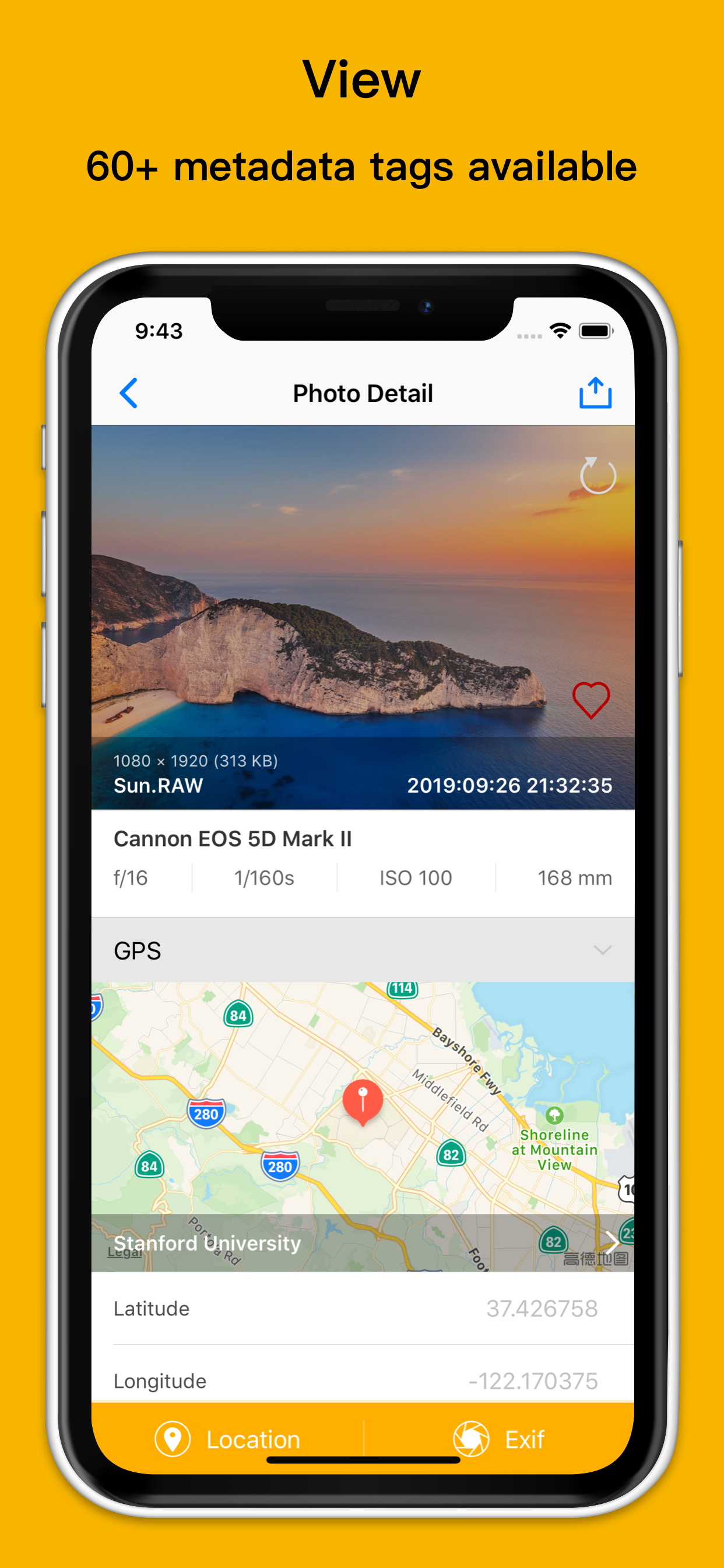
This is a powerful metadata tool for your photos and videos. You can easily view, edit, and remove exif metadata, including date, time, gps location, camera model, aperture, author and so on.It's very useful for professional photographers to manage the Exif data of their photo&videos.
Features in APP:
View Exif metadata
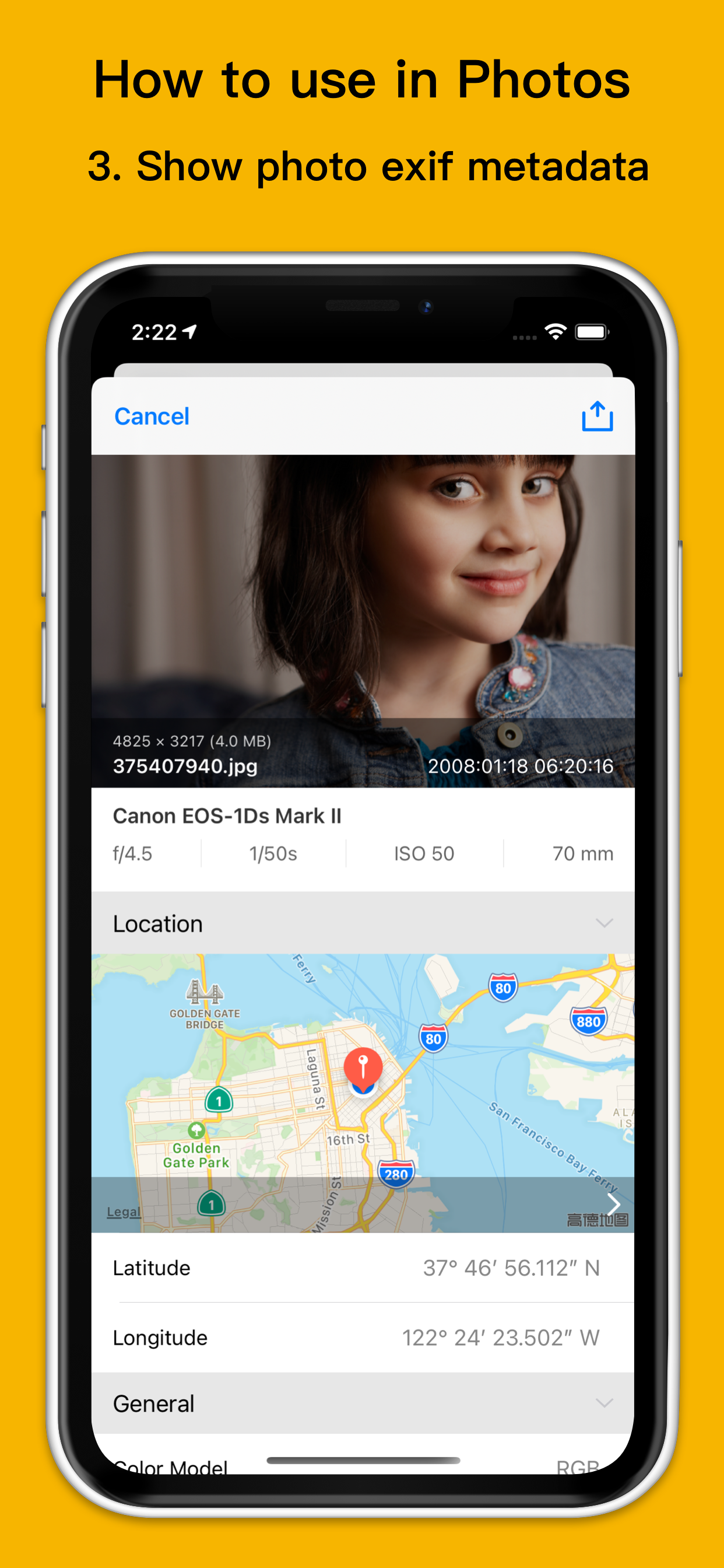
- View location data
- View more than 60+ metadata tags like ISO, shutter speed, focal length,camera model, lens model, time stamp, aperture, shutter count,file name and a lot more.
Edit Exif metadata
- Edit GPS location data.You can search the map to add location or long press to put a pin on the map.
- Support standard and satellite map
- Edit all the exif metadata,such as data, time, author, title, description,comment,keywords, copyright, camera maker, camera model, camera lens maker, camera lens model, aperture, exposure time, software
Remove Exif metadata
- Remove all exif metadate
- Remove GPS location
Bulk edit photo Exif metadata
- Edit or remove Exif metadata of multiple photos at once
- Edit or remove GPS location data of multiple photos at once
Works with
- All of your iOS devices(iPhone, iPad,iPod Touch)
- All photos&videos in your phone camera roll, iCloud photo library and photo stream
- Support Sony, Nikon, Fuji, Canon and other camera photo formats
- Support image formats(JPG,PNG,TIFF,HEIC) and RAW formats(CR2,NEF,DNG)
Others
- Ability to copy photo Exif data to clipboard
- Support Grid view and List view
- Support for deleting the photos&videos directly in the app
- Support for reverting to original image after wrong edit
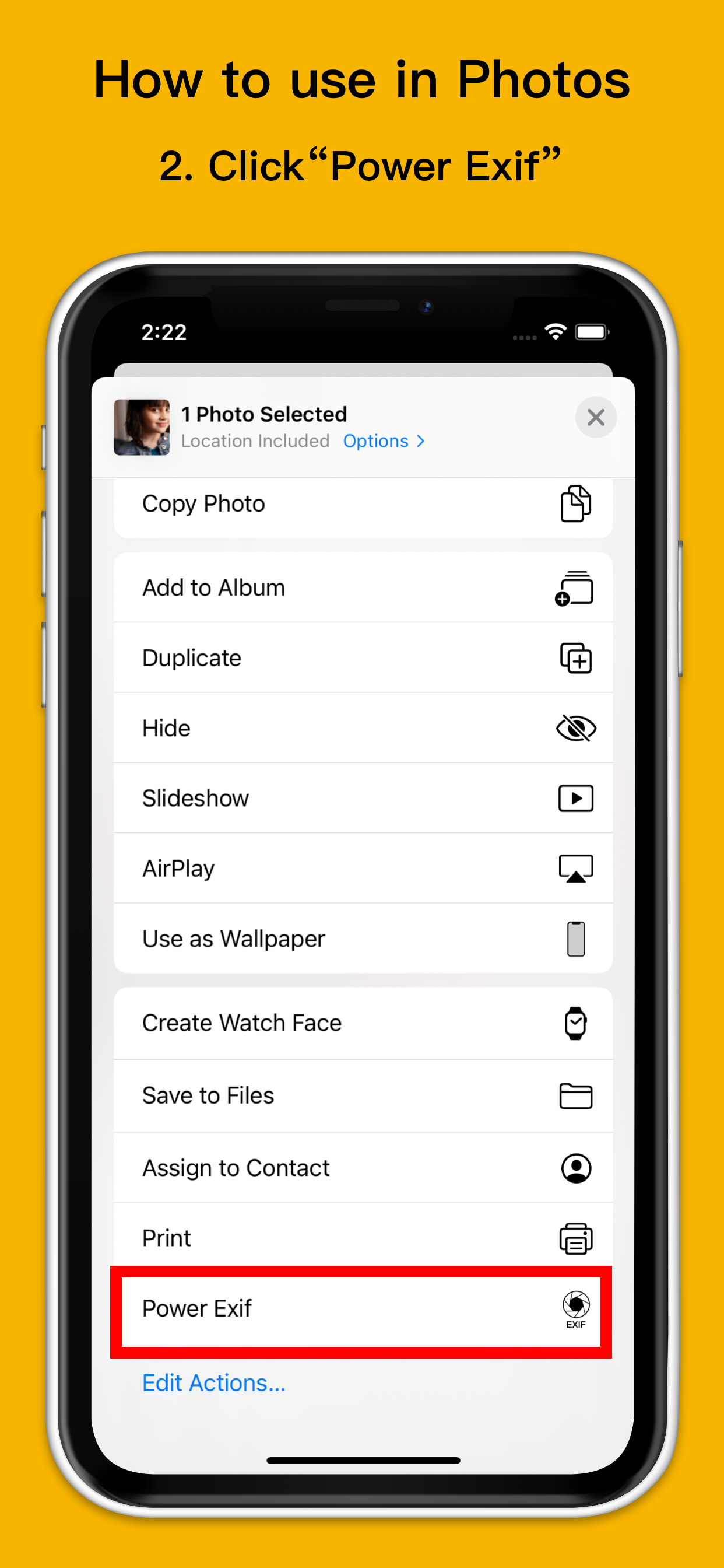
- Support direct browsing and sharing from the system album
- Ability to share photos&videos with or without Exif metadata
- Support dark mode
- Support template saving and importing
- Support filtering photos based on whether there is location information
- Support showing and sharing photo assets
What Exif metadata you can view in our app:
File Size, Object Name, Image Size, ISO, Focal Length, Color Model, Depth, Orientation, DPI Height, DPI Width, Pixel Height, Pixel Width, Profile Name, Brightness Value, CFAPattern, Color Space, Components Configuration, Compressed Bits Per Pixel, Contrast, Custom Rendered, Date Time Digitized, Date Time Original, Exif Version, Exposure Time, Exposure Bias Value, Exposure Mode, Exposure Program, Flash Exposure Comp, Recommended Exposure Index, File Source, Flash, Flash Pix Version, FocalLen In 35mm Film, Focal Length, Gamma, ISO Speed Ratings, Lens Specification, Light Source, Aperture, Aperture Value, F Number, Max Aperture Value, Metering Mode, Pixel X Dimension, Pixel Y Dimension, Saturation, Scene Capture Type, Scene Type, Sensing Method, Shutter Speed Value, Subject Area, Subsec Time Digitized, White Balance, Sensitivity Type, Sharpness, White Balance, Flash Compensation, Image Stabilization, Lens ID, Lens Info, Lens Model, Make, Model, Compression, Date Time, Orientation, Photometric Interpretation, Software, Resolution Unit, Tile Length, Tile Width, X Resolution, Y Resolution and so on.
If you have any questions or suggestions about our app, please e-mail [email protected] are looking forward to your feedbacks.
FAQ about Exif Viewer: https://power-exif-viewer.blogspot.com/2021/03/how-to-use-exif-viewer.html
Hide Show More...

Screenshots

Exif Viewer FAQ

  • Is Exif Viewer free?

    Yes, Exif Viewer is completely free and it doesn't have any in-app purchases or subscriptions.

  • Is Exif Viewer legit?

    🤔 The Exif Viewer app's quality is mixed. Some users are satisfied, while others report issues. Consider reading individual reviews for more context.

    Thanks for the vote

  • How much does Exif Viewer cost?

    Exif Viewer is free.

  • What is Exif Viewer revenue?

    To get estimated revenue of Exif Viewer app and other AppStore insights you can sign up to AppTail Mobile Analytics Platform.

User Rating

4.54 out of 5

134 ratings in United Kingdom

5 star
110
4 star
8
3 star
4
2 star
3
1 star
9
Ratings History

Exif Viewer Reviews

Works to an extent

pogoandzania on

United Kingdom

I bought this app for its ability to set metadata for multiple files at once; it works for date/time (though it does still crash now and then), but not location

Great app

Pete four2 on

United Kingdom

This app does what it claims to do and works every time. What more could you want¿

Spot on

Nnddwwyyvdg on

United Kingdom

Perfect for removing that pesky tracking

Awful.

Industreel on

United Kingdom

Can't navigate to find the image.

Baffling

Neilb12345 on

United Kingdom

I managed to open an image when I first opened the app but now I have no idea how to open another one.

Great

Snoop1965 on

United Kingdom

Love this app

No good

kef is this taken on

United Kingdom

Thought I could add location to photos but it doesn’t work

Not easy to read info

helldriver1957 on

United Kingdom

App appears to work okay but the exit info is difficult to read as it is so light in colour.

What’s happend?!

Podcast audiencer on

United Kingdom

For some reason this app has stopped being able to access my photos, instead giving a selection (currently two, and not the latest two) with no apparent way to get to all photos. Very, very odd. Was quite good until recently. Let’s hope it gets fixed soon.

Editing Location

Tony-tiger on

United Kingdom

When editing location, I get a message FAILED EDITING LOCATION Waste of money.

Store Rankings

Ranking History
App Ranking History not available yet
Category Rankings
Chart
Category
Rank
Top Paid
19
Top Paid
45
Top Paid
45
Top Paid
54
Top Paid
88

Keywords

Exif Viewer Competitors

Exif Viewer Installs

Last 30 days

Exif Viewer Revenue

Last 30 days

Exif Viewer Revenue and Downloads

Gain valuable insights into Exif Viewer performance with our analytics.
Sign up now to access downloads, revenue, and more.

App Info

Category
Photo Video
Publisher
婧 李
Languages
Portuguese, German, Chinese, Korean, Spanish, French, Hindi, Dutch, English, Italian, Japanese, Polish, Russian, Thai
Recent release
2.3 (10 months ago )
Released on
Jun 22, 2019 (6 years ago )
Last Updated
2 days ago
This page includes copyrighted content from third parties, shared solely for commentary and research in accordance with fair use under applicable copyright laws. All trademarks, including product, service, and company names or logos, remain the property of their respective owners. Their use here falls under nominative fair use as outlined by trademark laws and does not suggest any affiliation with or endorsement by the trademark holders.