iConnectHue for Philips Hue

Get the best out of your light

Published by: Stefan Gohler

Description

Discover a whole new world of lighting with iConnectHue, the ultimate Philips Hue app! Transform your lighting experience with our smart timers, customizable switches, and intuitive sleep timers, allowing you to adapt your Hue lights effortlessly for every occasion.
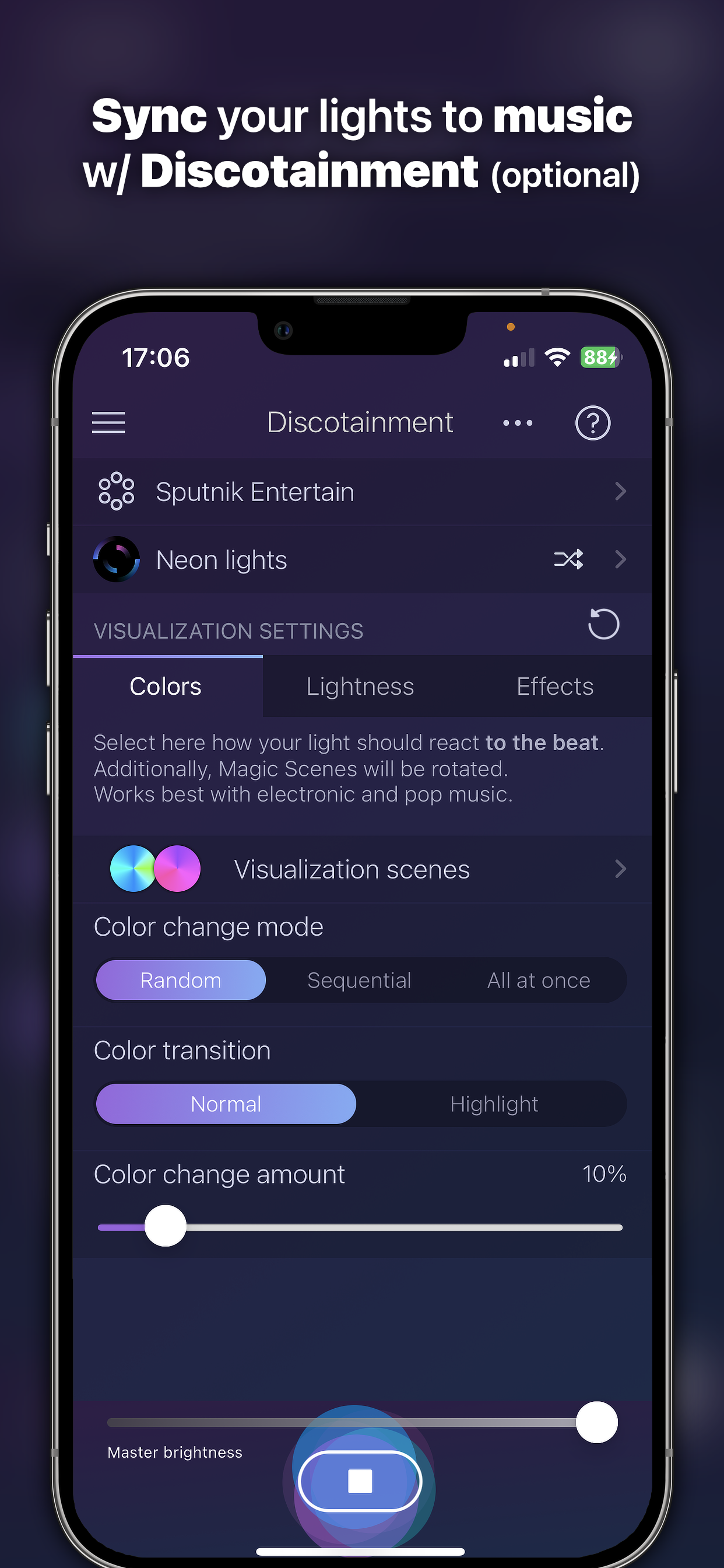
Whether you yearn for a soothing ambiance or a lively party atmosphere with our optional Discotainment, iConnectHue has you covered. Immerse yourself in striking calibrated colors, captivating gradients, and enchanting Magic Scenes, perfect for any mood.
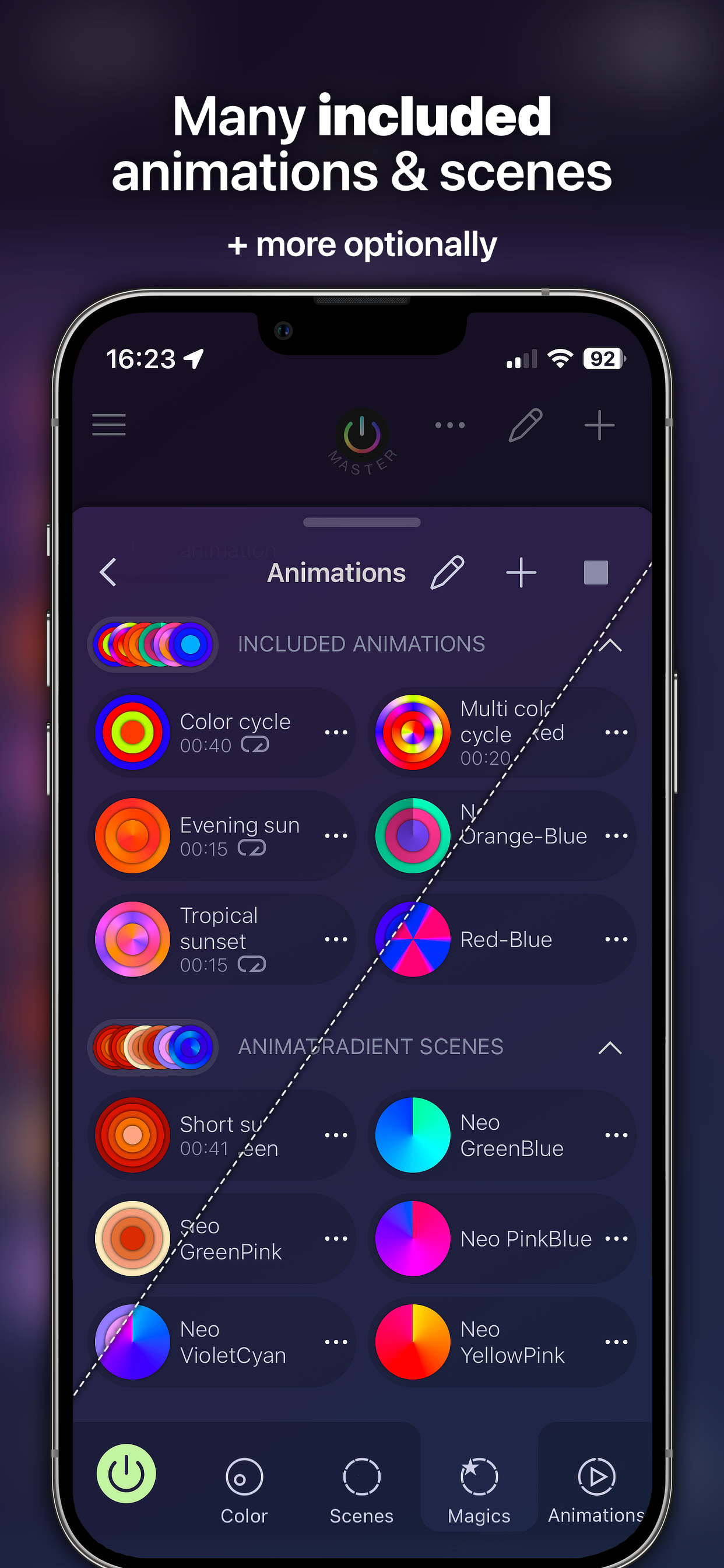
Our dynamic Animations breathe life into your home with lively colors. For lightning-fast access to daily actions, customizable widgets are at your fingertips.
300000+ installs: Join us and elevate your Hue lights to new heights with iConnectHue! Celebrated 5x as Philips' App of the month, we've created a potent, yet user-friendly interface that simplifies complex tasks.
More about all fantastic possibilities: iconnecthue.com/features
PLEASE NOTE: In case of any issues, please contact us! Our team will try hard to solve any problem that you may encounter.
You get with a one-time price:
• Full feature set: control almost every aspect of your Hues +constant updates
• Family focus: Scene sharing, family geofencing (first one turns on the light, last one off - optional), group hiding
• Everything non-music related happens on your Bridge - your iPhone stays off!
• Color animations on bridge. No empty batteries, everybody w/ iConnectHue can stop them!
• Color calibrated color picker w/ great gradient modes
• Create beautiful Magic Scenes, color your home - they work for every group & gradient light - super easy to create
• Drag & drop colors between lights
• Multiply the possibilities of your switches and Motion Sensors! More flexibility than any other app on market (more: iconnecthue.com/features)
• Create the Home widget you want! Add scenes, switches, sleep timers, reminders, dimmers, motion sensor temperature & more
• Access your lights and timers when not at home
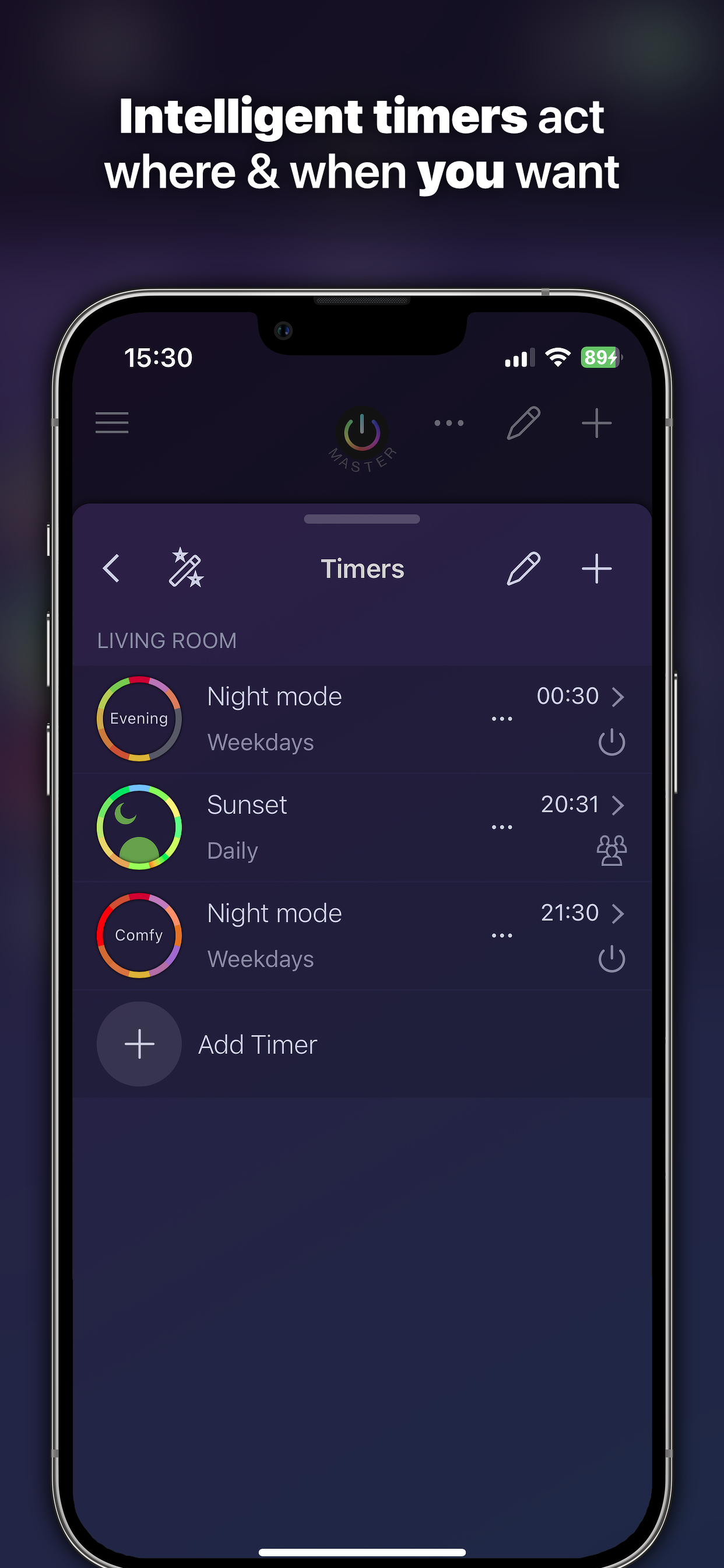
• Intelligent timers: Start them by time and day, by condition (group on/off or presence - w/ optional Automation), use colors & scenes, use random offsets, use sunrise or sunset time
• Instant timers: Darken lights when you go to bed, let your lights remind you, transition to scenes
• Find new lights & devices, add lights from other Bridges, update your firmware
• Integrated tutorials and FAQ make it easy to understand the usage and to solve problems
• Supports all Hue Zigbee hardware & many 3rd party lights
• +more via Membership or in app purchases
HUE BRIDGE V2/PRO REQUIRED!
To allow further development, additional modules are available via in app purchase or membership:
• Home & Away turns off lights when first arrives & last left +individually by user
• Animation Upgrade: unlimited animations, upload to switches, use them on your Apple Watch, widget & timers
• Discotainment: sync lights to music with Hue Entertainment, make your home a Disco - works with every source thanks to microphone use
• Weekend mode: let your switches and sensors act differently on week vs. weekend
• Watch Plus: control your groups, adjust their brightness and load their scenes
• Additional animation and Magic Scene packages
• Yearly feature upgrades
Memberships
Basic
• All purchases, share your content, many & large Widgets, 2 Bridges @ 1 location
Pro
Basic content plus
• Many bridges @ multiple locations
• Dashboard on Home view
• Light wizards: easily replace old lights, set startup mode via batch & on light search
• Daylight & Incandescent light mode
• Widget on Apple Watch
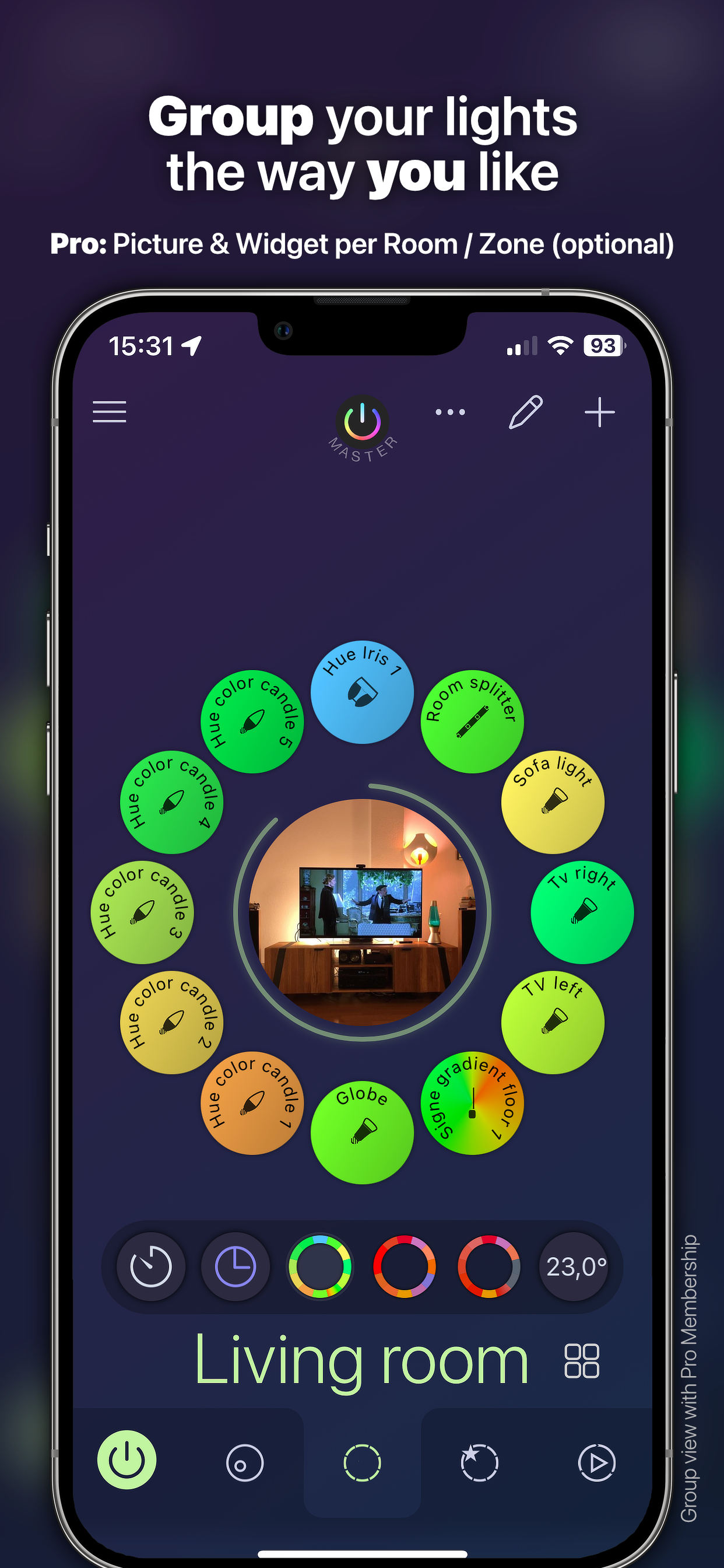
• Group picture&widget
• Apple Family Sharing of membership
• Advanced Shortcuts
• +More: iconnecthue.com/pro
Options&pricing: iconnecthue.com/app-options
It's less than a single Hue light! We want the best app for you and invest time and money. More:
iconnecthue.com/app-costs
It's the most comprehensive Hue app available:
iconnecthue.com/features/
Terms: iconnecthue.com/terms/eula_en.pdf
Hide Show More...

In-Apps

Pro membership 12 months
$17.99
Home & Away
$1.99
Animation Upgrade
$3.99
Discotainment
$3.99
Basic membership 12 months
$11.99
Watch Plus
$2.99
Christmas animation package
$1.99
Classic Widget Editor
$1.99
Multi Bridge
$4.99
Summer delights
$1.99

Screenshots

iConnectHue for Philips Hue FAQ

  • Is iConnectHue for Philips Hue free?

    Yes, iConnectHue for Philips Hue is free to download, however it contains in-app purchases or subscription offerings.

  • Is iConnectHue for Philips Hue legit?

    🤔 The iConnectHue for Philips Hue app's quality is mixed. Some users are satisfied, while others report issues. Consider reading individual reviews for more context.

    Thanks for the vote

  • How much does iConnectHue for Philips Hue cost?

    iConnectHue for Philips Hue has several in-app purchases/subscriptions, the average in-app price is $5.39.

  • What is iConnectHue for Philips Hue revenue?

    To get estimated revenue of iConnectHue for Philips Hue app and other AppStore insights you can sign up to AppTail Mobile Analytics Platform.

User Rating

4.18 out of 5

714 ratings in United States

5 star
495
4 star
63
3 star
33
2 star
36
1 star
87
Ratings History

iConnectHue for Philips Hue Reviews

beware

BigNeLLyMarko on

United States

i purchased this app because i wanted one of my lights to pulse in a way to make it look like it was breathing. i googled online and this app came up saying it did it. within 12 seconds after setting up i realized that this was false. i went to request a refund and the app was pending for a week and now they are refusing my refund. there is nothing this app does that the original hue app doesn’t do that i want. that to me is false advertising. i do not recommended this app

In-App Signup for Membership Times Out / Does Not Work

jonloubie on

United States

Tried to sign up for a “Pro” membership utilizing the in-app purchase flow, but upon pressing “Continue” the pop up screen disappears and the Apple Pay confirmation pop up does not appear.

Better than Hue’s app, basic is all you need though

synapsification on

United States

Going from basic to pro screwed this up. Rooms that used to work now show up with no lights. Paid $18 to get a project I didn’t want to deal with.

Must have Hue app

Reading, man on

United States

This is one of the best Phillips apps you can use and if you have an I watch it, takes it to a whole Nother level I love this app use it dozens of times a day

Constantly evolving, and amazing support!

NightHawkCA on

United States

Title rather says it all. Every time I had a question or found an issue, the support team has consistently addressed problems and explained potential solutions. Thanks for all that you do!

Works well, updated often

Love the roadcourse on

United States

Makes organizing and managing my hue lights easy.

Going back to Hue app

hdkaiebeisk on

United States

The Philips Hue app doesn’t charge a subscription to use a widget. I paid for this app years ago and yet I can’t use the most basic features. I hope more people follow suit and stand up to these greedy practices.

Unequaled among all 3rd party Hue Apps

Tw1tcH on

United States

Don’t get me wrong, I’m a fan and user of the native Hue app, but iConnectHue is unparalleled. Even Signify doesn’t offer the functionality this one does. These guys are constantly updating and improving this thing, it’s really quite impressive. If you’re looking for the ultimate solution to control your Philips Hue lights, this is it.

A MUST have for Philips Hue Systems—Keeps Getting Better!

jabish028 on

United States

I was extremely skeptical to open up my Hue bridge to a third party app, but after having some issues with bridge memory & some of the dials, I took the plunge in for a pro with this. Plus, I saw it listed in the Hue app and blogs as a noteworthy third party app, which put my privacy concerns at ease. Simply put: this app unlocks the full potential of your Philips Hue system. Once you have it, you won’t want to go back! This app gets all the features you want, well before Hue gets them out on their main app. And still, this app manages to provide even more. With the most recent update, the Hue app allowed for widgets. But those widgets are seriously limited. Even using the Home app widgets, you’re missing out. But with the latest iConnectHue update, you can create a full dashboard of interactive widgets, complete with refresh buttons, so you can check the status of lights, increase brightness, run a scene (or toggle through several), turn on and off groups, zones, lights…in other words: you can use the app without opening the app. Now, I know iConnectHue doesn’t necessarily have the most “polished” UI, but if there’s any trouble, the user guides really will answer your questions. You’ll be on your way to setting up complex commands or button presses on devices that are limited when used in the main Hue app. (For example, my Lutron Aurora’s can now do so much more, serving as an excellent mini dial). There are so many great things about this app that even after all this time, I haven’t unconverted all of its features. They have sound and light mixes as well as their own scenes. But you really can get granular control over whatever you want with iConnectHue. The fact that it’s still ahead of the game is incredible and worth the reasonably priced Pro upgrade. I just want to thank the team for their job well done and recommend this to everyone!

Restart your phone to get widgets back!

—————.————————- on

United States

Excellent app thank you for the years of updates

Store Rankings

Ranking History
App Ranking History not available yet
Category Rankings
Chart
Category
Rank
Top Paid
2
Top Paid
4
Top Paid
4
Top Paid
5
Top Paid
6

Keywords

iConnectHue for Philips Hue Competitors

iConnectHue für Philips Hue Installs

Last 30 days

iConnectHue für Philips Hue Revenue

Last 30 days

iConnectHue for Philips Hue Revenue and Downloads

Gain valuable insights into iConnectHue für Philips Hue performance with our analytics.
Sign up now to access downloads, revenue, and more.
This page includes copyrighted content from third parties, shared solely for commentary and research in accordance with fair use under applicable copyright laws. All trademarks, including product, service, and company names or logos, remain the property of their respective owners. Their use here falls under nominative fair use as outlined by trademark laws and does not suggest any affiliation with or endorsement by the trademark holders.