

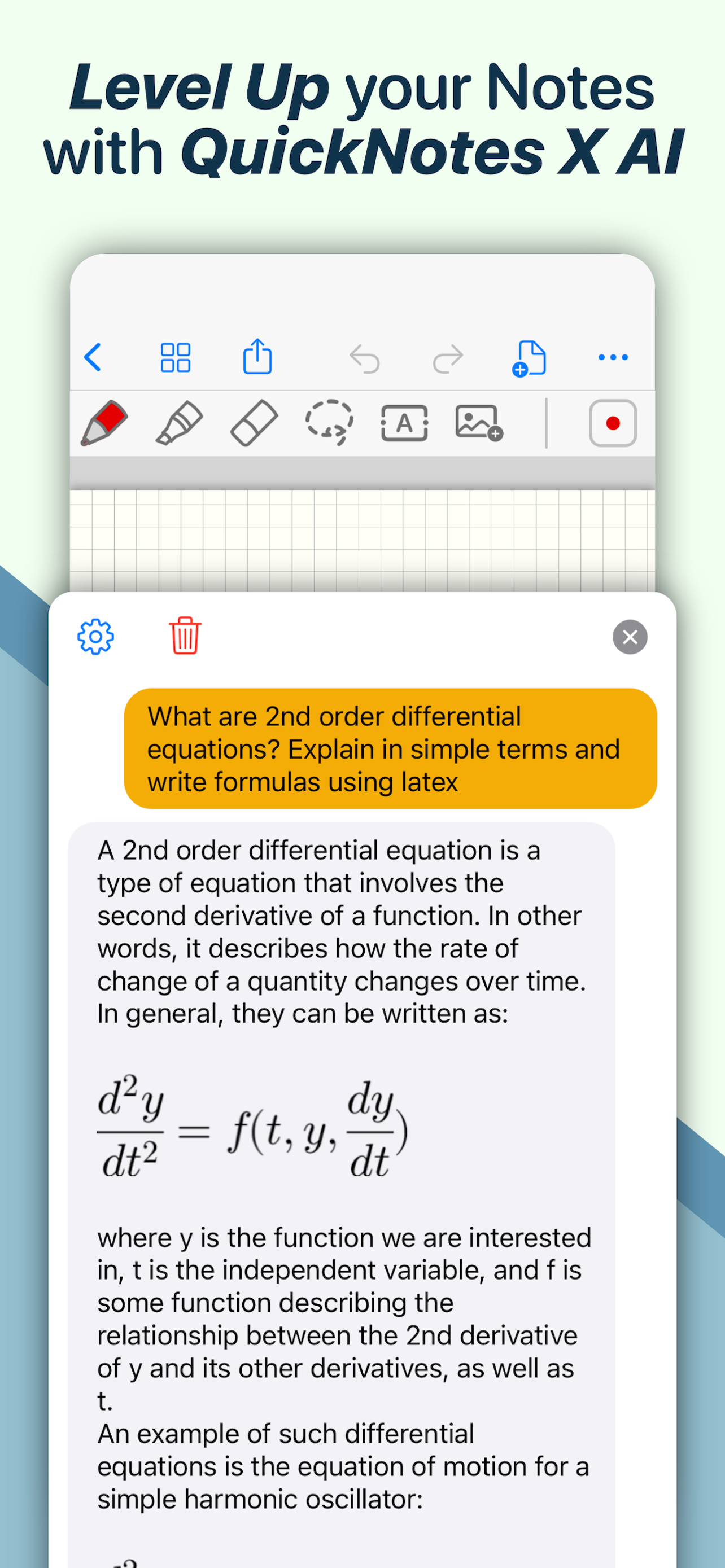
QuickNotes X: Notes, AI & PDF

Note-Taking, Made Easy.

Published by: Alessandro Sassi

Description

ESCAPE THE LIMITS OF PHYSICAL PAPER
• Experience a fluid, precise and natural note taking experience powered by the unparalleled performance of QuickNotes X custom vector ink engine;
• Choose your drawing style with numerous included tools, such as fountain and ballpoint pen;
• Freely customize your stroke color as well as line thickness and pressure sensitivity;
• Record and play back lectures with Voice Recording: your writing will be synced to the audio!
• Draw perfect shapes and straight lines thanks to automatic, ML-powered shape recognition;
• Move, resize, rotate and zoom your handwriting to take notes like a pro;
• Never run out of paper: swipe to the next page and a new page will be created if needed!
• Take perfect notes with your Apple Pencil, Logitech Crayon or other capacitive styluses.
ORGANIZE & PROTECT YOUR THOUGHTS
• Never lose your notes again thanks to the powerful organization provided by QuickNotes X;
• Create Notebooks to organize your notes;
• Add unlimited Folders & Subfolders to group your Notebooks;
• Lock individual Notebooks and Folders with a Password to protect your thoughts from prying eyes;
• Unlock protected notebooks using Face ID, Touch ID or by entering your Password;
• Rearrange your Notebooks and Folders however you like to make sure they are always in the correct order.
SEAMLESSLY SYNC TO ALL YOUR DEVICES
• Seamlessly back up & sync your notebooks and folders to all your devices thanks to iCloud;
• Write once, edit anywhere: when iCloud Sync is active all your content is automatically available on all your devices;
• Use the native Mac app to view your notes on the bigger screen and edit them right on your computer.
MARK UP & WRITE ON PDFs, SLIDES AND MORE
• Import and edit PDFs, PowerPoint presentations more;
• Annotate documents on your device with all the tools available, including fountain & ballpoint pen, highlighter and shape recognition;
• Open notes and documents side-by-side on your iPad for maximum flexibility;
• Quickly export your notes as images, PDF or QuickNotes X Documents for easy sharing
ENDLESS CUSTOMIZATION FOR YOUR CREATIVITY
• Create an unlimited number of presets for stroke color and line thickness to always have the right one ready at your fingertips;
• Choose between Dual or Single Bar Mode to take notes with the maximum level of flexibility and customizability;
• Choose to erase entire strokes on only some parts thanks to the new Precision and Whole Stroke Erasers;
• Use the Lasso tool to cut, copy, paste or delete groups of strokes or entire pages;
• Customize the look of your Notebooks and Folders by choosing from more than 80 options;
• Make each notebook cover yours: the Notebook cover is now fully editable so you can draw on it!
• Choose the right paper template for your Notebooks, such as Blank Paper, Cornell Paper, Chemistry Paper, Engineering Grid Paper, Music Paper and more!
TYPE AND WRITE ANYWHERE
• Add Text Boxes anywhere in a page to start typing, with plenty of customization options for color, font style and size, available right at your fingertips in the new Tool Bar;
• Move, rotate and scale text boxes to never run out of space;
• Combine handwritten notes with typed content and annotate or highlight key words in your Text Boxes;
AND THERE IS EVEN MORE!
• Swipe left or right to quickly move to the previous or next page in the notebook;
• Quickly jump to any page in the Notebook by using the Notes List menu in the Note Editor;
• Customize any new page you create thanks to the new "New Page" menu in the Editor;
• Create a QuickNotebook to always have a fresh new page when you open the app;
• Changing the paper template for a single page or the entire Notebook is only one tap away;
QuickNotes X: Note-Taking, Made Easy.
Website: https://www.quicknotesx.com
Twitter: @QuickNotesX
Instagram: @quicknotesx
-----------
Privacy Policy: https://www.quicknotesx.com/privacy
Terms of Use: https://www.apple.com/legal/internet-services/itunes/dev/stdeula
Hide Show More...

In-Apps

Pro Pack
SAR 24.99
Tools Pack
SAR 12.99
Covers Pack
SAR 4.99
Templates Pack
SAR 4.99
Cloud & ML Pack
SAR 3.69
QuickNotes X Pro
SAR 19.99
Notebooks & Folders Pack
SAR 12.99
QuickNotes X AI: 100000 Tokens
SAR 9.99
QuickNotes X AI: 300000 Tokens
SAR 17.99
QuickNotes X AI: 500000 Tokens
SAR 24.99

Screenshots

QuickNotes X FAQ

  • Is QuickNotes X free?

    Yes, QuickNotes X is free to download, however it contains in-app purchases or subscription offerings.

  • Is QuickNotes X legit?

    🤔 The QuickNotes X app's quality is mixed. Some users are satisfied, while others report issues. Consider reading individual reviews for more context.

    Thanks for the vote

  • How much does QuickNotes X cost?

    QuickNotes X has several in-app purchases/subscriptions, the average in-app price is SAR 13.76.

  • What is QuickNotes X revenue?

    To get estimated revenue of QuickNotes X app and other AppStore insights you can sign up to AppTail Mobile Analytics Platform.

User Rating

4.2 out of 5

383 ratings in Saudi Arabia

5 star
268
4 star
32
3 star
20
2 star
19
1 star
44
Ratings History

QuickNotes X Reviews

excellant

ezdehar on

Saudi Arabia

very nice

Crashes

Wizbyy on

Saudi Arabia

The app keeps crashing and erasing my progress which is really bad for me it wasted like 30 minutes of my time. Please fix this issue

Distorted notes

everyheart 29 on

Saudi Arabia

It was very easy to use before but after the update all my notes got distorted and now I have to rewrite all my notes again. The update is good though and made it much easier to use

Customer

ops pos on

Saudi Arabia

Annoying to use and not flexible at ALL , weird Application and waste of time and money

Perfect app

Muqrn on

Saudi Arabia

Perfect app

Ipad Pro M4 with ipencel Tracking Bad

jdbdrwho on

United States

I tried to use this app. When trying to write with my ipencil on an iPad Pro M4 Chipset 13 inch display The writing location is about 3 inches from the touch contact on my screen. I could never use this app. Plus no option to turn off Finger drawing. Useless app.

Not a note book

1Note is better on

United States

you have to pay to add more paper for notes. OneNote is free

Catgril

cagfsilh on

United States

N,c

Hi again

Mommy's Dragon on

United States

I don no wat to rit so hi 🌮 🌮🌮🌮🌮🌮🌮🌮🌮🌮🌮🌮🌮🌮🌮🌮🌮🌮🌮🌮🌮🌮🌮🌮🌮🌮🌮🌮🌮🌮🌮🌮🌮🌮🌮🌮🌮🌮 5⭐️⭐️⭐️⭐️⭐️UwU are not going anywhere in this season so we will have a better season next year and hopefully we will have the same chances of getting the best player we can hope to have this year. The only way we will have to go to a good season is to have the right team and be able to play the best players.idk what I’m writing rn I’m just clicking words so yea I like da app ig UwU 👁️🫦👁️, I just want to see what it does with my own time so it will help help help me I’m dieushnh Nice app 👍

Free features are great. Pro features are buggy or don’t work.

TheNerdyArrow on

United States

I’d like to see working PDF editing and export or a refund please. The design of imports also is quite frustrating. I’m not sure if it’s supposed to be this way or just doesn’t work well. Great as a notebook app. Additional pens are cool too. I’d focus on just that.

Store Rankings

Ranking History
App Ranking History not available yet
Category Rankings
Chart
Category
Rank
Top Free
457

Keywords

QuickNotes X Competitors

QuickNotes X Installs

Last 30 days

QuickNotes X Revenue

Last 30 days

QuickNotes X Revenue and Downloads

Gain valuable insights into QuickNotes X performance with our analytics.
Sign up now to access downloads, revenue, and more.

App Info

Publisher
Alessandro Sassi
Languages
English, Dutch, French, German, Italian, Japanese, Chinese, Spanish, Turkish
Recent release
5.4.6 (4 months ago )
Released on
Jul 25, 2015 (10 years ago )
Last Updated
6 days ago
This page includes copyrighted content from third parties, shared solely for commentary and research in accordance with fair use under applicable copyright laws. All trademarks, including product, service, and company names or logos, remain the property of their respective owners. Their use here falls under nominative fair use as outlined by trademark laws and does not suggest any affiliation with or endorsement by the trademark holders.

