Sketch 3D

Design 3D Model and Animations

Published by: Victor Ng

Description

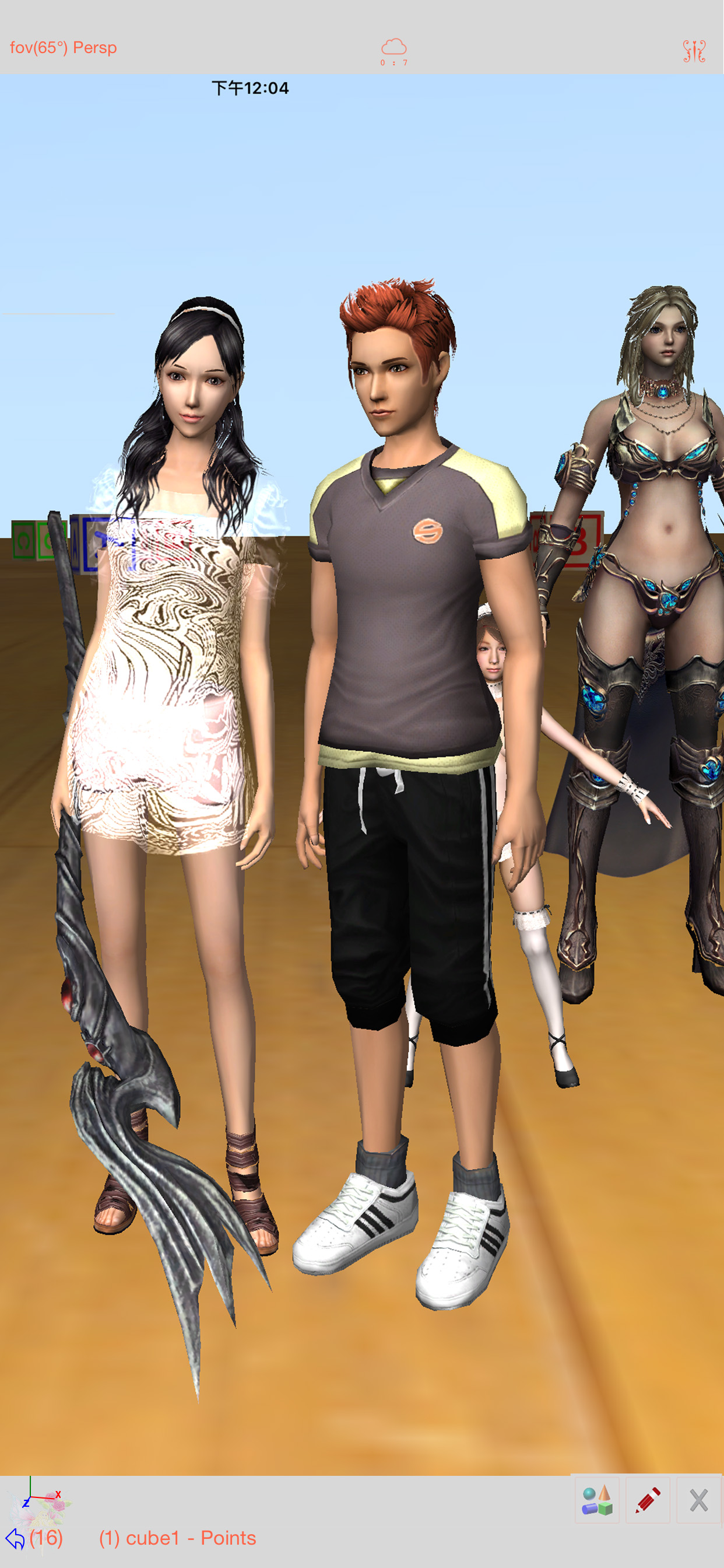
Sketch 3D is a tool for designing 3D models from your fingertips. You could download models from others, and could also share your great designs with other users by saving models in Public space.
New Feature: Integrated MaterialX library into the app.  
Mesh object can be applied with materialx documents. When Saving and Loading with material, the document relative path is stored as a diffuse map entry, similar to the way of handling movie textures. Other features like material adjustment and graph editing are not supported yet. User could download free material documents from public websites and import those zip files with this app, using ShareTo or AirDrop.
Feature: Use True Depth Camera to capture face model.
Feature: Support using video as model texture.
You could use video clips from Photo Album, or from Internet URL (YouTube URL not supported), and then apply it onto a model as texture map.
Feature: Capture movie from the 3D scene.
Note! If your device could not capture movie, then, could try out a smaller output resolution (by tapping the control pane). However, arbitrary output size may stop capturing prematurely.
Feature: Design 3D model animation with skeleton structure.
You could design a skeleton structure by placing bones in hierarchical relation. Attach model to the skeleton, and then moving the bones to define different poses. Each pose represented as a keyframe in the timeline view. And animation sequence is produced by playing interpolation between the keyframes.

Features:
- Import 3D content directly from browser or email, either in .zip, .rar, .7z.
- Support formats: Collada DAE, OBJ, 3DS, STL(for 3D printing), and others.
- Import/export to iCloud drive, via iTune File Sharing, or to Public area via Apple CloudKit Service.
- Supports AirDrop.
- Support Quad faces.
- Smooth surfaces using Subdivision.
- Mirroring editing.
- 2-fingers vertex movement, 3 or 4-fingers planar shape creation.
- Versatile multi-touches drag-through-space gestures to support editing and changing viewing angle at the same time.
- Flexible face strip drawing.
- Stitching boundary faces. Stitch triangle soap into connected faces. Stitch over edge or vertex to form a larger face.
- Stitching Triangles to Quads.
- Loop Cut faces.
- Bevel edges.
- Extrude faces or edges.
- Revolve (Spin).
- Vertex Smoothing.
- Vertex Slide along edges.
- Crease Editing after mesh subdivision.
- Split mesh from, or Join mesh to the editing one.
- Support hierarchical mesh node structure.
- Direct vertex color editing when texture map is not used.
- Edit texture map UV coordinates, include atlas generation.
- 3D Text generation.
- Scene interaction with your created shape.
- Design Animation with skeleton structure.
- Capture movie from the 3D scene.
- Support using video as model texture map.
Hide Show More...

In-Apps

Unlimited Video Capturing
$2.79
Unlimited Keyframe Editing
$2.79

Screenshots

Sketch 3D FAQ

  • Is Sketch 3D free?

    Yes, Sketch 3D is free to download, however it contains in-app purchases or subscription offerings.

  • Is Sketch 3D legit?

    ⚠️ The Sketch 3D app has poor ratings and negative feedback. Users seem unsatisfied with its performance or features.

    Thanks for the vote

  • How much does Sketch 3D cost?

    Sketch 3D has several in-app purchases/subscriptions, the average in-app price is $2.79.

  • What is Sketch 3D revenue?

    To get estimated revenue of Sketch 3D app and other AppStore insights you can sign up to AppTail Mobile Analytics Platform.

User Rating

2.27 out of 5

30 ratings in Canada

5 star
5
4 star
3
3 star
4
2 star
1
1 star
17
Ratings History

Sketch 3D Reviews

Hard

hamsofne on

Canada

This could be a good app but it is really hard to figure out and it is way to complicated

Horrible!

killer the wolf on

Canada

I don’t really know what the “Clear history” button does, there is also NO tutorial making this game extra hard.

A bit complicated

not so horrible on

Canada

I’ve been using this app but I want to know the controls, it’s really hard and i have been confused about the buttons. I literally didn’t even know there was an undo and redo button. Please make a tutorial video because there are not much buttons and I get confused on how to make people or like make an animation. I think some other people would be just confused as me, if you already have a tutorial for this app, please tell me where you can find it. Please and thank you, I hope you understand.

Functionality

coldshitake on

Canada

Thank you for thinking about 3D for iPhone. It’s important and could be powerful. With that said the functionality of the entire platform user interface is so poorly designed it’s impossible navigate and touch items because there is no real interface grid with enough space and legibility. You have menu commands / options that are all sitting on top of one another in multiple locations and actions. The type setting for the menu was poorly decided and very makes it very hard to read. And the absolute most difficult aspect of the app is that you don’t include an “tutorial” on how to use the commands and give users a window of what is or could be possible and why it’s so valuable. For those reasons I believe the rating fits. It’s a valiant effort but needs a massive overhaul.

Absolutely terrible

NivyWivy on

Canada

It’s confusing,there’s no tutorial or anything

This is terrible

PieEater76 on

Canada

You can’t do anything and there are zero tutorials this is the most disappointing app ever.

Good potential

Pandorafae on

Canada

Seems to have extremely good potential, but I think you need to take a step back and look at a program like Autodesk maya. Your naming conventions for tools are so confusing for us who are coming from industry standards.

I Feel Like this App has Potential

CrazyCatLady😹🐱🐈 on

Canada

This app probably has potential, but it’s very confusing to use for beginners in 3D animation/modelling/etc. You guys should implement some sort of tutorial for everything the app offers.

How do we do stuff

hishy brown on

Canada

I can’t do anything

uh

NERRRRDDDD on

Canada

no beginning tutorial! it isn’t really helpful for beginners, and the video tutorials don’t exactly reflect what the app is really like.

Store Rankings

Ranking History
App Ranking History not available yet
Category Rankings

Keywords

Sketch 3D Competitors

Sketch 3D Installs

Last 30 days

Sketch 3D Revenue

Last 30 days

Sketch 3D Revenue and Downloads

Gain valuable insights into Sketch 3D performance with our analytics.
Sign up now to access downloads, revenue, and more.
This page includes copyrighted content from third parties, shared solely for commentary and research in accordance with fair use under applicable copyright laws. All trademarks, including product, service, and company names or logos, remain the property of their respective owners. Their use here falls under nominative fair use as outlined by trademark laws and does not suggest any affiliation with or endorsement by the trademark holders.