Miro: your visual workspace

Veröffentlicht von: Realtimeboard

Beschreibung

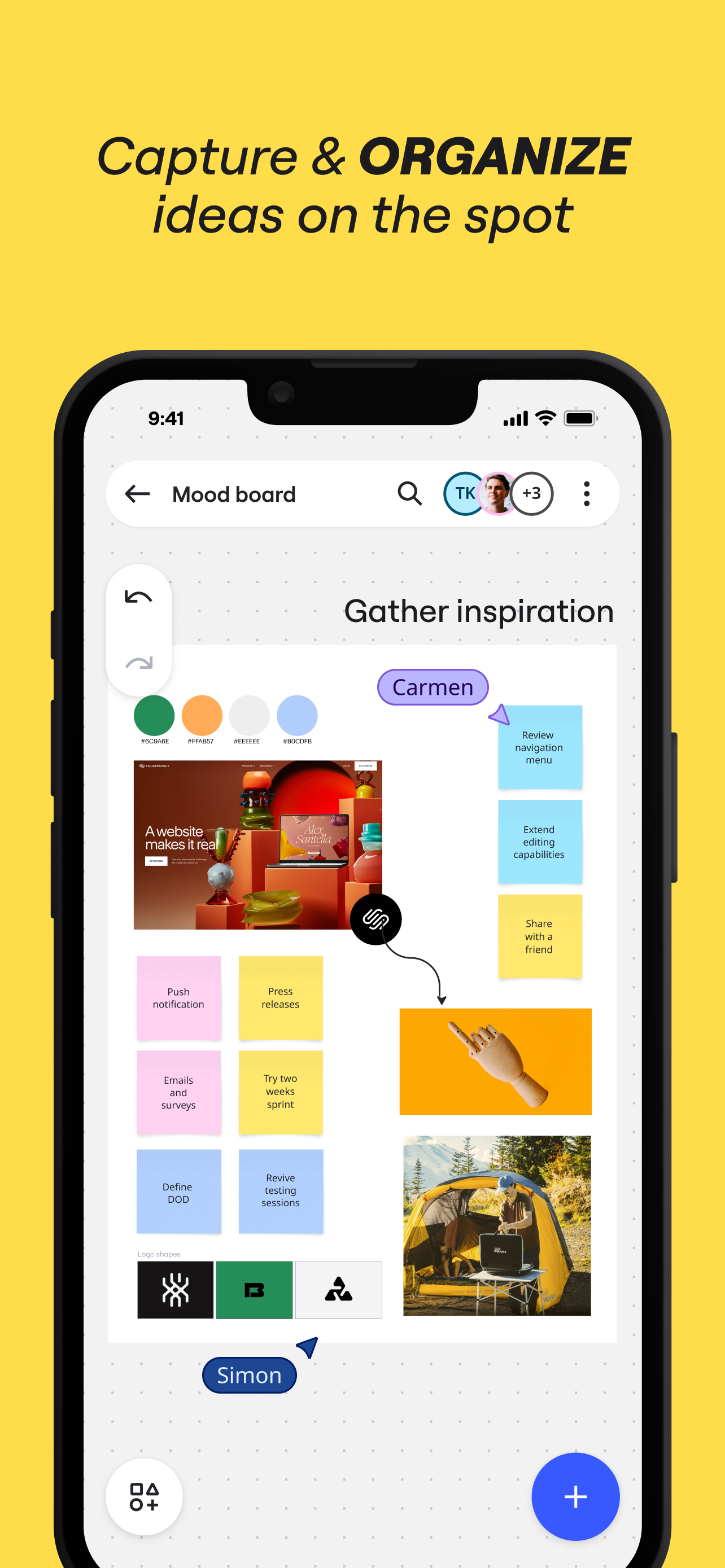
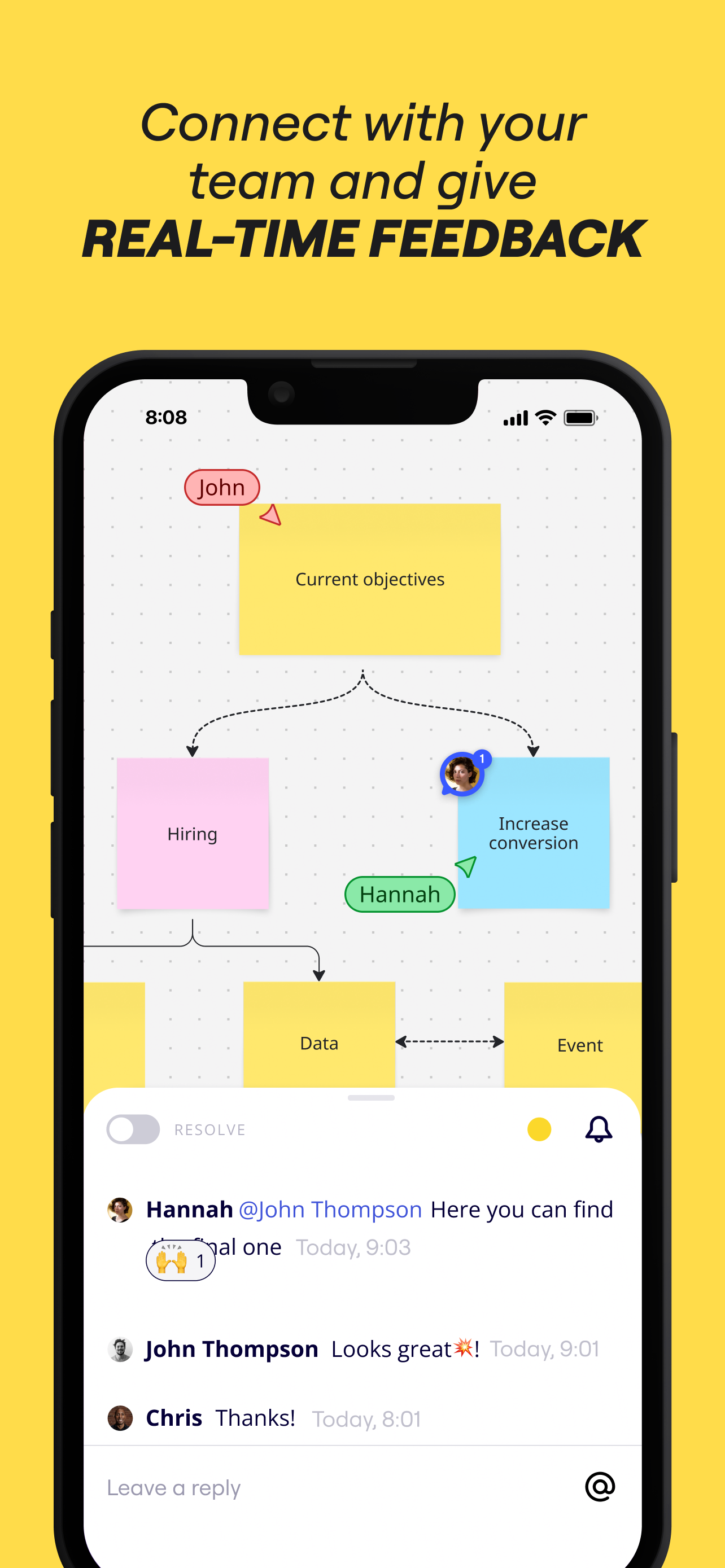
Miro is a visual workspace for innovation that enables distributed teams of any size to dream, design, and build the future together. With the magic of Miro's Intelligent Canvas™, visualizing concepts, ideas, and solutions as a team can happen anywhere — no dry-erase markers needed. Sync, flow, and feel the connection of working side by side with your team — even in remote, distributed, or hybrid work environments.
The Miro app for iPad and iPhone gives you the tools to collaborate with boards that put projects and context all in one place.
Our customers love using Miro to:
• Run online meetings and team workshops
• Brainstorm new ideas and designs on a limitless board
• Edit, annotate and mark up documents and PDFs
• Take digital notes with an Apple Pencil (and reduce paper use!)
• Easily collect resources, photos, docs, links, and references
• Plan and manage agile workflows and scrum rituals
• Create user journeys, map processes, and develop personas
• Teach and facilitate interactive classes in a collaborative space
• Create a vision board of ideas and inspiration
Miro allows you to create anytime, anywhere. With over 200+ pre-made templates, a drag-and-drop interface, and no limit on collaborators, working on a Miro board is fast and fun.

With Miro’s mobile app, you can:
• Scan paper post-it notes and convert them into editable digital notes
• Create, view, and edit all your boards
• Capture and organize your ideas on the go
• Share boards publicly or invite team members to edit
• Upload images, pictures, docs, spreadsheets, and more
• Share boards and invite team members to edit
• Review, add and resolve comments

On tablets, you can also use Miro to:
• Draw concepts and sketch new design ideas with an Apple Pencil
• Convert pencil or stylus drawings into shapes, notes, and diagrams
• Set up your tablet as the second screen with Zoom or Microsoft Teams
- Create Mind Maps to visualize your ideas
• Use Lasso to select and move sketches, drawings, or text anywhere on the board
• Use Highlighter to capture the attention of your team during a meeting

If you enjoy using Miro for collaboration, please leave us a review.
If something’s not working right or if you have a question or comment, get in touch with us using this form: https://help.miro.com/hc/en-us/requests/new?referer=store
Ausblenden Mehr anzeigen...

Screenshots

Miro Häufige Fragen

  • Ist Miro kostenlos?

    Ja, Miro ist komplett kostenlos und enthält keine In-App-Käufe oder Abonnements.

  • Ist Miro seriös?

    ⚠️ Die Miro-App hat schlechte Bewertungen und negatives Feedback. Die Nutzer scheinen mit der Leistung oder den Funktionen unzufrieden zu sein.

    Danke für die Stimme

  • Wie viel kostet Miro?

    Miro ist kostenlos.

  • Wie hoch ist der Umsatz von Miro?

    Um geschätzte Einnahmen der Miro-App und weitere AppStore-Einblicke zu erhalten, können Sie sich bei der AppTail Mobile Analytics Platform anmelden.

Benutzerbewertung

4.69 von 5

183 Bewertungen in Sonderverwaltungsregion Hongkong

5 star
153
4 star
18
3 star
5
2 star
0
1 star
7
Bewertungsverlauf

Miro Bewertungen

Poor compatibility when using w/ Apple Pencil + Magic Keyboard

abccdfhjko on

Sonderverwaltungsregion Hongkong

1. The copy & paste shortcuts not work, it always mess up especially pasting the same item when pressing the “Cmd” key, so “Cmd+” commands can never be used. 2. The delete button from UI does not work using finger / pencil. Need to use with Keyboard 3. The UI button simply not working well, especially ‘Delete’ ‘Duplicate’ buttons, not responding… 4. Apple Pencil not having good experience when trying to select and delete objects…

Great app but no way to subscribe in AppStore

...anson... on

Sonderverwaltungsregion Hongkong

App is excellent for personal visual note taking or diagram, very intuitive drawing and diagram experience in iPad, best of iPad diagram app. I love to pay immediately but find no way to do it here. Website need credit card payment and don’t even have option of PayPal…I don’t want to manage multiple sources of payment once I need to cut the card, which happened in last two years.

Too bad

Michael Jia on

Sonderverwaltungsregion Hongkong

No simplified Chinese version Can’t mark doc like pdf file page by page within a file Can't insert voice comment No realistic pen writing stroke

I never write reviews but for this I had too

King J$$$$$ on

Vereinigte Staaten

Wow. Just wow. I recently started a small media agency and I can’t begin to tell you how easy this app has made things for me. I can storyboard and script for clients. I can plan and strategize for the future. I can take notes. It doesn’t matter this app does it all and does it so well. I hope they continue to update and add cool features to this app even though its already great. I’ve only tried this on my IPad as that’s typically where I do most of my notes and plans however I’m sure it’s just as great or if not better on laptop. However we need more access to more than just 3 boards!!!!!

One Issue

Israelshaw on

Vereinigte Staaten

This is the best tool that exists for collaboration, with one issue. It places images in the size of their resolution. Meaning a high res image will drop in huge on the workspace, while a low res one will come it very small. Once a large image is placed, everyone zooms out, and increases their font and lineweights and other images to match. Pretty soon, everyone is using font size 1500, and maxing out the lineweights, which makes it hard to use certain tools. Solution: have all images come in the same size, but with different resolutions. Or, have a max frame size.

The worst

MGT89ieierur on

Vereinigte Staaten

Works fine on the computer, definitely lots of glitches. But as far as on your phone, NEVER works. Every single board says it’s “too large” and won’t load, even if the whole board has just one image or text. Useless as an app.

fine on mac wont open ipad tried everything

oddkodama on

Vereinigte Staaten

the hek

I HATE THIS

Luke124484 on

Vereinigte Staaten

FIRST OF ALL I NEED THIS APP THAT APP BLAH BLAH BLAH

Frozen

exochoego🐹❄️❤️ on

Vereinigte Staaten

Freezes on iPad, can’t do anything

Good but needs improvements

KhashayarJan on

Vereinigte Staaten

Overall it’s a good app to use Miro, however it desperately needs mouse and keyboard support, specially for iPad since. The pencil support is good, but you should add support for pro pencil as well.

Store-Rankings

Ranking-Verlauf
Kategorien-Rankings
Diagramm
Kategorie
Rang
Top Kostenlos
61
Top Kostenlos
72
Top Kostenlos
78
Top Kostenlos
96
Top Kostenlos
108

Schlüsselwörter

Miro Konkurrenten

Miro Installationen

Letzte 30 Tage

Miro Umsatz

Letzte 30 Tage

Miro Einnahmen und Downloads

Gewinnen Sie wertvolle Einblicke in die Leistung von Miro mit unserer Analytik.
Melden Sie sich jetzt an, um Zugriff auf Downloads, Einnahmen und mehr zu erhalten.
This page includes copyrighted content from third parties, shared solely for commentary and research in accordance with fair use under applicable copyright laws. All trademarks, including product, service, and company names or logos, remain the property of their respective owners. Their use here falls under nominative fair use as outlined by trademark laws and does not suggest any affiliation with or endorsement by the trademark holders.