Animation Desk® Draw & Animate

Create animation with us

Published by: Kdan Mobile Software

Description

Have fun exploring the world of animation. Learn how to make cartoons and animations, and share your videos on YouTube, TikTok, or Instagram.
Check out the video tutorials in the app, or get animation tips on our website.
AWARDS
- Recommended by EdTech Impact, Edshelf, EducationalAppStore.com, All about apps in YOUR classroom, iPad Educators
- Featured by Apple on iTunes Home Page
- Featured by TechCrunch
- Featured by Yahoo Tech
HOW TO CREATE FRAME-BY-FRAME ANIMATION
Animation Desk works like a digital flipbook. You can start from the first frame or a keyframe. Use the brushes or selection tool to complete their work.
CREATE ANIMATION WITH VIDEOS & PHOTOS
Import video and photo, and add fantastic animation effects.
MANY EDITING TOOLS
• Draw with different brushes or customize your own
• Add captions or subtitles for your animation
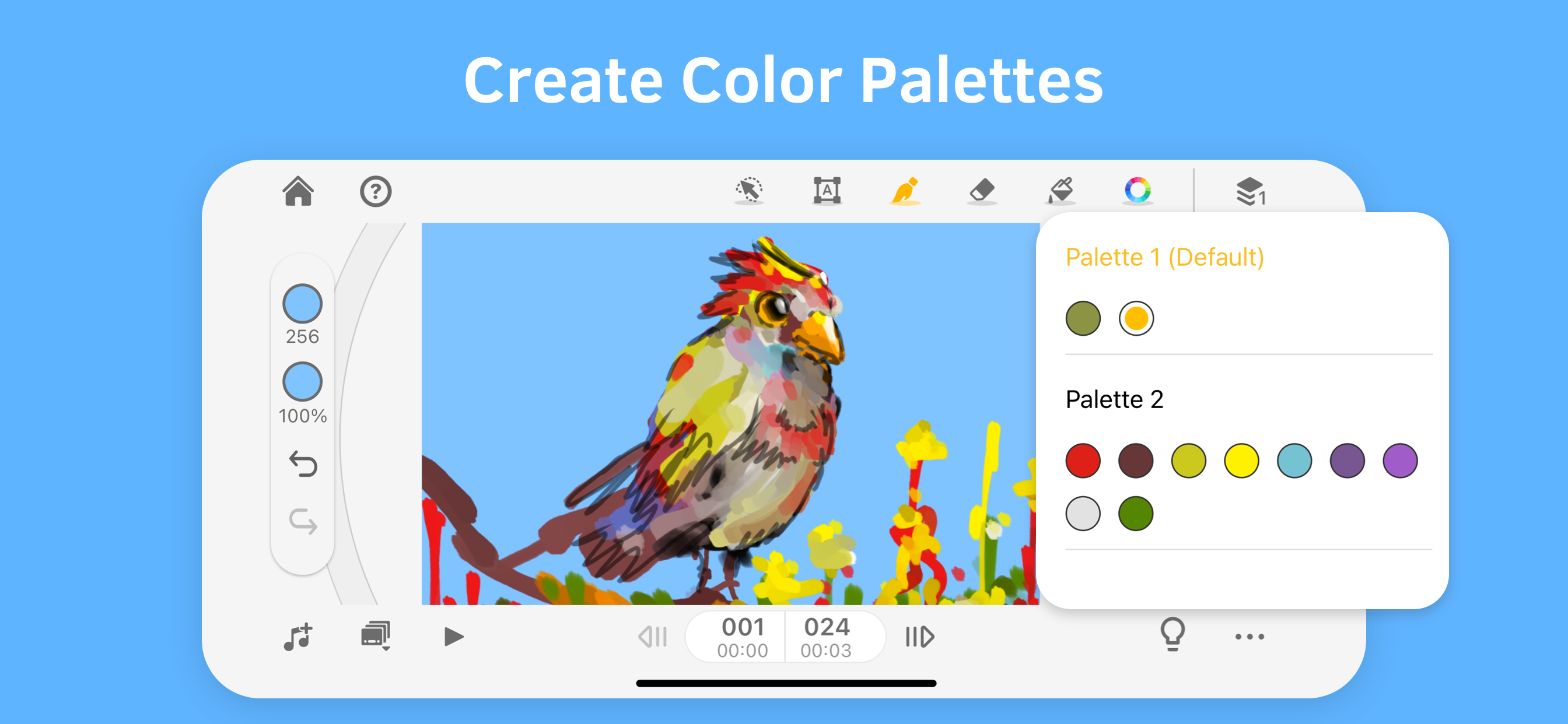
• Setup color palettes for characters or scenes
• Other editing tools: rulers, selection tools, and more
PLAY WITH FRAME & LAYERS
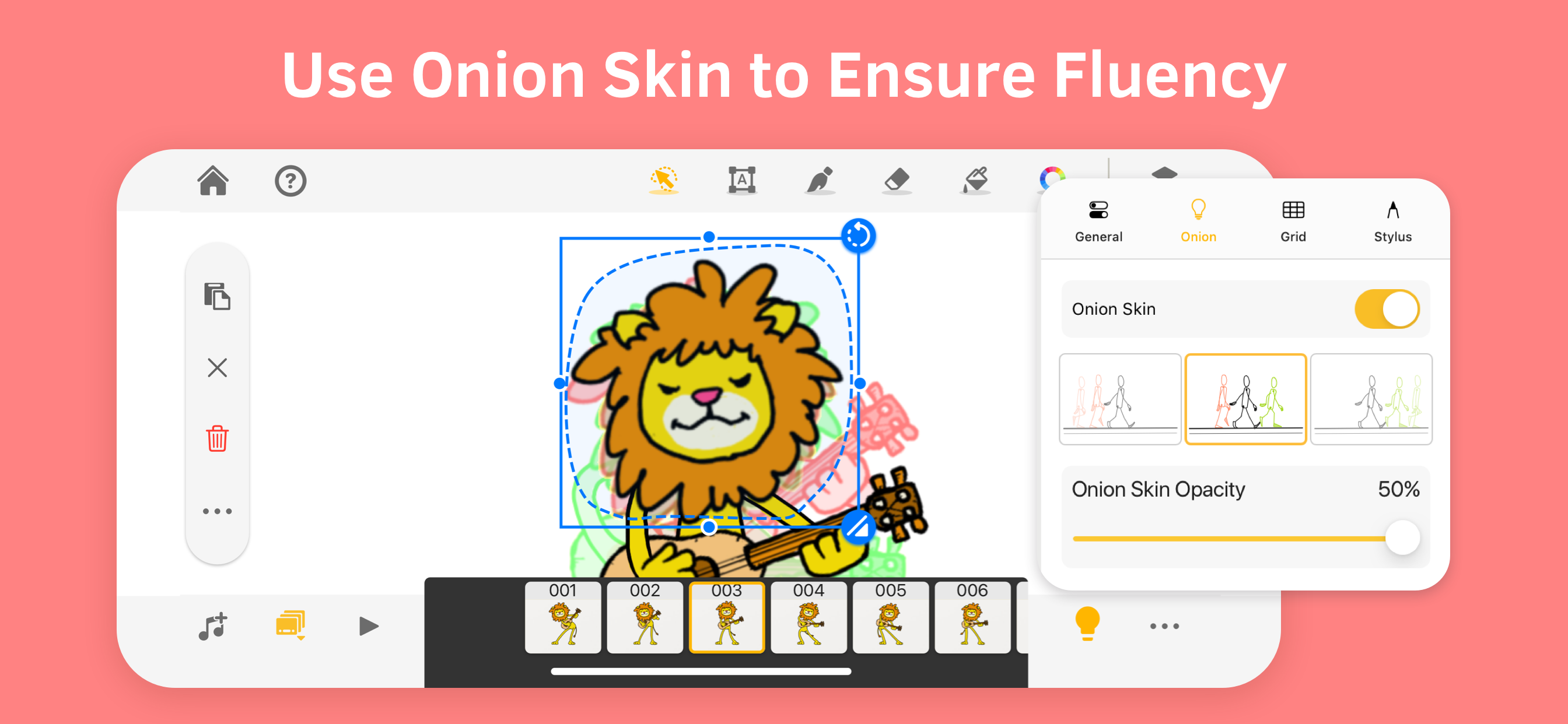
• Trace the motion with onion skinning
• Easily manage frames in the frame viewer
• Duplicate or repeat a frame, set up FPS to control the speed
• The basic version includes 3 sketch layers and one background layer
Export
• Export animation as a video, GIF, and PDF sheet!
• Export animation into Photoshop and make advanced editing
• Export individual frames as images
PLEASE NOTE
Animation Desk is free to download and use, and more features are available in the subscription plans. The basic version includes ads. For more information, please refer to the Term of Service below.
SUBSCRIPTION OPTIONS
• Kdan Cloud 500GB
• Animation Desk Pro with 500G Kdan Cloud storage
• Animation Desk Pro for students and educators
• Creativity 365 with 1 TB Kdan Cloud storage"
Any unused portion of a free trial period, if offered, will be forfeited when the user purchases a subscription to that publication, where applicable. Subscriptions will be charged through your iTunes account at the confirmation of purchase. Your subscriptions will automatically renew unless canceled at least 24 hours before the end of the current subscription period.
Your iTunes account will be charged for renewal within 24 hours before the end of the current period, for the same duration and at the current subscription price. You may manage your subscriptions in your iTunes
Terms of service: https://kdanmobile.com/en/terms_of_service
Privacy Policy: https://kdanmobile.com/en/privacy_policy
CONTACT US
Email: [email protected]
Helpdesk: http://support.kdanmobile.com
Instagram: https://www.instagram.com/animation_desk
Facebook: https://www.facebook.com/animationdesk
Hide Show More...

In-Apps

Creativity 365
€19.99
Animation Desk Pro
€8.99
Animation Desk Pro (Year)
€32.99
Animation Desk Pro (Month)
€4.99
Animation Desk Pro (Quarter)
€11.99
Animation Desk Education Pack
€17.99

Screenshots

Animation Desk® Draw & Animate FAQ

  • Is Animation Desk® Draw & Animate free?

    Yes, Animation Desk® Draw & Animate is free to download, however it contains in-app purchases or subscription offerings.

  • Is Animation Desk® Draw & Animate legit?

    🤔 The Animation Desk® Draw & Animate app's quality is mixed. Some users are satisfied, while others report issues. Consider reading individual reviews for more context.

    Thanks for the vote

  • How much does Animation Desk® Draw & Animate cost?

    Animation Desk® Draw & Animate has several in-app purchases/subscriptions, the average in-app price is €16.16.

  • What is Animation Desk® Draw & Animate revenue?

    To get estimated revenue of Animation Desk® Draw & Animate app and other AppStore insights you can sign up to AppTail Mobile Analytics Platform.

User Rating

4.22 out of 5

93 ratings in Ireland

5 star
53
4 star
19
3 star
14
2 star
2
1 star
5
Ratings History

Animation Desk® Draw & Animate Reviews

Pretty good app

Blahblehblah1 on

Ireland

The layout is a little hard to get used to but my only complaint is that you can only import audio through Apple Music and not your own files.

Frames keep disappearing

qwertyiopjgs on

Ireland

I’ve been making stickman animations (only 10-19frames)on this for a few days but when ever I leave the app and go back into it the frames disappear and only leave around 4 or 5 still a great app would recommend!

Wow

woowowowoowoow on

Ireland

Actually fkin amazing for beginners or hey anyone can use this damn app ITS FREEEEEE IM BROKE BUT THIS HAS SAVED ME thank u to the developers ill give u all a hug my one critique is that i disslike the traditional animation light up desk id rather my page be blank but i can get over it

Cool app

ryangaynor123 on

Ireland

I like the app

Disappointing

Shirakea on

Ireland

First time using the app, I spent an hour making an animation and was very happy with it, when I went to export it the order of the frames got switched up and for most frames the first layer was replaced with the drawing on the first frame. There was no way to fix this and my work now is unusable.

Deleted

Keaneye on

Ireland

I liked this when it first came out. Then the money came in and yeah you improved a things, but I remember doing an animation I really liked on it. Decided I want to share on Instagram. No such option to share your own work except through their own Animation Desk social platform. You these subscriptions so they can tell you what you’re allow to do with your animation. I wanted to export videos to compile in After Effects. Even this was awkward. I use Rough Animator and it’s far better.

Excellent

noelnen on

Ireland

Ever since childhood I always wanted to animate, but I had to do it in little flip books, where you couldn’t have sound, or music, and you couldn’t film it unless you had a huge amount of expensive equipment. Now years later, thanks to the iPad Pro, and this amazing app, I can do everything I always wanted. I have tried to use other animation apps and they were incredibly technical and irritating to use. What I like about Animation Desk, is that it feels the same way as what it was like to animate in those notebooks I had as a child, it’s not complicated or tedious, and feels very free and smooth. The only drawback of the app, is that you can’t do looping backgrounds if you’re character is running, and there are no camera moves. I highly recommend this app.

Good

guest-user1 on

Ireland

I’m a beginner to animation but it would be handy if there were more realistic brushes and possibly a tool to draw straight line like a ruler overall a good app and easy to use

cool

Gacha!StarGoodzStories😂😁😁😭 on

Ireland

nice animation,

Good

reveiw from a guy on

Ireland

Like the app just needs to have a better way to sort threw projects if there is please tell me.

Store Rankings

Ranking History
Category Rankings
App is not ranked yet

Keywords

Animation Desk® Draw & Animate Competitors

Animation Desk® Draw & Animate Installs

Last 30 days

Animation Desk® Draw & Animate Revenue

Last 30 days

Animation Desk® Draw & Animate Revenue and Downloads

Gain valuable insights into Animation Desk® Draw & Animate performance with our analytics.
Sign up now to access downloads, revenue, and more.
This page includes copyrighted content from third parties, shared solely for commentary and research in accordance with fair use under applicable copyright laws. All trademarks, including product, service, and company names or logos, remain the property of their respective owners. Their use here falls under nominative fair use as outlined by trademark laws and does not suggest any affiliation with or endorsement by the trademark holders.