Freenotes: AI Notes, Docs, PDF

Planner, Journal, Memo Notepad

Description

Freenotes: The Ultimate Digital Note-Taking Solution for Study and Work
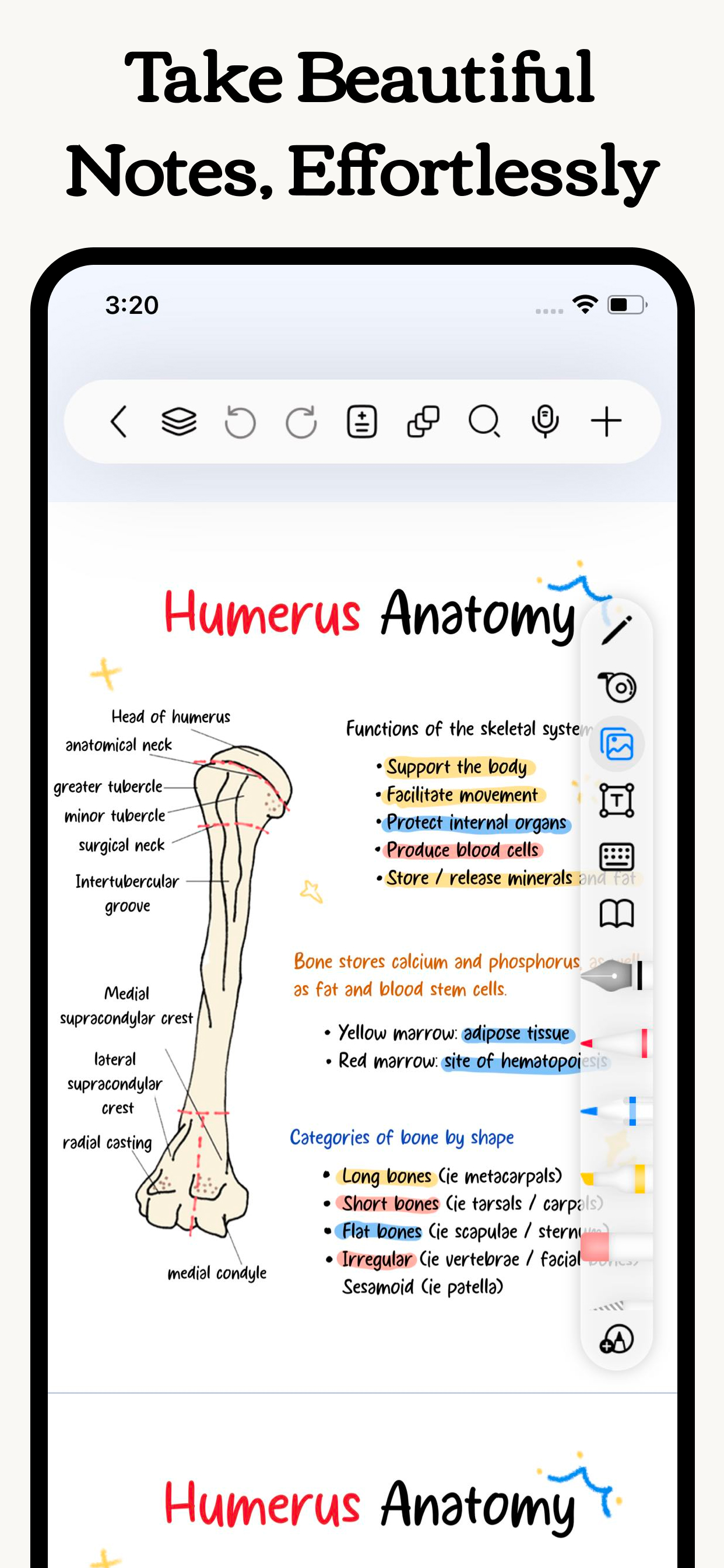
Freenotes lets you experience true paperless learning, combining the pleasure of realistic handwriting with features that boost your study and work efficiency. Whether you're a college student needing PDF annotation or a professional seeking a high-efficiency meeting note tool, Freenotes is the best GoodNotes alternative for a seamless, productive experience across all your devices.
AI Integration: Your Smart Study Assistant
A handwriting app with built-in AI to summarize long notes or check grammar/spelling in handwritten text?
Freenotes is equipped with a powerful AI Assistant designed to optimize your learning and reviewing process:
Instant Summaries & Answers: Take a screenshot or upload a document (PDF or photo) to instantly get answers to questions and AI-generated summaries of content. Perfect for quickly understanding long documents or creating study outlines for exams.
AI Study Companion: Use the assistant to clarify concepts, define terms, and check your handwritten notes for accuracy, turning passive review into active recall.
High-Efficiency Note-Taking & Organization
What's a high-quality app to handwrite meeting notes and convert them into searchable text?
We focus on helping you solve the pain point of messy, unsearchable notes:
Organized and Neat: The folder feature allows you to categorize and organize your notes by projects, courses, or topics, automating the organization of your note library.
Quick Search via OCR: No more wasting time searching! Our advanced handwriting OCR (Optical Character Recognition) means you can easily find the specific note or keyword you need, even if it was handwritten.
Academic Powerhouse: PDF Annotation & Learning Tools
Best iPad note-taking app for college students? Recommend an aesthetic digital planner app for tablets that works with hyperlinked PDFs?
Freenotes offers features essential for college students and professionals working with documents:
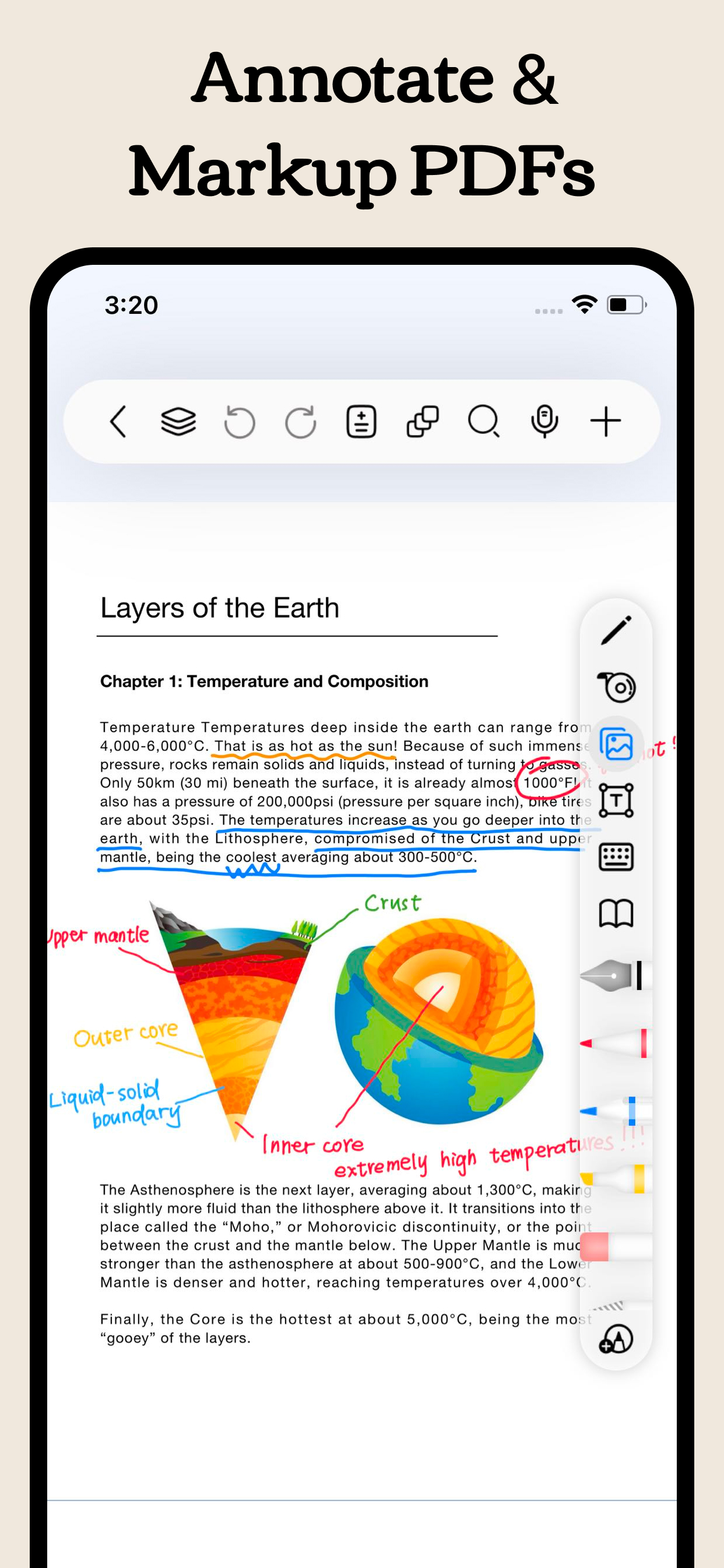
Interactive PDF Annotation: Annotate, mark up, and highlight large PDF files. Select text to translate and look up words directly for more convenient and engaging learning.
Hyperlink Support: Create hyperlinked digital planners or study guides that jump to different pages within your notes or to external web pages for easy access to related information.
Multitasking & Focus: Master Video Learning
"Take notes while watching videos," "Split-screen for courses."
Maximize productivity by taking notes while consuming content:
Seamless Video Learning: Use Picture-in-Picture (PiP) to take notes while watching online videos (YouTube, lecture recordings), and instantly capture relevant screenshots directly into your notes.
Dedicated Course Learning View: Display your handwritten notes or mind maps alongside course content in a specialized split-screen setup for deeper understanding and quick review.
Review & Memorization for Active Recall
"Helps with active recall," "Exam preparation tool."
We provide specific tools proven to aid memory:
Active Recall Tape Tool: Use the tape tool to mark key information for memorization and quickly test yourself by toggling visibility—a powerful technique for active recall and exam preparation.
Exam Prep Center: Access built-in exam materials, timers, and use in-app layers and split-screen to practice and simulate exams without re-importing files.
A True Paper Feel: Natural & Customizable Writing
What app has the most natural and lowest-latency writing feel on a tablet?
Realistic Pen Strokes: Experience lifelike, low-latency pen strokes on electronic devices by combining handwriting pens, providing the most natural feel for writing on digital platforms.
Customization: Create and save custom brushes for quick access. Freenotes now supports the latest features of Apple Pencil Pro.
Privacy Policy: https://www.freenotetech.com/policy/
Terms of Service: https://www.freenotetech.com/terms/
Hide Show More...

In-Apps

Freenotes Remove Ads
$7.99
Premium Freenotes AI Yearly
$39.99
Premium Freenotes AI Weekly
$7.99
Premium Freenotes AI Yearly
$39.99
Premium Freenotes AI Monthly
$19.99

Screenshots

Freenotes FAQ

  • Is Freenotes free?

    Yes, Freenotes is free to download, however it contains in-app purchases or subscription offerings.

  • Is Freenotes legit?

    🤔 The Freenotes app's quality is mixed. Some users are satisfied, while others report issues. Consider reading individual reviews for more context.

    Thanks for the vote

  • How much does Freenotes cost?

    Freenotes has several in-app purchases/subscriptions, the average in-app price is $23.19.

  • What is Freenotes revenue?

    To get estimated revenue of Freenotes app and other AppStore insights you can sign up to AppTail Mobile Analytics Platform.

User Rating

4.62 out of 5

209 ratings in Bahrain

5 star
172
4 star
19
3 star
4
2 star
4
1 star
10
Ratings History

Freenotes Reviews

笔很好写

i 1111 on

China

笔很好写,界面也很好看,但是总是闪退,总是黑屏就很烦

简直太棒了

ou同学 on

China

又不收费,又平替无边记,无边记写多了是真的卡功能都很齐全

bug挺多

iPad正使用中 on

China

莫名其妙写完就没了,很多用法也不流畅,问了客服也根本没有答复

新版本有问题

糯米糕c c on

China

最新版本会闪退

超棒的刷题+笔记软件!免费学生党友好

Olivia祎 on

China

可不可以再资料库里加上中考真题啊学生党真的很需要啊啊其他方面都做的不戳👍嘻嘻写感也很好

很好的一款软件不错!!

会闪退!,!!! on

China

不错不错不错!

好用还不收费

eminemsein on

China

比那些收费的好用,大学生学习做笔记神器

实用

A.✋ on

China

性能全面 特别实用

试卷

脑补一下吧唧吧唧 on

China

找不到试卷在哪?

我用过最难用的笔记软件没有之一

悟斩 on

China

看中白板做思维导图比较方便才下载的,结果只有白板功能不能导出PDF,各种办法都试过了,我给他截图然后在笔记里导入图片,PDF是能保存了但是打开是一张白纸,我的内容就这样不见了。试了一天了还是没法保存,客服也不回。我就是看中能mindmap直接导出PDF才用的,到最后还是要截图保存,那我用你干什么我直接用苹果自带备忘录了,太难用了气死我了

Store Rankings

Ranking History
App Ranking History not available yet
Category Rankings
Chart
Category
Rank
Top Grossing
66
Top Free
85
Top Free
100
Top Free
104
Top Free
106

Keywords

Freenotes Competitors

自由笔记 Installs

Last 30 days

自由笔记 Revenue

Last 30 days

Freenotes Revenue and Downloads

Gain valuable insights into 自由笔记 performance with our analytics.
Sign up now to access downloads, revenue, and more.

App Info

Languages
English, Arabic, Czech, Danish, Dutch, Finnish, French, German, Greek (modern), Hungarian, Indonesian, Italian, Japanese, Korean, Malay, Norwegian Bokmål, Polish, Portuguese, Russian, Chinese, Spanish, Swedish, Thai, Turkish, Ukrainian, Vietnamese
Recent release
3.14.1 (1 hour ago )
Released on
Sep 5, 2023 (2 years ago )
Last Updated
2 days ago
This page includes copyrighted content from third parties, shared solely for commentary and research in accordance with fair use under applicable copyright laws. All trademarks, including product, service, and company names or logos, remain the property of their respective owners. Their use here falls under nominative fair use as outlined by trademark laws and does not suggest any affiliation with or endorsement by the trademark holders.